1
INTRODUCTION
Congratulations on your purchase of the CAT5-1600A Extender. Your complete
satisfaction is very important to us.
Gefen
Gefen delivers innovative, progressive computer and electronics add-on solutions
that harness integration, extension, distribution and conversion technologies.
Gefen’s reliable, plug-and-play products supplement cross-platform computer
systems, professional audio/video environments and HDTV systems of all sizes
with hard-working solutions that are easy to implement and simple to operate.
The Gefen CAT5-1600A Extender
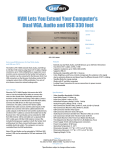
The Gefen CAT5-1600A extends VGA, Audio, and USB up to 330 feet (100 meters) using CAT-5 cables. Display resolutions up to 1920x1200 are supported. A
local monitor can be connected to the Sender unit and up to two monitors can be
connected to the Receiver unit. Four USB connectors on the Receiver unit allow
control of the computer system from a KVM workstation. Mini-stereo connectors
extend analog audio. A power-saving “Green Mode” can be set via DIP switches
on the Sender and Receiver. When activated, both units will go into low-power
Standby Mode when the Sender’s VGA input signal disappears.
How It Works
Place the Sender unit next to the VGA source. Use the included VGA cable to
connect the source to the Sender unit. Optionally connect a local monitor to the
Sender unit using another VGA cable. Connect up to two monitors to the Receiver unit with VGA cables. Connect the USB devices to the input and output
connectors. For audio, connect a mini-stereo cable between the audio source
and the audio input on the Sender unit. Connect a mini-stereo cable between the
audio output on the Receiver unit and the audio device. Use two CAT-5 cables to
connect the Sender unit to the Receiver unit.
To power-on the units, connect the locking power supplies and plug them into
available electrical outlets. The computer can now be controlled from the KVM
workstation.
1