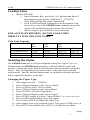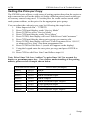
1
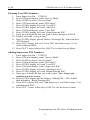
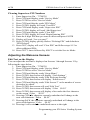
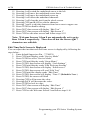
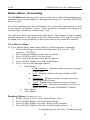
ACDI EX2000 Series User & Technical Manual Setup Unpacking the Vending System The following equipment is included in your EX2000 Series shipment: EX2000 Series vending unit 2015PD Pedestal Stand or FRONT LOCKING CASSETTE STAND (FLC) Parts Box including: o Operation and Service Manuals o 24V Power Supply o Sign Kit o Key Chain with keys (Bypass/Door/Cashbox) o Bolt Pack for mounting the EX2000 to the pedestal stand o H10-Interface Harness (Copier Specific) o Interface Installation Instructions Physical Mounting Your ACDI Vending System will mount easily to any of the stands designed and offered by ACDI or it can mount to the wall, or cabinet. If mounting to a wall or cabinet, route all cabling through the cutouts at the bottom. Power-up When powering on the EX2000 Series, the display will read “Initializing Coinop #. ##” (version #) If the unit is new and coins are not loaded into the Coin Changer, the LCD Display will read as follows: “Please Use Exact Change” “B&W $0.10” “Color $0.50” After loading coins into the EX2000 Series, the LCD Display will read as follows: “Please Insert Coin or Bill” “B&W “Color $0.10” $0.50” ***Please refer to “ADJUSTING WELCOME SCREENS” for information on editing Text and the Amount of Time each screen is displayed. Setup 2