1
Connecting to the Internet with iZiggi-HD
Because your computer connects to iZiggi-HD via Wi-Fi, you are
disconnected from the Internet when using iZiggi-HD. However, you can
regain your Internet connection by connecting iZiggi-HD to your existing
Wi-Fi network. Once iZiggi-HD is connected to the Internet, your iPad, PC or
Mac (connected to iZiggi-HD) is also linked to the internet.
Generally, your iPad/Computer can access the internet via your Wi-Fi router.
With IPEVO iZiggi-HD,
You can view the “Live View” from your iPad/Computer in the real time.
Plus, you can connect to the Internet by linking iZiggi-HD to the Wi-Fi
network you already use
Follow these simple steps to do so.
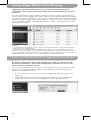
1. Please make sure your iPad, Mac or PC is connected to iZiggi-HD. To
connect iZiggi-HD, please follow the steps starting on Page 5.
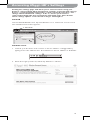
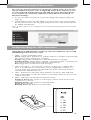
2. Tap the “Internet Connection” tab on the iZiggi-HD settings page (see
Pages 8 for accessing settings).
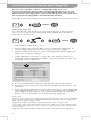
3. Under “Wireless Connection,” select “On.” [If a wired connection is
preferred, select “Off (Ethernet Cable)” and plug an ethernet cable (not
included) into the LAN port.]
4. A list of available Wi-Fi networks will appear. Select your network.
5. Enter the password for your network and click OK. The password is case
sensitive.
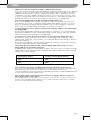
6. A pop-up window will appear. Please click “Restart” to restart iZiggi-HD
and complete the process, or click “Later” to manually restart iZiggi-HD
later. iZiggi-HD will connect to your network within 100 seconds. Your
device is now connected to the Internet through iZiggi-HD.
Please note:
If you are not returned to the iZiggi-HD settings page after the 100 second countdown,
please reconnect your device to iZiggi-HD by going to Settings > Wi-Fi > iZiggi_xxxx
(with “xxxx” being the unique SSID).
iZiggi-HD is unable to determine if your password is correct or if you have
successfully connected to your network. If you are unable to access the Internet after
restart, please check if the password is entered correctly and try again. The password
is case sensitive.
iZiggi-HD only supports a Wi-Fi network at 2.4GHz. 5GHz Wi-Fi is not supported.
9