1
USB Document Camera
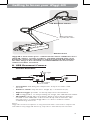
Getting to know your iZiggi-HD
Multi-Jointed Stand
to position the camera
USB Document Camera
Wireless Base
Multi-Jointed Stand
to position the camera
Wireless Base
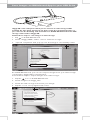
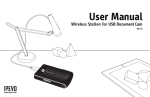
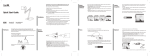
iZiggi-HD is made of two parts - USB Document Camera and Wireless Base.
iZiggi-HD captures a variety of subjects, including standard letter-sized
documents, devices like smartphones and iPad. Captured high-definition
live video image is then streamed on to IPEVO Whiteboard or Presenter
software via Wi-Fi connection.
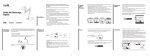
A. USB Document Camera
Camera Elements
Exposure toggle
LED
Microphone
Focus button
Autofocus switch
t Focus button: will bring the subject into sharp focus after a few
seconds.
t Autofocus switch: may be set to Single (S) or Continuous (C).
t Exposure toggle: provides on-the-fly exposure customization.
Exposure toggle
LED an image, this LED will turn white.
t LED: if iZiggi-HD is on and providing
t Microphone: iZiggi-HD comes with a built-in microphone which is
located on the underside of the camera body next to the lens. The
microphone is on when iZiggi-HD is on. This is useful for video
conferencing and more.
Microphone
Focus button
Notice:
Autofocus switch
iZiggi-HD’s built-in microphone is only functional when connected to computer via
USB. When using iZiggi-HD wirelessly, only video is transmitted, but not audio.
2