1
Chapter 3.
Installation Procedure
CES installation required to connect the CES box physically with IOPs and the
installation of “File Transfer Utility” in both the IOPs. This utility has to be
installed only on IOPs having release 2_2_1_9 onwards. Follow the procedure given
below to install the CES properly. Please note that a PC Keyboard and Monitor
(TFT or CRT) will need to be connected to the CES during installation. These can be
disconnected later when the CES goes into operation.
3.1.
PHYSICAL CONNECTIVITY BETWEEN IOPs & CES
CES can be connected in Two different modes with the IOP
Case: 1
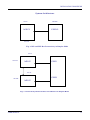
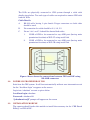
When IOPs are in simplex refer Figure 2 for physical connectivity of
IOP with CES. Serial port (ASIO) of IOP can be connected to
COM1/COM2 of CES.
Case : 2
When IOPs are in Duplex refer Figure 3 for physical connectivity of
IOPs with CES. The serial port of IOP0 can be connected to COM1 of
CES and serial port of IOP1 can be connected to COM2 of CES. The
connectivity can be made crossed if the password of both the IOPs are
same.
However, it has been suggested to make the connectivity as shown in
Figure 3 for the ease in rectification of the problem if one of the
COM/ASIO port goes faulty.
Note :
USER MANUAL
Any ASIO port (except ASIO7) of IOP can be used to
make physical connectivity of IOPs with CES. The end to
end connectivity of IOPs with CES can be checked by using
CHK-PORT-UTILITY.
12