1
Digital sensors.
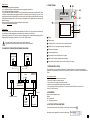
6. FRONT PANEL.
Thermograph is equipped with 2 digital inputs:
- D1 for events recording (door opening, defrosting cycles, aggregate operation etc.).
- D2 for loading and unloading time recording
The type of each event sensor is defined by 3.4 and 3.6 parameters (normally closed/ normally opened). When
connecting contacts signalling the aggregate operation or defrosting cycles to digital input, you have to be
particularly careful so that no signalling circuit is not a live both in active or inactive state. Otherwise, the recorder
will breakdown. Signalling relies on short-circuiting or opening the circuit of digital input only, rather than the
transfer of charge!
Each closing and opening the circuit is recorded in the recorder memory.
The sensors do not require wiring polarity.
Power supply.
SEL
Recorder is powered from the vehicle electrical installation 12V and 24V. You can connect the recorder directly
from the battery, fuse lath or aggregate. You should protect the power source with 5A fuse.
Power supply is connected to 11 (-) and 12 (+) terminals. Maximum power consumption (when printing) is 50W.
Stationery version is powered by mains with 110V~ or 230V~ 50/60Hz voltage.
LF
Display
Thermal printer
The value of supply voltage is marked on the vehicle rating plate.
It is prohibited to operate with electric cables when the unit is energized!!
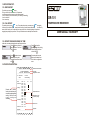
Confirming button, it is also used to run the configuration menu
ON/OFF (hold for 5 seconds) and changes cancelling button
5. SAMPLE OF THE RECORDER WIRING DIAGRAM.
Brief report printing button
Full report printing button
Door sensor
e.g. Reed relay
“Delivery” function
button
Flap opening in order to install a new roll of paper
Back-lit button for printer operating status signalling
A
B
A
Printer feeding back-lit button, it is also used for pulling out the paper
B
7. PAPER INSTALLATION.
Alarm
Put an included roll of thermal paper in the printer. The thermal paper used for printing is standard and
available in every stationery point of sale.It is recommended to use rolls of a width of 57mm and diameter of
35mm.
DR101
How to install the paper:
1. Press the flap dropout button on the front panel.
2. Put the roll of paper in the printer chamber
3. Pull out about 3 cm of paper outside the printer flap
4. Close the flap controlling that the paper came out correctly
5. If it is necessary pull out the paper using “LF” button (red button/ SEL diode must be turned off
so that “LF” button be active).
Red
White
Digital inputs
(opened/closed)
Fuse 5A
Access to the configuration menu.
Setting:
000 - password off
211 - emergency password
Temperature sensors
External
alarm
indicator
8. PASSWORD.
Accumulator
9. FACTORY SETTINGS RESTORE.
To restore parameters to the factory settings, set “data restore” and confirm with
Restoring process is signalled by command on the display:
4
Data restoring..
5