1
Occupancy Sensor – Ceiling Mounted • Installation Guide
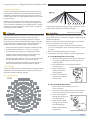
v. Feed the wires through the
holes in the ceiling tile.
vi. On the front of the ceiling
tile, flatten the wire bracket
so it is snug against the
mounting plate.
vii.On the back of the ceiling
tile, twist the wires together
to hold the mounting plate
securely.
viii.Replace the ceiling tile.
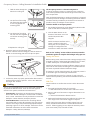
4. Attach the sensor to the mounting plate.
With the 2-button interface facing you, slide the sensor to
the left on the mounting plate until it snaps into place.
The Occupancy Sensor is a Transmit-only Device.
To link the occupancy sensor to a transceiver; the transceiver
must first be powered, within wireless range of the sensor, and
set to accepts links.
Next, the desired transmitter, or another transceiver, is triggered
to send a special link message. The awaiting transceiver receives
and stores the link permanently so the devices can interact to
provide a variety of intelligent control options.
To Link or Unlink an Occupancy Sensor
1. Set the desired transceiver to the desired Link/Unlink mode.
(refer to that device’s installation guide).
2. Click the Menu button on the
bottom of the sensor once. This
sends a link/unlink radio
telegram.
NOTE: The button interface on the
sensor is used for linking and
testing only. The occupancy timer
settings are configured on the
transceiver to which the sensor is linked.
Refer to the “Linking” section of the transceiver/controller
installation guides to complete the linking & setup process.
Testing the Sensor
Before starting a test, ensure the sensor’s energy storage is fully
charged by placing it under bright light (2000 lux) for 1.5 hours,
or insert a battery for 5 minutes while in a well-lit area.
NOTE: If the sensor does not have a sufficient charge, it cannot
enter into the test modes. No LED light or 1 red blink when the
set button is pressed indicates insufficient charge.
If a battery is used to charge the sensor for a light test, ensure it
is removed to get an accurate light measurement.
5. Confirm the sensor is properly positioned to detect motion
and has sufficient light to operate - refer to the “Walk Test”
and “Light Test” sections.
Linking
Two or more compatible devices can be linked and configured
to provide the desired control. There are two basic types of
devices in the system; transmitters and transceivers.
▪▪ Transmit-only: Transmitters are simple energy-harvesting
devices that send RF messages to communicate a condition,
level, or state. Transmitters can only be linked to transceivers.
Examples > Rocker Switches, Occupancy Sensors
▪▪ Transmit & Receive: Transceivers are controlling devices
that send as well as receive RF messages. They also process
relevant control logic, and actuate the appropriate outputs
(switching a light on or off for example). Transceivers can be
linked with transmitters as well as other transceivers.
Examples > Relays, Dimmers, Gateways
© 2015 EnOcean GmbH
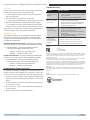
A test mode will stay active for 3 minutes. To exit a test and
resume normal operation, press and hold the Menu button for 5
seconds.
Walk Test
Use the walk test to confirm that motion is within the sensor’s
range.
1. Press and hold the Set button for 5 seconds.
••> Red LED will blink to confirm that a walk test is active.
2. Move in and out of the sensor‘s range to determine its coverage area.
••> Sensor will blink when it detects motion.
3. Make small hand movements just inside the limit of the sensor‘s range to see if the motion triggers a response.
NOTE: Ensure the sensor does not falsely trigger from user
activity outside the desired zone or other heat and motion
sources. If false triggering occurs, adjust the sensitivity switch
(next to the battery slot) from REG to LOW.
Page 3