1
Introduction
EEMS325 Display Device
Power Supply:
Supply Rating; 12–17 VDC. 3.53A
Output; 17VDC 60W, LPS (limited power source)
2.1.3 The Stand
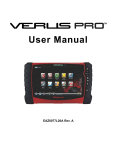
The VERUS unit has a built-in, metal stand attached to the back. When the stand is not in use, it
is secured to the back of the unit by an integrated casing hook. When extended, the stand allows
the unit to rest at a 45° angle for hands-free viewing.
2.1.4 Wrist Strap (Optional)
An adjustable wrist strap that attaches to the back of the unit to secure and stabilize the VERUS
while you work is available as an option. Using the wrist strap allows the VERUS to comfortably
rest on your forearm and leaves a hand free for connecting test leads and operating the touch
screen. The strap also eliminates the possibility of the VERUS falling off a vehicle due to vibrations
or other movement, and also prevents you from accidentally dropping the tool.
2.1.5 Control Buttons
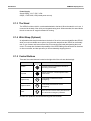
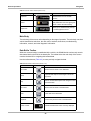
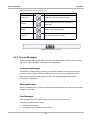
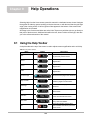
There are five control buttons located on the right side of the unit near the handgrip:
Name
Button
Description
S Button
A function button that provides a shortcut for
performing routine tasks.
Keyboard
Opens, and closes, a virtual keyboard on the
touch screen.
Brightness Up
Incrementally increases the screen
backlighting.
Brightness Down
Incrementally decreases the screen
backlighting.
Power
Turns the unit on and off. Also, press and hold
for 5 seconds for emergency shutdown.
All other tool operations are controlled through the touch screen.
7
















































![VERUS PRO User Manual [3980kb PDF File] - Snap](http://vs1.manualzilla.com/store/data/005690474_1-9ff68923f14d7698ce72469cabae3990-150x150.png)