1
Conceptronic C300APRA2
User Manual
Factory Reset Button
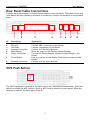
The Router may be reset to the original factory default settings by using a ballpoint or
paperclip to gently push down the reset button in the following sequence:
1. With the router powered on (check the Power LED to make sure it lights steady green),
press and hold down the reset button using a paper clip or similar object for about 6 to
8 seconds.
2. The router will restart. Watch the Power LED to verify that it is restarting.
3. When it is powered on again it is ready to be configured. The whole process takes
about 30 seconds.
4. The device settings will be restored to the factory default IP address 192.168.0.1 and
the subnet mask is 255.255.255.0, the default management Username is “admin” and
the default Password is “admin.”
Note: A factory reset will erase the current configuration settings and reset them to the
default settings. After it has restarted, log in to the router’s web-based management
interface and use the Setup Wizard to configure the basic settings.
15