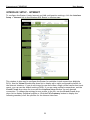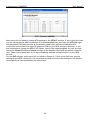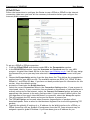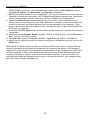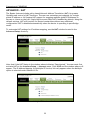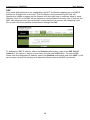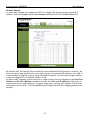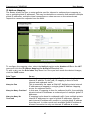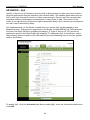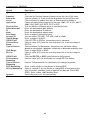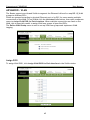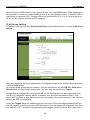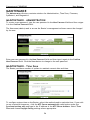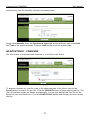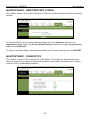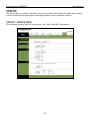
1
CONCEPTRONIC C300APRA2 Version 1.0 802.11n Wireless ADSL Router User Manual Conceptronic C300APRA2 User Manual Table of Contents CONCEPTRONIC C300APRA2 ................................................................................ 1 Version 1.0............................................................................................... 1 802.11n Wireless ADSL Router ............................................................................. 1 User Manual ................................................................................................ 1 About This Manual ........................................................................................... 4 Before You Start ........................................................................................... 4 Installation Overview ..................................................................................... 4 Requirements for Installation ........................................................................... 4 WLAN Ethernet Adapter .................................................................................. 4 Operating System ......................................................................................... 5 Web Browser ............................................................................................... 5 Packing List ................................................................................................... 6 Wireless LAN .................................................................................................. 6 Radio Transmission........................................................................................ 7 Range........................................................................................................ 7 SSID .......................................................................................................... 7 Front Panel LED Display..................................................................................... 8 Rear Panel Cable Connections ............................................................................. 9 WPS Push Button ............................................................................................. 9 Installation ...................................................................................................10 Before You Begin .........................................................................................10 Installation Notes.........................................................................................10 Information you will need from your ADSL service provider ...................................12 Information you will need about C300APRA2 .....................................................13 Information you will need about your LAN or computer ........................................14 Device Installation.....................................................................................14 Power on Router .......................................................................................14 Factory Reset Button .................................................................................15 Setup ..........................................................................................................16 Web-based Configuration Utility.......................................................................16 QUICK START ..............................................................................................18 INTERFACE SETUP - INTERNET..........................................................................23 PPPoE/PPPoA...........................................................................................25 Dynamic IP Address....................................................................................27 Static IP Address .......................................................................................28 Bridge Mode ............................................................................................29 INTERFACE SETUP - LAN .................................................................................30 Use the Router for DHCP .............................................................................31 Disable the DHCP Server..............................................................................31 Use DHCP Relay ........................................................................................31 INTERFACE SETUP - WIRELESS ..........................................................................32 Basic Wireless ..........................................................................................33 WPS Security ...........................................................................................34 WEP Encryption ........................................................................................36 WPA Encryption ........................................................................................36 ADVANCED....................................................................................................37 ADVANCED - FIREWALL ..................................................................................37 ADVANCED - Routing .....................................................................................38 ADVANCED – NAT .........................................................................................39 2 Conceptronic C300APRA2 User Manual DMZ ......................................................................................................40 Virtual Server ..........................................................................................41 IP Address Mapping ....................................................................................42 ADVANCED – QoS..........................................................................................43 ADVANCED – VLAN ........................................................................................45 Assign PVID .............................................................................................45 VLAN Group Setting ...................................................................................46 ADVANCED – ADSL ........................................................................................48 ACCESS MANAGEMENT ......................................................................................49 ACCESS MANAGEMENT - ACL ............................................................................49 ACCESS MANAGEMENT - FILETER .......................................................................50 IP/MAC Filter ...........................................................................................50 Application Filter ......................................................................................51 URL Filter ...............................................................................................52 ACCESS MANAGEMENT - SNMP ..........................................................................53 ACCESS MANAGEMENT - UPnP ..........................................................................53 ACCESS MANAGEMENT - DDNS ..........................................................................54 ACCESS MANAGEMENT - CWMP .........................................................................55 MAINTENANCE ...............................................................................................56 MAINTENTANCE - ADMINISTRATION ....................................................................56 MAINTENTANCE – Time Zone............................................................................56 MAINTENTANCE – FIRMWARE............................................................................57 MAINTENTANCE – RESET/RESTART SYSTEM ...........................................................58 MAINTENTANCE – DIAGNOSTICS ........................................................................58 STATUS........................................................................................................59 STATUS – DEVICE INFO ...................................................................................59 STATUS – SYSTEM LOG ...................................................................................60 STATUS - STATISTICS.....................................................................................61 HELP...........................................................................................................62 Technical Specifications ...................................................................................63 3 Conceptronic C300APRA2 User Manual About This Manual This manual provides descriptions of the Conceptronic C300APRA2 802.11n Wireless ADSL Router, its hardware and software features, and how to set up and use the device on your small office or home network. Before You Start Please read and make sure you understand all the prerequisites for proper installation of your new Wireless ADSL Router. Have all the necessary information and equipment on hand before starting the installation. A packing list is included at the end of this section. Installation Overview The procedure to install the Wireless ADSL Router can be described in general terms in the following steps: 1. Gather information and equipment needed to install the device. Check the contents of the package to be certain that everything listed on the packing list is included. A packing list is included at the end of this section. The information you will need includes the account name or number and the password used to gain access to your service provider’s network, and ultimately to the Internet. 2. Install the hardware, that is, connect the Ethernet cables to the device to establish the necessary network links to your computer and connect the power adapter to power on the Wireless ADSL Router. 3. Check the IP settings on your computer and change them if necessary so the computer can access the web-based software built into the Wireless ADSL Router. Without the correct IP settings your computer will not be able to communicate with the device or access the software used to configure the Wireless ADSL Router. Without compatible IP settings on your computer, you will not be able to use a web browser to access the Internet. 4. Use the web-based management software to configure the device. Many users can install the Wireless ADSL Router with the Setup Wizard. Some users may not need to change any of the device settings that establish and maintain the network connection. Follow the instructions of your service provider to find out what is required for your account. Requirements for Installation To install and use the Wireless ADSL Router you need a computer equipped with an Ethernet port (such as an Ethernet NIC) and a web browser. WLAN Ethernet Adapter Any computer that uses the Wireless ADSL Router must be able to connect to it through the Wireless Ethernet (WLAN) on the Wireless ADSL Router. This connection is a Wireless Ethernet (WLAN or WiFi) connection and therefore requires that your computer be equipped with a Wireless Ethernet Adapter as well. Many notebook computers are now sold with a Wireless Ethernet Adapter already installed. There is also a Wired Ethernet port that is used to connect the WLAN adapter to your wired network. This port can be used to configure the Wireless ADSL Router. Most fully assembled desktop computers come with an Ethernet NIC adapter as standard equipment. If your computer does not have an Ethernet port, you must install an Ethernet NIC adapter before you can configure the Wireless ADSL Router. If you 4 Conceptronic C300APRA2 User Manual must install an adapter, follow the installation instructions that come with the Ethernet NIC adapter. Operating System The Wireless ADSL Router uses an HTML-based web interface for setup and management. The web configuration manager may be accessed using any operating system capable of running web browser software. Web Browser Any common web browser can be used to configure the Wireless ADSL Router using the web configuration management software. The program is designed to work best with more recently released browsers such as Microsoft Internet Explorer® version 6.0, Netscape Navigator® version 6.2.3, or later versions. The web browser must have JavaScript enabled. JavaScript is enabled by default on many browsers. Make sure JavaScript has not been disabled by other software (such as virus protection or web user security packages) that may be running on your computer. 5 Conceptronic C300APRA2 User Manual Packing List Open the shipping carton and carefully remove all items. Make sure that you have the items listed here. • One Conceptronic C300APRA2 - 802.11n Wireless ADSL Router with two fixed Antennas • One CD-ROM containing this User’s Guide • One Straight-through Ethernet cable • One Power Adapter, 12V, 1.25 DC • One Quick Installation Guide • One Warranty Card Wireless LAN A Wireless LAN is a cellular computer network that transmits data using radio signals instead of cables. Wireless LAN technology is commonly used for home, small office and large corporate networks. Wireless LAN devices have a high degree of mobility and flexibility that allow network to be quickly set up or dismantled and allow them to roam freely throughout the network. The IEEE 802.11n Wireless LAN standard is an improvement on the IEEE 802.11g standard. The 802.11n embedded Wireless LAN access point is fully compatible with legacy IEEE 802.11b and IEEE 802.11g devices. Some basic understanding of wireless technology and terminology is useful when you are setting up the Wireless ADSL Router or any wireless access point. If you are not familiar with wireless networks please take a few minutes to learn the basics. For home users who will not incorporate a RADIUS server in their network, the security for the Conceptronic C300APRA2, used in conjunction with other WPA-compatible 802.11 products, will still be much stronger than ever before. Utilizing the Pre-Shared Key mode of WPA, the Wireless ADSL Router will obtain a new security key every time it connects to the 802.11 network. You only need to input your encryption information once in the configuration menu. No longer will you have to manually input a new WEP key frequently to ensure security. With the Wireless ADSL Router, you will automatically receive a new key every time you connect, vastly increasing the safety of your communication. The Wireless ADSL Router is an ideal solution for quickly creating and extending a wireless local area network (WLAN) in offices or other workplaces, trade shows and special events. The 802.11n standard is backwards compatible with 802.11b and 802.11g devices. The Wireless ADSL Router has the newest, strongest, most advanced security features available today. When used with other 802.11n WPA (WiFi Protected Access) compatible products in a network with a RADIUS server, the security features include: WPA: WiFi Protected Access, which authorizes and identifies users, based on a secret key that change automatically at regular intervals. WPA uses TKIP (Temporal Key Integrity Protocol) to change the temporal key every 10,000 packets (a packet is a kind of message transmitted over a network.) This insures much greater security than the standard WEP security. (By contrast, the previous WEP encryption implementation required the keys to be changed manually.) 6 Conceptronic C300APRA2 User Manual Radio Transmission Wireless LAN devices use electromagnetic waves within a broad, unlicensed range of the radio spectrum to transmit and receive radio signals. When a wireless access point is present, it becomes a base station for the Wireless LAN nodes in its broadcast range. Wireless LAN nodes transmit digital data using FM (frequency modulation) radio signals. Wireless LAN devices generate a carrier wave and modulate this signal using various techniques. In this way, digital data can then be superimposed onto the carrier signal. This radio signal carries data to Wireless LAN devices within range of the transmitting device. The antennae of Wireless LAN devices listen for and receive the signal. Range Range should not be a problem in most homes or small offices. If you experience low or no signal strength in some areas, consider positioning the device in a location between the Wireless LAN devices maintaining a roughly equal straight-line distance to all devices that need to access the Wireless ADSL Router through the wireless interface. Adding more 802.11n access points to rooms where the signal is weak can improve signal strength. SSID Wireless networks use an SSID (Service Set Identifier) to allow wireless devices to roam within the range of the network. Wireless devices that wish to communicate with each other must use the same SSID. Several Wireless ADSL Routers or access points can be set up using the same SSID so that wireless stations can move from one location to another without losing connection to the wireless network. The Wireless ADSL Router operates in Infrastructure mode. It controls network access on the wireless interface in its broadcast area. It will allow access to the wireless network to devices using the correct SSID after a negotiation process takes place. The Conceptronic C300APRA2 broadcasts its SSID so that any wireless station in range can learn the SSID and ask permission to associate with it. Many wireless adapters are able to survey or scan the wireless environment for access points. An access point in Infrastructure mode allows wireless devices to survey that network and select an access point with which to associate. 7 Conceptronic C300APRA2 User Manual Front Panel LED Display Place the Router in a location where the LED indicators on the front panel can be viewed. The LED indicators on the front panel include the Power, Status, WAN, WLAN and WPS indicators. Each Ethernet LAN port displays an indicator for monitoring link status and activity (Link/Act). 1 2 Nr 1 Description Power LED Status OFF ON –GREEN ON –RED 2 LAN LEDs (1, 2, 3, 4) OFF ON – STEADY GREEN ON – BLINK GREEN 3 WLAN LED OFF ON – BLINK Yellow ON – STEADY GREEN ON – BLINK GREEN 4 DSL LED OFF ON – BLINK GREEN 5 Internet LED 3 4 5 Status Explanation The device is turned off. The device is turned on successfully. The device is malfunction or POST (Power On Self Test) failure No Network Link is created to the LAN Port. The LAN port is connected. Data is sent or received through the LAN Port. Wireless interface is disabled. Wireless interface is connecting. Wireless interface is connected. Data is sent or received through wireless interface. No ADSL connection is created. ADSL line is in the process of synchronization. ADSL line has good synchronization. The Router is powered off. Traffic is detected between LAN and Internet. The WAN IP address is from IPCP or DHCP, DSL is up or a static IP address is configured, and PPP negotiation has been successfully completed. There is no DHCP response, no PPPoE response, PPPoE authentication has failed, and/or there is no IP. ON – STEADY GREEN OFF ON – BLINK GREEN ON – STEADY GREEN ON – STEADY RED 8 Conceptronic C300APRA2 User Manual Rear Panel Cable Connections Connect the power adapter cord and network cables on the rear panel. The power switch and reset button are also located on the back of the device. Connect the antennas to the antenna posts. 1 2 Nr 1 2 3 4 5 6 Description Antenna Connection DSL port LAN Ports Antenna Connection Reset Button Power Connection 7 Power Button 8 Antenna Connection 3 4 5 6 7 8 Explanation Connect with the fixed Antenna Connect ADSL connection to the Router Connect computer(s) to the Router Connect with the fixed Antenna Reset the router to the Factory Default Settings Connect the Power Adapter included in the package to the Router Push in to power-on the Router. Push again to power-off the Router. Connect with the fixed Antenna WPS Push Button The WPS Push Button is located at the right side of the C300APRA2 Wireless Router. Press the button to enable the WPS function. Refer to WPS Security section for more detail. When the function is enabled, the blue light will be on. 9 Conceptronic C300APRA2 User Manual Installation This section will walk you through the installation process. Placement of the Wireless ADSL Router is very important. Do not place the Router in an enclosed area such as a closet, cabinet, or in the attic or garage. Place the Wireless ADSL Router in a location where it can be easily connected to Ethernet devices, the telephone line as well as to a power source. Before You Begin Please read and make sure you understand all the prerequisites for proper installation of your new Router. Have all the necessary information and equipment on hand before beginning the installation. Installation Notes In order to establish a connection to the Internet it will be necessary to provide information to the Router that will be stored in its memory. For some users, only their account information (Username and Password) is required. For others, various parameters that control and define the Internet connection will be required. You can print out the two pages below and use the tables to list this information. This way you have a hard copy of all the information needed to setup the Router. If it is necessary to reconfigure the device, all the necessary information can be easily accessed. Be sure to keep this information safe and private. Low Pass Filters Since ADSL and telephone services share the same copper wiring to carry their respective signals, a filtering mechanism may be necessary to avoid mutual interference. A low pass filter device can be installed for each telephone that shares the line with the ADSL line. These filters are easy to install passive devices that connect to the ADSL device and/or telephone using standard telephone cable. Ask your service provider for more information about the use of low pass filters with your installation. Operating Systems The C300APRA2 uses an HTML-based web interface for setup and management. The web configuration manager may be accessed using any operating system capable of running web browser software, including Windows 98 SE, Windows ME, Windows 2000, Windows XP, and Windows Vista. Web Browser Any common web browser can be used to configure the Router using the web configuration management software. The program is designed to work best with more recently released browsers such as Opera, Microsoft Internet Explorer® version 6.0, Netscape Navigator® version 6.2.3, or later versions. The web browser must have JavaScript enabled. JavaScript is enabled by default on many browsers. Make sure JavaScript has not been disabled by other software (such as virus protection or web user security packages) that may be running on your computer. 10 Conceptronic C300APRA2 User Manual Ethernet Port (NIC Adapter) Any computer that uses the Router must be able to connect to it through the Ethernet port on the Router. This connection is an Ethernet connection and therefore requires that your computer be equipped with an Ethernet port as well. Most notebook computers are now sold with an Ethernet port already installed. Likewise, most fully assembled desktop computers come with an Ethernet NIC adapter as standard equipment. If your computer does not have an Ethernet port, you must install an Ethernet NIC adapter before you can use the Router. If you must install an adapter, follow the installation instructions that come with the Ethernet NIC adapter. Additional Software It may be necessary to install software on your computer that enables the computer to access the Internet. Additional software must be installed if you are using the device as a simple bridge. For a bridged connection, the information needed to make and maintain the Internet connection is stored on another computer or gateway device, not in the Router itself. If your ADSL service is delivered through a PPPoE or PPPoA connection, the information needed to establish and maintain the Internet connection can be stored in the Router. In this case, it is not necessary to install software on your computer. It may however be necessary to change some settings in the device, including account information used to identify and verify the connection. All connections to the Internet require a unique global IP address. For bridged connections, the global IP settings must reside in a TCP/IP enabled device on the LAN side of the bridge, such as a PC, a server, a gateway device such as a router or similar firewall hardware. The IP address can be assigned in a number of ways. Your network service provider will give you instructions about any additional connection software or NIC configuration that may be required. Wireless LAN Computers using the Wireless network can access the Internet or use the embedded 802.1g wireless access point. Wireless workstations must have an 802.1g or 802.1b wireless network card installed to use the Wireless ADSL Router. In addition the workstations must be configured to operate on the same channel and SSID as the Wireless ADSL Router. If wireless security is used, the wireless workstations must be properly configured for the security settings used. 11 Conceptronic C300APRA2 User Manual Information you will need from your ADSL service provider Username This is the Username used to log on to your ADSL service provider’s network. Your ADSL service provider uses this to identify your account. Password This is the Password used, in conjunction with the Username above, to log on to your ADSL service provider’s network. This is used to verify the identity of your account. WAN Setting / Connection Type These settings describe the method your ADSL service provider uses to transport data between the Internet and your computer. Most users will use the default settings. You may need to specify one of the following WAN Setting and Connection Type configurations (Connection Type settings listed in parenthesis): • PPPoE/PPPoA (PPPoE LLC, PPPoE VC-Mux, PPPoA LLC or PPPoA VC-Mux) • Dynamic IP Address (1483 Bridged IP LLC, 1483 Bridged IP VC-Mux) • Static IP Address (1483 Bridged IP LLC, 1483 Bridged IP VC-Mux, 1483 Routed IP LLC (IPoA) or 1483 Routed IP VC-Mux) • Bridge Mode (1483 Bridged IP LLC or 1483 Bridged IP VC Mux) Modulation Type ADSL uses various standardized modulation techniques to transmit data over the allotted signal frequencies. Some users may need to change the type of modulation used for their service. The default DSL modulation (Auto Synch-Up) used for the Router automatically detects all types of ADSL, ADSL2, and ADSL2+ modulation. Security Protocol This is the method your ADSL service provider will use to verify your Username and Password when you log on to their network. Your Router supports the PAP and CHAP protocols. VPI Most users will not be required to change this setting. The Virtual Path Identifier (VPI) is used in conjunction with the Virtual Channel Identifier (VCI) to identify the data path between your ADSL service provider’s network and your computer. If you are setting up the Router for multiple virtual connections, you will need to configure the VPI and VCI as instructed by your ADSL service provider for the additional connections. This setting can be changed in the WAN Settings window of the web management interface. VCI Most users will not be required to change this setting. The Virtual Channel Identifier (VCI) used in conjunction with the VPI to identify the data path between your ADSL service provider’s network and your computer. If you are setting up the Router for multiple virtual connections, you will need to configure the VPI and VCI as instructed by your ADSL service provider for the additional connections. This setting can be changed in the WAN Settings window of the web management interface. 12 Conceptronic C300APRA2 User Manual Information you will need about C300APRA2 Username This is the Username you need to access the Router’s management interface. When you attempt to connect to the device through a web browser you will be prompted to enter this Username. The default Username for the Router is “admin.” The user cannot change this. Password This is the Password you will be prompted to enter when you access the Router’s management interface. The default Password is “admin.” The user may change this. LAN IP addresses for the C300APRA2 This is the IP address you will enter into the Address field of your web browser to access the Router’s configuration graphical user interface (GUI) using a web browser. The default IP address is 192.168.0.1. This may be changed to suit any IP address scheme the user desires. This address will be the base IP address used for DHCP service on the LAN when DHCP is enabled. LAN Subnet Mask for the C300APRA2 This is the subnet mask used by the C300APRA2, and will be used throughout your LAN. The default subnet mask is 255.255.255.0. This can be changed later. 13 Conceptronic C300APRA2 User Manual Information you will need about your LAN or computer Ethernet NIC If your computer has an Ethernet NIC, you can connect the C300APRA2 to this Ethernet port using an Ethernet cable. You can also use the Ethernet ports on the C300APRA2 to connect to other computer or Ethernet devices. DHCP Client status Your C300APRA2 is configured, by default, to be a DHCP server. This means that it can assign an IP address, subnet mask, and a default gateway address to computers on your LAN. The default range of IP addresses the C300APRA2 will assign are from 192.168.0.100 to 192.168.0.199. Your computer (or computers) needs to be configured to obtain an IP address automatically (that is, they need to be configured as DHCP clients.) It is recommended that you collect and record this information here, or in some other secure place, in case you have to re-configure your ADSL connection in the future. Once you have the above information, you are ready to setup and configure your C300APRA2. Device Installation The Wireless ADSL Router maintains three separate interfaces, an ADSL, an Ethernet, and a Wireless LAN interface. Place the Wireless ADSL Router in a location where it can be easily connected to Ethernet devices, the telephone line as well as to a power source. The Router can be placed on a shelf or desktop, ideally you should be able to see the LED indicators on the front if you need to view them for troubleshooting. Power on Router The Router must be used with the power adapter included with the device. 1. Connect the power adapter to the Power Input (12V AC 1.2A) on the back panel of the Wireless ADSL Router and plug the other end of the power adapter to a wall outlet or power strip. 2. Depress the Power button into the on position. 3. The Power LED on the front panel will shine bright green to indicate the device is powered on. 4. If the Ethernet port is connected to a working device, check the LAN LED indicator to make sure the connection is valid. The Wireless ADSL Router will attempt to establish the ADSL connection, if the ADSL line is connected and the Wireless ADSL Router is properly configured the DSL LED will light up after several seconds. If this is the first time installing the device, some settings may need to be changed before the Wireless ADSL Router can establish a connection. 14 Conceptronic C300APRA2 User Manual Factory Reset Button The Router may be reset to the original factory default settings by using a ballpoint or paperclip to gently push down the reset button in the following sequence: 1. With the router powered on (check the Power LED to make sure it lights steady green), press and hold down the reset button using a paper clip or similar object for about 6 to 8 seconds. 2. The router will restart. Watch the Power LED to verify that it is restarting. 3. When it is powered on again it is ready to be configured. The whole process takes about 30 seconds. 4. The device settings will be restored to the factory default IP address 192.168.0.1 and the subnet mask is 255.255.255.0, the default management Username is “admin” and the default Password is “admin.” Note: A factory reset will erase the current configuration settings and reset them to the default settings. After it has restarted, log in to the router’s web-based management interface and use the Setup Wizard to configure the basic settings. 15 Conceptronic C300APRA2 User Manual Setup This section will show you how to set up and configure your new D-Link Router using the Webbased configuration utility. Web-based Configuration Utility Connect to the Router To configure the WAN connection used by the Router it is first necessary to communicate with the Router through its management interface, which is HTML-based and can be accessed using a web browser. The easiest way to make sure your computer has the correct IP settings is to configure it to use the DHCP server in the Router. The next section describes how to change the IP configuration for a computer running a Windows operating system to be a DHCP client. To access the configuration utility, open a web-browser such as Internet Explorer and enter the IP address of the router (192.168.0.1). Type “admin” for the User name and “admin” in the Password field. If you get a Page Cannot be Displayed error, please refer to the Troubleshooting section for assistance. Click OK to connect to the main page. When you successfully connect to the web manager, the main Device Info page displays a summary of the current status of the Router. This Page can be accessed at any time by clicking Status -> Device Info. All configuration and management of the Router is done using the web-based management interface pictured in the example. To access the various configuration menus, open the directories listed at the top window, Quick Start, Interface Setup, Advanced Setup, Access Management, Maintenance, Status, and Help. 16 Conceptronic C300APRA2 User Manual Device Info overview 17 Conceptronic C300APRA2 User Manual QUICK START You can setup the C300APRA2 through the build-in Quick Start. This Quick Start will help you configure the basic settings of the C300APRA2 step by step. Click the Quick Start link to see the page. Quick Start window To use the Quick Start, click the Run Wizard button. Note: Before you begin with the Wizard Configuration, make sure you have all information for the Internet settings available. (For example: Account information, connection type, etc.) A. The welcome screen lists four steps of the Quick Start. Click Next to continue. 18 Conceptronic C300APRA2 B. You are recommended to set an admin password here. Enter the new password and re-enter it for confirmation. User Manual When completed, click Next. C. For system management purpose, a correct time setting is critical to have accurate time stamps on the system logs. Set an appropriate Time Zone in this step. When completed, click Next. D. Select the Internet Connection method which corresponds with your provider settings. If you don’t know which option you need for your internet connection, please check the documentation of your provider or contact your provider helpdesk. When completed, click Next. 19 Conceptronic C300APRA2 E. When your provider requires a Static IP connection, select the Static IP option. User Manual Connection - Static IP Enter the requested information: • VPI • VCI • IP Address • Subnet Mask • ISP Gateway • Connection Type When completed, click Next. F. When your provider requires a Dynamic IP connection, select the Dynamic IP option. Connection – Dynamic IP Enter the requested information: • VPI • VCI • Connection Type When completed, click Next. 20 Conceptronic C300APRA2 User Manual G. When your provider requires a PPPoE connection, select the PPPoE/PPPoA option. Connection – PPPoE/PPPoA Enter the requested information: • Username • Password • VPI • VCI • Connection Type When completed, click Next. H. When your provider requires a PPTP connection, select the Bridge option. Connection - Bridge Enter the requested information: • VPI • VCI • Connection Type When completed, click Next. When the WAN configuration is complete, the Quick Start will continue with the Wireless configuration: 21 Conceptronic C300APRA2 User Manual I. The Setup Wizard is now complete. If you want to apply your settings, click Next. If you want to change any setting, click Back to return to the previous screen. If you want to close the Setup Wizard without any changes, click Exit. J. When you click Next, the router will apply the configured settings and request for login. K. Once login with the new password, the Quick Start will show the message. Click Close to exit the Quick Start. You will return to the Quick Start window. 22 Conceptronic C300APRA2 User Manual INTERFACE SETUP - INTERNET To configure the Router’s basic Internet and LAN configuration settings, click the Interface Setup -> Internet link in the Wireless ADSL Router’s opening page. This window is also used to configure the Router for multiple virtual connections (Multiple PVCs). Use the Virtual Circuit drop-down list to display up to eight configurable profiles for the Internet interface. If you do not intend to use more than a single virtual connection (most users), you can use the default setting (PVC0). If you are using multiple connections, use the Virtual Circuit drop-down list to access the Interface Setup window for each desired connection. To change the settings for any profile in the list, use the Virtual Circuit dropdown list to display individual profiles or click the PVCs Summary button to display the following summary of all the profiles for the Internet interface. 23 Conceptronic C300APRA2 User Manual PVCs Summary window Most users will not need to change ATM settings in the ATM VC section. If this is the first time you are setting up the ADSL connection it is recommended that you leave the ATM QoS type and associated Cell Rate settings at the default values until you have established the connection and verified that your ISP supports ATM for your ADSL account. However, if you are instructed to change the VPI or VCI values, type in the values assigned for your account. Leave the Virtual Circuit and Status settings at the defaults (Pcv0 and Activated) values for now. These can be used later if you are configuring multiple virtual circuits for your ADSL service. For the QoS settings, most users will not need to change it. If this is the first time you are setting up the ADSL connection it is recommended that you leave the settings at the default values until you have established the connection. 24 Conceptronic C300APRA2 User Manual PPPoE/PPPoA Follow the instructions to configure the Router to use a PPPoA or PPPoE for the Internet connection. Make sure you have all the necessary information before you configure the Internet (WAN) connection. PPPoE/PPPoA connection To set up a PPPoE or PPPoA connection: 1. Click the PPPoA/PPPoE radio button under ISP in the Encapsulation section. 2. In the PPPoE/PPPoA section, type the Username and Password used for your ADSL account. A typical User Name will be in the form [email protected]. Your ISP may assign the Password to you or you may have selected it when you set up the account with your ISP. 3. Choose the Encapsulation setting from the drop-down list. This defines the encapsulation method used for your ADSL service. The available options are PPPoE LLC, PPPoE VC-Mux, PPPoA LLC, and PPPoA VC-Mux. If you have not been provided specific information for this section, leave the default setting. 4. Activate or Deactivate the Bridge Interface. Select the correct Connection value in the Connection Setting section. If your account is time-based, that is, if your connection fees are based on the amount of time the Router is actively connected to the Internet, select the Connect On-Demand option and enter an appropriate idle timeout in the entry field provided. If your account is billed with a flat fee regardless of how much time the Router is connected, select the Always On option. This will maintain the PPP session as long as the Router is powered on. 5. The TCP MSS Option can be used when excessive fragmentation of packets effect download speeds. Enter a value for the Maximum Segment Size to avoid fragmenting TCP packets. 6. Typically the globally IP settings (i.e. IP address for the WAN interface) for a PPPoA, or PPPoA connection will use Dynamic IP assignment from the ISP. Some accounts may be assigned a specific global IP address. If you have been give an IP address for you 25 Conceptronic C300APRA2 User Manual PPPoE/PPPoA connection, click the Static radio button under Get IP Address and enter the Static IP Address, IP Subnet Mask, and Gateway information. 7. NAT should remain Enabled. If you disable NAT, you will not be able to use more than one computer for Internet connections. NAT is Enabled and Disabled system-wide, therefore if you are using multiple virtual connections, NAT will disabled on all connections. 8. Leave the Default Route feature enabled (Yes) if you want to use the Router as the default route to the Internet for your LAN. Whenever a computer on the LAN attempts to access the Internet, the Router becomes the Internet gateway to the computer. If you have an alternative route for Internet traffic you may turn this off (No) without effecting the Router’s connection. 9. Leave the TCP MTU Option value at the default setting unless you have specific reasons to change this. 10. Select the desired Dynamic Route from RIP1, RIP2-B, or RIP2-M. Next, set the Direction to Both, IN Only, OUT Only, or None. 11. The Multicast feature is Disabled by default. Toggle between IGMP v1 and IGMP v2. 12. When you are satisfied that all the Internet settings are configured correctly, click on the SAVE button. When PPPoE or PPPoA is used, the Router becomes the PPP client, that is, all the software needed to establish and maintain the connection is located on the Router. ISPs frequently require PPP client software to be installed on workstations. If any computers have PPP client software installed on them, this software must be removed or at least disabled before the computers are able to connect to the Internet through the Router. If you are required to provide a User Name and Password every time you access the Internet, your computer may have PPP client software installed on it. 26 Conceptronic C300APRA2 User Manual Dynamic IP Address A Dynamic IP Address connection configures the Router to automatically obtain its global IP address from a DHCP server on the ISP’s network. The service provider assigns a global IP address from a pool of addresses available to the service provider. Typically the IP address assigned has a long lease time, so it will likely be the same address each time the Router requests an IP address. Dynamic IP Address connection To configure a Dynamic IP Address WAN connection, follow these steps: 1. Click the Dynamic IP Address radio button under ISP in the Encapsulation section. This 2. 3. 4. 5. 6. 7. defines both the connection protocol and encapsulation method used for your ADSL service. The available options are 1483 Bridged IP LLC, 1483 Bridged IP VC-Mux, 1483 Routed IP LLC(IPoA) and 1483Routed IP VC-Mux. If you have not been provided specific information for the Connection Type setting, leave the default setting. The Bridge Interface feature is deactivated by default. Leave the Default Route feature enabled (Yes) if you want to use the Router as the default route to the Internet for your LAN. Whenever a computer on the LAN attempts to access the Internet, the Router becomes the Internet gateway to the computer. If you have an alternative route for Internet traffic you may turn this off (No) without effecting the Router’s connection. Leave the TCP MTU Option value at the default setting unless you have specific reasons to change this. Select the desired Dynamic Route from RIP1, RIP2-B, or RIP2-M. Next, set the Direction to Both, IN Only, OUT Only, or None. The Multicast feature is Disabled by default. Toggle between IGMP v1 and IGMP v2. When you are satisfied that all the Internet settings are configured correctly, click on the SAVE button. 27 Conceptronic C300APRA2 User Manual Static IP Address When the Router is configured to use Static IP Address assignment for the Internet (WAN) connection, you must manually assign a global IP Address, Subnet Mask and Gateway IP Address used for the WAN connection. Follow the instruction below to configure the Router to use Static IP Address assignment for the WAN connection. Static IP Address connection To configure a Static IP type connection for the WAN, follow these steps: 1. Click the Static IP Address radio button under ISP in the Encapsulation section. 2. In the Static IP section, choose the Encapsulation setting from the pull-down menu. This defines the encapsulation method used for your ADSL service. The available options are 1483 Bridged IP LLC, 1483 Bridged IP VC-Mux, 1483 Routed IP LLC (IPOA), and 1483 Routed IP VC-Mux. If you have not been provided specific information for this section, leave the default setting. 3. Change the Static IP Address, IP Subnet Mask, and Gateway IP address as instructed by your ISP. These are the global IP settings for the Internet (WAN) interface. This is the “visible” IP address of your account. Your ISP should have provided these IP settings to you. 4. NAT should remain enabled. If you disable NAT is disabled, you will not be able to use more than one computer for Internet connections. NAT is enabled and disabled systemwide, therefore if you are using multiple virtual connections, NAT will disabled on all connections. 5. Leave the Default Route feature enabled (Yes) if you want to use the Router as the default route to the Internet for your LAN. Whenever a computer on the LAN attempts to access the Internet, the Router becomes the Internet gateway to the computer. If you have an alternative route for Internet traffic you may turn this off (No) without effecting the Router’s connection. 6. Leave the TCP MTU Option value at the default setting unless you have specific reasons to change this. 7. Select the desired Dynamic Route from RIP1, RIP2-B, or RIP2-M. Next, set the Direction to Both, IN Only, OUT Only, or None. 8. The Multicast feature is Disabled by default. Toggle between IGMP v1 and IGMP v2. 9. When you are satisfied that all the Internet settings are configured correctly, click on the SAVE button. 28 Conceptronic C300APRA2 User Manual Bridge Mode For Bridged connections it will be necessary for most users to install additional software on any computer that will the Router for Internet access. The additional software is used for the purpose of identifying and verifying your account, and then granting Internet access to the computer requesting the connection. The connection software requires the user to enter the User Name and Password for the ISP account. This information is stored on the computer, not in the Router. Bridge Mode connection Follow the instructions below to configure a Bridged connection for the Internet interface. 1. Click the Bridge Mode radio button under ISP in the Encapsulation section. 2. In the Bridge Mode section, choose the Encapsulation setting from the pull-down menu. This defines the encapsulation method used for your ADSL service. The available options are 1483 Bridged IP LLC and 1483 Bridged IP VC-Mux. If you have not been provided specific information for this section, leave the default setting. 3. When you are satisfied that all the Internet settings are configured correctly, click on the SAVE button. 29 Conceptronic C300APRA2 User Manual INTERFACE SETUP - LAN To access the LAN window, click the LAN button in the Interface Setup directory. LAN Setup window You can configure the LAN IP address to suit your preference. Many users will find it convenient to use the default settings together with DHCP service to manage the IP settings for their private network. The IP address of the Router is the base address used for DHCP. In order to use the Router for DHCP on your LAN, the IP address pool used for DHCP must be compatible with the IP address of the Router. The IP addresses available in the DHCP IP address pool will change automatically if you change the IP address of the Router. To configure the LAN IP address, type in the desired values and click the SAVE button. Your web browser should automatically be redirected to the new IP address. You will be asked to login to the Router’s web manager again. The DHCP server is enabled by default for the Router’s Ethernet LAN interface. DHCP service will supply IP settings to workstations configured to automatically obtain IP settings that are connected to the Router though the Ethernet port. When the Router is used for DHCP it becomes the default gateway for DHCP client connected to it. Keep in mind that if you change the IP address of the Router the range of IP addresses in the pool used for DHCP on the LAN will also be changed. The IP address pool can be up to 253 IP addresses. The three options for DHCP service are as follows: Use the Router as a DHCP server for your LAN. Disable DHCP service and manually configure IP settings for workstations. Use DHCP service provided by your ISP. 30 Conceptronic C300APRA2 User Manual Use the Router for DHCP To use the built-in DHCP server, click the Enabled radio button under DHCP if it has not already selected. The IP Address Pool settings can be adjusted. The Starting IP Address is the lowest available IP address (default = 192.168.0.100). If you change the IP address of the Router, this will change automatically to be 1 more that the IP address of the Router. Type in the Lease Time in the entry field provided. This is the amount of time in seconds that a workstation is allowed to reserve an IP address in the pool if the workstation is disconnected from the network or powered off. You may also configure DNS settings for the LAN when using the Router in DHCP mode. Toggle the DNS Relay setting to Use User Discovered DNS Server Only from Use Auto Discovered DNS Server Only and enter the IP addresses for the Primary DNS Server and Secondary DNS Server in the field provided. The manually configured DNS settings will be supplied to clients that are configured to request them from the Router. Disable the DHCP Server To disable DHCP, click the Disabled radio button and click on the SAVE button. Choosing this option requires that workstations on the local network must be configured manually or use another DHCP server to obtain IP settings. If you configure IP settings manually, make sure to use IP addresses in the subnet of the Router. You will need to use the Router’s IP address as the Default Gateway for workstations in order to provide Internet access. Use DHCP Relay To use DHCP service from your ISP or another DHCP server, click the Relay radio and type the DHCP Server IP for Relay Agent address in the space provided. Click SAVE to begin DHCP relay from the ISP. 31 Conceptronic C300APRA2 User Manual INTERFACE SETUP - WIRELESS The two essential settings for wireless LAN operation are the SSID and Channel Number. The SSID (Service Set Identifier) is used to identify a group of wireless LAN components. The SSID can be broadcast in order to allow properly configured wireless stations to learn the SSID and join the group. Wireless LAN is enabled by default on the Router. If the wireless access point has been previously disabled you can enable 802.11g Wireless LAN operation by clicking the Activated radio button for Access Point and continue to configure basic settings. Click the SAVE button to begin wireless LAN function with the settings as configured. It is not necessary to reboot the Router. 32 Conceptronic C300APRA2 User Manual Basic Wireless Basic wireless settings To disable the wireless interface, click in the Deactivated radio button under Access Point and click the SAVE button. This will immediately disable the wireless access point; it is not necessary to restart the access point to make this change. If the wireless interface has been disabled, click in the Activated radio button under Access Point and click the SAVE button. This will immediately disable the wireless access point; it is not necessary to restart the access point to make this change. The SSID can be changed to suit your wireless network. Remember that any wireless device using the access point must have the same SSID and use the same channel. The SSID can be a continuous character string (i.e. no spaces) of up to 16 characters in length. The Channel: may be changed to channels that are available in your region. Channels available for wireless LAN communication are subject to regional and national regulation. Click the SAVE button to save any change to the Channel. 33 Conceptronic C300APRA2 User Manual WPS Security The Conceptronic C300APRA2 supports WPS (Wi-Fi Protected Setup). WPS is a standard for easy and secure establishment of a wireless network. With WPS you can setup and protect your wireless network in just a few easy steps. WPS Settings Note: To use WPS with the C300APRA2, you need to have Wireless Clients which supports WPS. If you have 1 or more Wireless Clients without WPS support, it is advised to secure your network manually using the Setup Wizard. Note: For more (technical) information about WPS, you can visit the following website: http://en.wikipedia.org/wiki/Wi-Fi_Protected_Setup The C300APRA2 supports 2 ways to activate and establish a WPS connection: Push Button configuration Pin Code configuration WPS – Push Button configuration The WPS Push Button configuration requires a (virtual) button on your Wireless Client to establish a connection between the C300APRA2 and your Wireless Client. Some Wireless Clients work with a real button to activate the WPS Push Button technology; some Wireless Clients use a software-based virtual button. WPS Settings – Virtual Button Follow the steps below to activate and establish a WPS connection with the Push Button technology: A. Press the WPS Button at the right side of the C300APRA2 until the WPS LED blinks. Or you can click the PBC radio button under WPS mode and click Start WPS on the web page. 34 Conceptronic C300APRA2 User Manual B. Press the WPS Button at your Wireless Client. This can be a hardware button or a virtual button in the software of your Wireless Client. The C300APRA2 will activate WPA security over your wireless network and accepts the wireless connection of your Wireless Client. If the authentication of the Wireless Client is succeeded, the WPS LED will burn steady blue for 5 minutes. After these 5 minutes, the LED will turn off. Your Wireless Client is now connected to the C300APRA2 and your network is secured with WPA Encryption. You can add more Wireless WPS Clients without loosing the connection to previous Wireless WPS Clients. If you want to add more Wireless WPS clients, repeat step A & B. Note: The WPA Key generated by the C300APRA2 is random. WPS – Pin Code configuration To use the pin code configuration, click the PIN code under WPS mode. WPS Settings – PIN Code Configuration There are two ways to enable the WPS by using Pin code. A. Enter the Pin number of WPS client in the Enrollee PIN code field and click Start WPS. B. Click Start WPS and enter the number under AP self PIN code at the Wireless Client. The C300APRA2 will activate WPA security on your wireless network. The C300APRA2 will keep the WPS authentication active for 120 seconds. During this process, the WPS LED will blink. If there is no connection in these 120 seconds, the LED will turn off and the WPS authentication process is stopped. 35 Conceptronic C300APRA2 User Manual WEP Encryption WEP (Wireless Encryption Protocol) encryption can be enabled for security and privacy. WEP encrypts the data portion of each frame transmitted from the wireless adapter using one of the predefined keys. The router offers 64- or 128-bit encryption with four keys available. Wireless Settings window for WEP To enable WEP, select the WEP-64Bits or WEP-128Bits from the Authentication Type dropdown list, configure the WEP Encryption Keys as desired. The available key lengths are 64 or 128-bit encryption. In the spaces provided, type in Key 1, Key 2, Key 3 and Key 4. The length of the character string used of the keys depends on the level (Key Length) of encryption selected. Only one key can be active. The active key is selected by clicking the radio button for the key you want to use. Click the SAVE button when you have configured WEP as desired to put the changes into effect. Note: If encryption of any kind, at any level is applied to the Wireless network, all devices on the network must comply with all security measures. WPA Encryption WPA uses an encryption method combined with an authentication procedure that requires an acceptance of a pre-configured password. WPA or Wireless Protection Access is an improved standard of wireless security. The Router also supports two common encryption types TKIP and AES. To configure WPA settings, select the WPA-PSK, WPA2-PSK, or WPA-PSK/WPA-PSK from the Authentication Type drop-down list. Select TKIP, AEC or TKIP/AES encryption. The encryption algorithm TKIP (Temporal Key Integrity Protocol) uses per packet key generation (based on WEP), while AES (Advanced Encryption Standard) is a block- based encryption method. Both methods require entry of a pre-shared key to allow association. Type a password from 8 to 63 ASCII characters or 64 hexadecimal characters long in the Pre-Shared Key field. 36 Conceptronic C300APRA2 User Manual ADVANCED The Advanced menu contains main windows for Firewall Routing, NAT, QoS, VLAN and ADSL. ADVANCED - FIREWALL This window allows the Router to enforce specific policies intended to protect the private network against certain types of attacks. Firewall window To enable the firewall feature, select the Enabled option and click SAVE. To enable the Stateful Packet Inspection feature, select the Enabled option and click SAVE. 37 Conceptronic C300APRA2 User Manual ADVANCED - Routing Use Static Routing to specify a route used for data traffic within your Ethernet LAN or to route data on the WAN. This specifies that all packets destined for a particular network or subnet use a predetermined gateway. Routing window To add a static route to a specific destination IP on the local network, click the ADD ROUTE button to view the setup window. Adding Route window To add a static route to a specific destination IP on the local network, enter a Destination IP Address, select a suitable IP Subnet Mask, and type in the Gateway IP Address. Click SAVE to enter the new static route in the table below. The route becomes active immediately upon creation. The Metric field determines the number of hops or routers that will be allowed to route traffic. 38 Conceptronic C300APRA2 User Manual ADVANCED – NAT The Router features include policy-based Network Address Translation (NAT) for greater flexiblity and control of NAT functions. The user can customize port mapping for a single global IP address or full feature NAT support for mapping multiple global IP addresses to servers or clients on the LAN. Single User Account (SUA) NAT is enabled by default. Using the default settings, NAT will function for Routed connections without any additional configuration. NAT is disabled automatically when the device is operating in pure Bridge mode. To customize NAT settings for IP address mapping, use the NAT window located in the Advanced Setup directory. NAT window Note that if the NAT Status in the window above indicates “Deactivated,” the user must first activate NAT on the Interface Setup -> Internet menu. Click SAVE and the window above will appear. The IP Address Mapping (for Multiple IP Service) link only appears when the Multiple option is selected under Number of IPs. Multiple IP Services window 39 Conceptronic C300APRA2 User Manual DMZ Since some applications are not compatible with NAT, the Router supports use of a DMZ IP address for a single host on the LAN. This IP address is not protected by NAT and will therefore be visible to agents on the Internet with the right type of software. Keep in mind that any client PC in the DMZ will be exposed to various types of security risks. If you use the DMZ, take measures (such as client-based virus protection) to protect the remaining client PCs on your LAN from possible contamination through the DMZ. DMZ window To designate a DMZ IP address, select the Enabled radio button, type in the DMZ Host IP Address of the server or device on your LAN, and click the SAVE button. To remove DMZ status from the designated IP address, select the Disabled radio button and click SAVE. It will be necessary to save the settings and reboot the Router before the DMZ is activated. 40 Conceptronic C300APRA2 User Manual Virtual Server To customize inbound port mapping of NAT for a Single User Account using one global IP address, select the Single option under Number of IPs and click the Virtual Server link. Virtual Server window By default, NAT will map all ports according to the traditional IP NAT protocol. However, the user may opt to map specific ports or a range of ports to a specified IP address on the LAN. It is also possible to map all ports to a specified LAN IP address. You will use this same window if you are using NAT for a multiple number of IPs. To specify NAT mapping, type in the port or range of ports used for mapping in the Start Port Number and End Port Number columns and enter the LAN Local IP Address of the server or system used for the selected ports. To map a single port, type the port number in both Start and End port entry fields. Click the SAVE button to apply the NAT port mapping and save the settings. 41 Conceptronic C300APRA2 User Manual IP Address Mapping The Router allows the user to setup policies used for inbound or outbound port mapping to one or multiple global IP addresses. This may be desirable on networks that maintain multiple global IP addresses, multiple virtual connections or where servers on the network must respond to connection requests from the WAN. IP Address Mapping window To configure the mapping rules, select the Multiple option under Number of IPs on the NAT menu and click the IP Address Mapping (for Multiple IP Service) link. To edit a rule, use the Rule Index drop-down list. Once you have made the desired changes, click the SAVE button. Rule Types One-to-One Many-to-One Many-to-Many Overload Many-to-Many No Overload Server Use this for mapping a single global IP address to a single private internal IP address. In this case, IP mapping is done for both inbound and outbound traffic. This is essentially the same as SUA NAT. Multiple private internal IP addresses are mapped to a single global IP address. Mapping occurs for outbound traffic. In this case, IP mapping is done for outbound traffic from multiple private internal IP addresses to a shared pool of multiple global IP addresses. IP mapping is also done for outbound traffic from multiple private internal IP addresses to a pool of global IP addresses, however each internal IP address will connect to a single global IP address from the pool. In other words each available global IP address is allowed connection to only one internal IP address at a time. 42 Conceptronic C300APRA2 User Manual ADVANCED – QoS Quality of Service or QoS assigns a priority level to data packets to make sure time sensitive network applications operate smoothly with minimal delay. QoS enables applications such as VoIP (voice-over Internet Protocol) or video conferencing to function well on networks that may have multiple simultaneous transmissions of many types of data. Since much of the traffic is not significantly affected by slight transmission delay, QoS is used to give preference to traffic that is affected by delay. QoS implementation on the Router instead uses four queues that can be mapped to and assigned priority. QoS protocols supported on the Router include IEEE 802.1p, Differentiated Services Code Point (DiffServ) weighted scheduling, IP Type of Service (IP ToS) as well as application specific and VLAN Group QoS mapping. To implement QoS on the Router, select the preferred protocol used for QoS and map the priority scheduling used to the four queues used on the Router. QoS window To enable QoS, click the Activated radio button under QoS, enter the information below and click ADD. 43 Conceptronic C300APRA2 Option QoS Summary Rule Index Active Application Physical Ports Destination MAC IP Mask Port Range Protocol ID Vlan ID Range IPP/DS Field IP Precedence Range Type of Service DSCP Range 802.1p IPP/DS Field IP Precedence Remarking Type of Service Remarking DSCP Remarking 802.1p Remarking Queue # User Manual Description Click Activated to enable the QoS function, or Deactivated to disable it. Click the QoS Setting Summary button to see the list of QoS rules. Select a number of a rule from the drop-down list to edit the rule. Click Activated to enable the rule, or Deactivated to disable it. Choose an application protocol for the rule: IGMP, SIP, H.323, MGCP, SNMP, DNS, DHCP, RIP, RSTP, RTCP or RTP. Tick the WLAN or Ethernet ports to use the QoS rule. Enter the destination MAC address. Enter the destination IP address. Enter the destination subnet mask. Enter a range of destination port. You can select TCP/UDP, TCP, UDP, ICMP or IGMP. Enter a range of VLAN ID. Click IPP/TOS or DSCP as the packet priority standard. Select a value (0-7) from the two drop-down list to set the range of IPP/ToS. Select addition ToS parameter: Normal service, Minimize delay, Maximize throughput, Maximize reliability or Minimize monetary cost. Enter a range (0-63) of DSCP. Select a value (0-7) from the two drop-down list to set the range of 802.1P Click the IPP/TOS or DSCP radio button as QoS protocol. Select a value (0-7) for the Router to change IPP/ToS packet. Select a ToS paramenter for the Router will change its packet. Enter a value (0-63) for the Router to change DSCP. Select a value(0-7) for the Router to change 802.1P and specify the type of packet. Available types of packets are Key Net Traffic(RIP, OSPF), Voice, Video, IGMP and Key Data. Select the priority for the sent packet. 44 Conceptronic C300APRA2 User Manual ADVANCED – VLAN The Router supports port-based VLANs to segment the Ethernet LAN and/or map 802.1Q VLAN groups to different PVCs. VLANs are grouped according to physical Ethernet port or by PVC for users running multiple connections on the WAN. To use VLANs click the Activated radio button, then open a separate menu to Assign VLAN PVID for Each Interface. When multiple connections are used on the WAN, this is especially useful to assign VLAN user groups to specified PVCs. The Define VLAN Group menu is used to set up VLAN user groups and implement VLAN taqging. VLAN window Assign PVID To assign VLAN PVID, click Assign VLAN PVID for Each Interface in the VLAN window. PVID Assign window 45 Conceptronic C300APRA2 User Manual Enter the desired PVID values in the menu and then click the SAVE button. PVIDs assignment can be used to create port-based VLANs for any of the four Ethernet ports; or use the PVID to map VLANs to separate PVCs. The eight PVCs are labeled ATM VC # 1, VC # 2 and so on up to VC # 7 for the purpose of VLAN to PVC mapping. VLAN Group Setting To define a VLAN group, click Define VLAN Group in the VLAN window to access VLAN Group Setting. VLAN Group Setting window Make the desired VLAN Group assignment and tagging settings in the window above and then click the SAVE button. Up to eight VLAN groups may be created. Tick the desired port of the ATM VCs, Ethernet or Wireless LAN for each VLAN member port. Any port may be specified as Tagged. Packets that are tagged (are carrying the 802.1Q VID information) can be transmitted from one 802.1Q compliant network device to another with the VLAN information intact. This allows 802.1Q VLANs to span network devices (and indeed, the entire network, if all network devices are 802.1Q compliant). Select the Tagged option to enable tagging for the port. Ports with tagging enabled will put the VID number, priority and other VLAN information into the header of all packets that flow into and out of it. If a packet has previously been tagged, the port will not alter the packet, 46 Conceptronic C300APRA2 User Manual thus keeping the VLAN information intact. Other 802.1Q compliant devices on the network to make packet-forwarding decisions can then use the VLAN information in the tag. 47 Conceptronic C300APRA2 User Manual ADVANCED – ADSL This window allows the user to set the configuration for ADSL protocols. For most ADSL accounts the default settings will work. This configuration works with all ADSL implementations. If you have been given instructions to change the ADSL Mode or ADSL Type, select the desired option from the drop-down lists and click the SAVE button. ADSL window 48 Conceptronic C300APRA2 User Manual ACCESS MANAGEMENT The Access Management directory contains links for the ACL, Filter, SNMP, UPnP, DDNS, and CWMP menus. ACCESS MANAGEMENT - ACL Access Control on the Router is an IP-based and/or application-based filtering mechanism used for security and efficiency. ACL window Add rules to the list that specify IP address or IP address range. For each rule, a network application can be specified. The Interface effected can be specific to the LAN, WAN or Both. To add a rule, select an index from the ACL Rule index drop-down list and enter the information. Click the SAVE button to apply and save the new rule. Each rule must be indexed and can be active (Yes) or not (No) while remaining on the list. The entire Access Control List can be Activated or Deactivated without change the list. 49 Conceptronic C300APRA2 User Manual ACCESS MANAGEMENT - FILETER The filtering functions on the Router are based on IP address, MAC address, URL or common network applications. Choose the type of filtering to configure and enter the criteria appropriate for that type of filtering. Each menu presents settings specific to the type. IP and MAC based filtering rules can be applied sequentially so that each rule has the option of forwarding packets that do not match the rule, or going to the next rule on the list for further scrutiny. IP/MAC Filter IP and MAC based filters are indexed by rule set and again by individual rule in the set. Select IP / MAC Filter from the Filter Type Section drop-down list to configure the filter. Choose IP or MAC based filtering options, enter the related information and click the SAVE button to add the new rule to the list. To remove a rule set from the list, select the rule from the IP / MAC Filter Rule index drop-down list and click the Delete button. The Rule Unmatched option determines whether to Forward a packet or go to Next rule on the list. Each set applies the rules in the set sequentially in the order they are listed (or indexed). IP/MAC Filter window 50 Conceptronic C300APRA2 User Manual Application Filter The Application Filter is a simple filter that drops all incoming packets for the selected applications from the Internet. Select Application Filter from the Filter Type Section dropdown list to configure the filter. Application Filter window Choose the applications to Allow or Deny from those listed applications and click the SAVE button to apply and save the application filtering rule. The application filter can be Activated or Deactivated at any time without changing the selected options. 51 Conceptronic C300APRA2 User Manual URL Filter The URL Filter will deny access to any URL entered in the list. Up to 16 URLs can be specified. The URL Filter can be active (Yes) or not (No) without changing the entries on the list. Select URL Filter from the Filter Type Section drop-down list to configure the filter. URL Filter window Select an index number for a new URL to be added to the list, type the URL and click the SAVE button to add it to the list. Remove a URL from the list by choosing the index number for the URL to be removed and clicking on the Delete button. 52 Conceptronic C300APRA2 User Manual ACCESS MANAGEMENT - SNMP Simple Network Management Protocol (SNMP) is a standard for internetwork and intranetwork management. SNMP window Enter the desired information in the Get Community and Set Community fields and then click the SAVE button when you are finished with your SNMP settings. ACCESS MANAGEMENT - UPnP UPnP supports zero-configuration networking and automatic discovery for many types of networked devices. When enabled, it allows other devices that support UPnP to dynamically join a network, obtain an IP address, convey its capabilities, and learn about the presence and capabilities of other devices. DHCP and DNS service can also be used if available on the network. UPnP also allows supported devices to leave a network automatically without adverse effects to the device or other devices on the network. Diverse networking media including Ethernet, Firewire, phone line, and power line networking can support UPnP. UPnP window To enable UPnP for any available connection, click Activated under UPnP, and click the SAVE button. You can also opt to allow user to make configuration changes through UPnP by selecting Activated under the Auto-configured setting. 53 Conceptronic C300APRA2 User Manual ACCESS MANAGEMENT - DDNS The Router supports Dynamic Domain Name Service or Dynamic DNS. Dynamic DNS is used for account that may not have a permanent fixed global IP address for servers or other resources that are accessed through the Internet. It allows the user to alias a dynamic IP address to a fixed host name. DDNS window To configure Dynamic DNS: 1. Click the Activated radio button to enable it. 2. Enter the full host and domain name used for your Dynamic DNS under My Host Name. 3. This is used to redirect e-mails arriving at your Dynamic DNS service provider’s address to an alternative e-mail account. Type in the E-Mail Address that will receive the forwarded e-mails. 4. Type in the Username for your Dynamic DNS account. 5. Type in the Password for your Dynamic DNS account. 6. The Wildcard support option may be selected to allow for variations on your public URL address to be used, for example if upper case letters are typed in the URL. 7. Click the SAVE button to activate the Dynamic DNS settings. 54 Conceptronic C300APRA2 User Manual ACCESS MANAGEMENT - CWMP CPE WAN Management Protocol (CWMP) allows technicians to connect to the customer’s device doing management and configurations. CWMP window To 1. 2. 3. 4. enable the CWMP feature: Click the Activated radio button in CWMP. Enter the IP address, User Name and Password of the remote device under Login ACS. Enter the Path, Port User Name and Passwrod under Connection Request. Click the Activated radio button in Periodic Inform and inter the period of time in Interval to enable the feature. 5. Click the SAVE button to activate the CWMP feature. 55 Conceptronic C300APRA2 User Manual MAINTENANCE The Maintenance directory contains windows for Administration, Time Zone, Firmware, SysRestart, and Diagnostics. MAINTENTANCE - ADMINISTRATION To create a new password, type the new password in the New Password field and then retype it in the Confirm Password field. The Username (admin) used to access the Router’s management software cannot be changed by the user. Administrator Settings window Enter your new password in the New Password field and then type it again in the Confirm New Password field. Click the Save button to change to the new password. MAINTENTANCE – Time Zone The Router provides a number of options to maintain current date and time. Time Zone window To configure system time on the Router, select the method used to maintain time. If you wish to use a network timeserver, click the NTP Server automatically radio button under the Synchronize time with and type in the IP address of the NTP Server Address. Select Time Zone and choose Daylight Saving settings where appropriate. 56 Conceptronic C300APRA2 User Manual Alternatively, you can manually configure the system time. Simply click Manually under the Synchronize time with section and then type in the Date and Time in the spaces provided. Click the SAVE button to set the system time. MAINTENTANCE – FIRMWARE Use this window to load the latest firmware or .rom file for the device. Firmware Upgrade window To upgrade firmware or .rom file, type in the name and path of the file or click on the Browse button to search for the file. Click the UPGRADE button to begin copying the file. The file will load and restart the Router automatically. You can also backup the .rom file of the Router to your local hard drive. Click the ROMFILE SAVE button and choose a location to save the file. 57 Conceptronic C300APRA2 User Manual MAINTENTANCE – RESET/RESTART SYSTEM This window allows you to restart the Router with the current settings or the factory default settings. SysRestart window To reset the Router to its factory default settings, click the SysRestart button in the Maintenance menu. Select the Factory Default Settings radio button under System Restart with and click RESTART. To perform a simple reboot, select System Restart with Current Settings and click RESTART. MAINTENTANCE – DIAGNOSTICS This window is used to test connectivity of the Router. The diagnostic features execute a series of tests of your system software and hardware connections. Use these when working with your ISP to troubleshoot problems. Diagnostics window 58 Conceptronic C300APRA2 User Manual STATUS Use this window to quickly view basic current information about the LAN, WAN, and wireless interfaces and device information including Firmware Version and MAC address. STATUS – DEVICE INFO This display window is used to view Device, LAN, WAN, and ADSL information. Device Info window 59 Conceptronic C300APRA2 User Manual STATUS – SYSTEM LOG This window displays chronological event log data. Use the navigation buttons to view or scroll log pages. View System Log window You may also save a simple text file containing the log to your computer. Click the SAVE LOG button and follow the prompts to save the file. 60 Conceptronic C300APRA2 User Manual STATUS - STATISTICS Use the Transmit Statistics window to monitor traffic on the Ethernet, Wireless or ADSL connection. Select the interface for which you want to view packet statistics and the information will appear below. Statistics window Click Refresh to view traffic information. 61 Conceptronic C300APRA2 User Manual HELP This window displays the Router’s help. Help window 62 Conceptronic C300APRA2 User Manual Technical Specifications 63 Conceptronic C300APRA2 Standards • IEEE 802.11 • IEEE 802.11b/g • IEEE 802.11n Draft (EWC) Device Management Web-Based – Internet Explorer v6 or later; Netscape Navigator v6 or later; or other Java-enabled browsers. Data Rate For 802.11n: • MCS - 0 ~ 15 at 20MHz & 40MHz mode. • 64 data rates supported in C300APRA2. • (Max data rate: 300Mbps) For 802.11g: • 54, 48, 36, 24, 18, 12, 9 and 6Mbps For 802.11b: • 11, 5.5, 2, and1Mbps Security • 64- and 128-bit WEP • WPA – WiFi Protected Access (WPATKIP/PSK/AES) • 802.1x (EAP-MD5/TLS/TTLS/PEAP) • MAC Address Access Control List Wireless Frequency Range • 2400 ~ 2497MHz ISM band Wireless Operating Range • 802.11n (Full Power with 2x 2dBi gain diversity dipole antenna) • Indoors up to 100 meters (328 feet) • Outdoors up to 400 meters (1312 feet) Antenna Type • 3x External 2.4G Antenna with cable Operating Voltage • 5VDC, 1.2A Radio and Modulation Type For 802.11n: • BPSK, QPSK, 16QAM, 64QAM, OFDM For 802.11g: • BPSK, QPSK, 16QAM, 64QAM, OFDM For 802.11b: • DQPSK, DBPSK, DSSS, and CCK LEDs • Power • LAN • WLAN • DSL • Internet User Manual Temperature Operating: 0ºC to 40ºC Storing: -20ºC to 70ºC Humidity Operating: 5%~95% (non-condensing) Certifications FCC Class B CE Class B C-Tick UL TUV Dimensions L = 199mm W = 118mm H = 35mm Weight 313.5g 64 Conceptronic C300APRA2 User Manual 65