1
Parallel Object Programming C++
User and Standard Installation Manual
The POP-C++ Team
Grid & Cloud Computing Group
http://gridgroup.hefr.ch
Software Version : 2.0
Manual Version : 2.0-a
Parallel Object Programming C++
User and Installation Manual
Manual version : 2.0a
Copyright(c) 2005-2011 Grid and Cloud Computing Group
University of Applied Science of Western Switzerland,
Fribourg
Boulevard de Pérolles 80, CP 32, CH-1705 Fribourg,
Switzerland.
http://gridgroup.hefr.ch
Permission is granted to copy, distribute or modify this
document under the terms of the GNU Free Documentation
License published by the Free Software Foundation.
POP-C++ is free software, it can be redistributed or modified
under the terms of the GNU Lesser General Public License
(LGPL) as published by the Free Software Foundation. It is
distributed in the hope that it will be useful, but without any
warranty.
See the GNU General Public License for more details
(LGPLv3).
This work was partially funded by the CoreGRID Network of
Excellence, in the European Commission's 6th Framework
Program and by the University of Applied Sciences of
Western Switzerland of Fribourg.
The POP-C++ Team :
Pierre Kuonen
Tuan Anh Nguyen
Jean-François Roche
Valentin Clément
David Zanella
Marcelo Pasin
Laurent Winkler
Nicolas Brasey
Content
1. Introduction and Background......................................................................................................... 1
1.1
Introduction ......................................................................................................................... 1
1.2
The POP-Model ................................................................................................................... 1
1.3
Sytem Overview .................................................................................................................. 2
1.4
Structure of this Manual ...................................................................................................... 2
1.5
Additional Informations....................................................................................................... 3
2. Parallel Object Model .................................................................................................................... 4
2.1.
Introduction ......................................................................................................................... 4
2.2.
Parallel Object Model .......................................................................................................... 4
2.3.
Shareable Parallel Objects ................................................................................................... 5
2.4.
Methods Invocation Semantics............................................................................................ 5
2.5.
Parallel Object Allocation.................................................................................................... 7
2.6.
Requirement-driven Parallel Objects .................................................................................. 7
3. User Manual ................................................................................................................................... 9
3.1.
Introduction ......................................................................................................................... 9
3.2.
Parallel Objects .................................................................................................................. 10
3.2.1. Parallel Classes .................................................................................................................. 10
3.2.2. Creation and Destruction ................................................................................................... 10
3.2.3. Parallel Class Method Invocations .................................................................................... 11
3.2.4. Object Description ............................................................................................................. 12
3.2.5. Data Marshalling................................................................................................................ 12
3.2.6. Marshalling Sequential Objects ......................................................................................... 14
3.2.7. Usage of this in POP-C++ ............................................................................................. 15
3.3.
Object Layout .................................................................................................................... 17
3.3.1. The @pack() directive .................................................................................................... 17
3.3.2. Class Unique Identifier ...................................................................................................... 18
3.4.
POP-C++ Standard Library ............................................................................................... 18
3.4.1. The POPstring class...................................................................................................... 18
3.4.2. Synchronization ................................................................................................................. 19
3.4.3. Exceptions ......................................................................................................................... 21
3.5.
Programming Example ...................................................................................................... 23
3.5.1. Integer.ph ........................................................................................................................... 23
3.5.2. Integer.cc............................................................................................................................ 24
3.5.3. main.cc............................................................................................................................... 25
3.6.
Limitations ......................................................................................................................... 26
4. Compiling and Running ............................................................................................................... 28
4.1.
Compilation ........................................................................................................................28
4.2.
Example: compiling the Integer program ...........................................................................28
4.2.1.
4.2.2.
4.2.3.
4.3.
Compiling ......................................................................................................................... 28
Compiling the object code ................................................................................................. 29
Running.............................................................................................................................. 29
Compiling a POP-C++ program containing several parallel classes with dependencies .. 30
5. Installation Instructions................................................................................................................ 31
5.1.
Introduction ....................................................................................................................... 31
5.1.1. Standalone...........................................................................................................................31
5.1.2. POP-Community ............................................................................................................... 31
5.1.3. Standard mode ................................................................................................................... 32
5.1.4. Secure mode....................................................................................................................... 33
5.1.5. Virtual mode ..................................................................................................................... 33
5.1.6. Virtual-Secure mode ...........................................................................................................33
5.2.
Before installing................................................................................................................. 33
5.2.1. Prerequisites ...................................................................................................................... 33
5.2.2. Location of the files ........................................................................................................... 34
5.2.3. Downloading the POP-C++ Distribution ...........................................................................34
5.3.
Standard Installation .......................................................................................................... 35
5.3.1. Preparing compilation........................................................................................................ 35
5.3.2. Compiling POP-C++ tool .................................................................................................. 36
5.3.3. POP-C++ Setup ................................................................................................................. 36
5.3.4. Files modified by the setup ............................................................................................... 39
5.4.
Testing Installation............................................................................................................. 39
5.5.
Start/Stop POP-C++ .......................................................................................................... 40
A. Command Line Syntax................................................................................................................. 41
Compiling an application ............................................................................................................. 42
B. Runtime environment variables ................................................................................................... 43
Bibliography ..................................................................................................................................... 44
Introduction and Background
1
CHAPTER
1
Introduction and
Background
1.1 Introduction
1.2 The POP Model
1.3 System Overview
1.4 Structure of this Manual
1.5 Additional Information
1.1 Introduction
Programming large heterogenous distributed environments such as GRID, P2P or Cloud
infrastructures is a challenging task. This statement remains true even if we consider
researches that have focused on enabling these types of infrastructures for scientific
computing such as resource management and discovery [4, 6, 2], service architecture [5],
security [14] and data management [1, 12]. Efforts to port traditional programming tools
such as MPI [3, 11, 7] or BSP [13, 15], also had some success. These tools allow
programmers to run their existing parallel applications on large heterogenous distributed
environments. However, efficient exploitation of performance regarding the heterogeneity
still needs to be manually controlled and tuned by programmers.
POP-C++ is an implementation, as an extension of the C++ programming language [8], of
the POP (Parallel Object Programing) model first introduced by Dr. Tuan Anh Nguyen in his
PhD thesis [9]. The POP model is based on the very simple idea that objects are suitable
structures to distribute data and executable codes over heterogeneous distributed hardware
and to make them interact between each other.
Inspired by CORBA [10] and C++, the POP-C++ programming language extends C++ by
adding a new type of parallel object, allowing to run C++ objects in distributed
environments. With POP-C++, programming efficents distributed applications is as simple
as writing a C++ programs.
1.2 The POP Model
The POP model extends the traditional object oriented programming model by adding the
minimum necessary functionality to allow for an easy development of coarse grain
distributed high performance applications. When the object oriented paradigm has unified
the concept of module and type to create the new concept of class, the POP model unifies
the concept of class with the concept of task (or process). This is realized by adding to
traditional sequential classes a new type of class: the parallel class. By instantiating parallel
classes we are able to create a new category of objects we will call parallel objects in the
rest of this document.
Parallel objects are objects that can be remotely executed. They coexist and cooperate with
2
Introduction and Background
traditional sequential objects during the application execution. Parallel objects keep
advantages of object-orientation such as data encapsulation, inheritance and polymorphism
and adds new properties to objects such as:
• Distributed shareable objects
• Dynamic and transparent object allocation
• Various method invocation semantics
1.3 System Overview
Although the POP-C++ programming system focuses on an object-oriented programming
model, it also includes a runtime system which provides the necessary services to run POPC++ applications over distributed environments. An overview of the POP-C++ system
architecture is illustrated in figure 1.1.
Fig. 1.1 - POP-C++ system architecture
The POP-C++ runtime system consists of three layers: the service layer, the service
abstractions layer, and the programming layer. The service layer is built to interface with
lower level toolkits (e.g. Globus) and the operating system. The essential service abstraction
layer provides an abstract interface for the programming layer. On top of the architecture is
the programming layer, which provides necessary support for developing distributed objectoriented applications. More details of the POP-C++ runtime layers are given in a separate
document [9].
1.4 Structure of this Manual
This manual has five chapters, including this introduction. The second chapter explains the
POP- C++’s programming model. The third chapter describes the POP-C++ programming
syntax. The fourth chapter explains how to compile and run POP-C++ applications. The
fifth chapter shows how to compile and install the POP-C++ tool. Programmers interested
in using POP-C++ should read first chapters 2, 3 and 4. System managers should read first
chapter 5, and eventually chapters 2 and 4.
Introduction and Background
1.5 Additional Informations
More information can be found on the POP-C++ web site which contains :
• A quick tutorial to get started with POP-C++
• Solutions to commonly found problems
• Programming examples
• Latest sources :
http://gridgroup.hefr.ch/popc
3
4
Parallel Object Model
CHAPTER
2
Parallel Object Model
2.1 Introduction
2.2 Parallel Object Model
2.3 Shareable Parallel Objects
2.4 Methode Invocation Semantics
2.5 Parallel Object Allocation
2.6 Requirement-driven Parallel
Objects
2.1 Introduction
Object-oriented programming provides high level abstractions for software engineering. In
addition, the nature of objects makes them ideal structures to distribute data and executable
codes over heterogeneous distributed hardware and to make them interact between each
other. Nevertheless, two questions remain:
• Question 1: which objects should run remotely?
• Question 2: where does each remote object lives?
The answers, of course, depend on what these objects do and how they interact with each
other and with the outside world. In other words, we need to know the communication and
the computation requirements of objects. The parallel object model presented in this chapter
provides an object-oriented approach for requirement-driven high performance applications
in a distributed heterogeneous environment.
2.2 Parallel Object Model
POP stands for Parallel Object Programming, and POP parallel objects are generalizations
of traditional sequential objects. POP-C++ is an extension of C++ that implements the POP
model. POP-C++ instantiates parallel objects transparently and dynamically, assigning
suitable resources to objects. POP-C++ also offers various mechanisms to specify different
ways to do method invocations. Parallel objects have all the properties of traditional objects
plus the following ones:
• Parallel objects are shareable. References to parallel objects can be passed to any
other parallel object. This property is described in section 2.3.
• Syntactically, method invocations on parallel objects are identical to method
invocations on traditional sequential objects. However, parallel objects support
various method invocation semantics: synchronous, asynchronous, sequential,
mutex and concurrent. These semantics are explained in section 2.4.
• Parallel objects can be located on remote resources in separate address spaces.
Parallel objects allocations are transparent to the programmer. The object allocation is
Parallel Object Model
5
presented in section 2.5.
• Each parallel object has the ability to dynamically describe its resource requirement
when created. This feature is discussed in detail in section 2.6
As for traditional objects, parallel objects are active only when they execute a method (non
active distributed object semantic). Communication between parallel objects are realized
only through remote methods invocations.
2.3 Shareable Parallel Objects
Parallel objects are shareable. This means that the reference of a parallel object can be
shared by several other parallel objects. Sharing references of parallel objects are useful in
many cases. For example, figure 2.1 illustrates a scenario of using shared parallel objects:
input and output parallel objects are shareable among worker objects. A worker gets
work units from input which is located on the data server, performs the computation and
stores the results in the output located at the user workstation. The results from different
worker objects can be automatically synthesized and visualized inside output object.
To share the reference of a parallel object, POP-C++ allows parallel objects to be arbitrarily
passed from one place to another as arguments of method invocations.
Fig 2.1 - A scenario using shared parellel objects
2.4 Methods Invocation Semantics
Syntactically, method invocations on parallel objects are identical to those on traditional
sequential objects. However, to each method of a parallel object, one can associate different
invocation semantics. Invocation semantics are specified by programmers when declaring
methods of parallel objects. These semantics define different behaviours for the execution of
the method as described below (see section 3.2.3 for syntax details)
• Interface semantics, the semantics that affect the caller of the method:
6
Parallel Object Model
თ Synchronous invocation: the caller waits until the execution of the called
method on the remote object is terminated. This corresponds to the traditional
method invocation.
თ Asynchronous invocation: the invocation returns immediately after sending the
request to the remote object. Asynchronous invocation is important to exploit the
parallelism. However, as the caller does not wait the end of the execution of the
called method, no computing result is available. This excludes asynchronous
invocations from producing results. Results can be actively returned to the caller
object using a callback the caller. To do so the called object must have a reference
to the caller object. This reference can be passed as an argument to the called
method (see figure 2.2). To learn how to pass this reference, see to section 3.4.
Fig 2.2 - Callback method returning value from an asynchronous call
• Object-side semantics, the semantics that affect the order of the execution of methods
in the called parallel object:
თ A mutex call is executed after completion of all calls previously arrived on the
object.
თ A sequential call is executed after completion of all sequential and mutex calls
previously arrived.
თ A concurrent call can be executed concurrently (time sharing) with other
concurrent or sequential calls, except if mutex calls are pending or executing. In
the later case he is executed after completion of all mutex calls previously
arrived.
In a nutshell, different object-side invocation semantics can be expressed in terms of
atomicity and execution order. The mutex invocation semantics guarantees the global order
and the atomicity of all method calls. The sequential invocation semantics guarantees only
the execution order of sequential methods. Concurrent invocation semantics guarantees
neither the order nor the atomicity.
Figure 2.3 illustrates different method invocation semantics. Sequential invocation Seq1() is
Parallel Object Model
7
served immediately, running concurrently with Conc1(). Although the sequential invocation
Seq2() arrives before the concurrent invocation Conc2(), it is delayed due to the current
execution of Seq1() (no order between concurrent and sequential invocations). When the
mutex invocation Mutex1() arrives, it has to wait for other running methods to finish.
During this waiting, it also blocks other invocation requests arriving afterward (Conc3())
until the mutex invocation request completes its execution (atomicity and barrier).
Fig 2.3 - Example of different invocation requests
2.5 Parallel Object Allocation
The first step to allocate a new object is the selection of an adequate placeholder. The
second step is the object creation itself. Similarly, when an object is no longer in use, it must
be destroyed in order to release the resources it is occupying in its placeholder. The POP-C+
+ runtime system provides automatic placeholder selection, object allocation, and object
destruction. This automatic features result in a dynamic usage of computational resources
and gives to the applications the ability to adapt to changes in both the environment and the
user behavior.
The creation of POP-C++ parallel objects is driven by high-level requirements on the
resources where the object should lie (see section 2.6). If the programmer specifies these
requirements they are taken into account by the runtime system for the transparent object
allocation. The allocation process consists of three phases: first, the system finds a suitable
resource where the object will lie, then the object code is transmitted and launched on that
resource, and finally the corresponding local interface is created to be connected to the
remote object. All this process is fully transparent to the programmer.
2.6 Requirement-driven Parallel Objects
Parallel processing is increasingly being done using distributed systems, with a strong
tendency towards web and global computing. Efficient extraction of high performance from
highly heterogeneous and dynamic distributed environments is a challenging task. POP-C++
was conceived under the belief that for such environments, high performance can only be
obtained if the two following conditions are satisfied:
8
Parallel Object Model
• The application should be able to adapt to the environment.
• The programming environment should somehow enables objects to describe their
resource requirements.
POP-C++ allows the programmer to integrate resource requirements into parallel objects
under the form of high-level resource descriptions. Each parallel object can be associated
with an object description that describe the characteristics of the resources needed to
execute this object. Many different resources requirement can be expressed, such as::
• Resource (host) name (low level description, mainly used to develop system
services).
• The maximum computing power that the object needs (expressed in Mflops).
• The maximum amount of memory that the parallel object consumes.
• The expected communication bandwidth and latency.
• ...
An object description can contain several items. Each item corresponds to a type of
characteristics of the desired resource. The item is classified into two types: strict item and
non-strict item. A strict item means that the designated requirement must be fully satisfied.
If no satisfying resource is available, the allocation of parallel object fails. Non-strict items,
on the other hand, give the system more freedom in selecting a resource. Resource that
partially match the requirements are acceptable although a full qualification resource is
preferable. For example, a certain object has a preferred performance 150MFlops although
100MFlops is acceptable (non-strict item), but it need memory storage of at least 128MB
(strict item).
The evaluation of object descriptions is done during the parallel object creation. The
programmer can provide an object description with each object constructor. The object
descriptions can be parametrized by the arguments of the constructor. Object descriptions
are used by the runtime system to select an appropriate resource for the object. The syntax
of object descriptions is presented on section 3.2.4.
User Manual
9
CHAPTER
3
User Manual
3.1 Introduction
3.3.2 Class Unique Identifier
3.2 Parallel Objects
3.4 The POP-C++ standard Library
3.2.1 Parallel Classes
3.4.1 The POPString class
3.2.2 Creation and Destruction
3.4.2 Synchronization
3.2.3 Parallel Class Method Invocations 3.4.3 Exceptions
3.2.4 Object Description
3.5 Programming example
3.2.5 Data Marshalling
3.5.1 Integer.ph
3.2.6 Marshalling Sequential Objects
3.5.2 Integer.cc
3.2.7 Usage of this in POP-C++
3.5.3 main.cc
3.3 Object Layout
3.6 Limitations
3.3.1 The @pack() directive
3.1 Introduction
The POP model (see chapter 2) is a suitable programming model for large heterogenous
distributed environments but it should also remain as close as possible to traditional object
oriented programming. Parallel objects of the POP model generalize sequential objects,
keeping the good properties of object oriented programming (data encapsulation,
inheritance, polymorphism, ...) and add new properties.
The POP-C++ language is an extension of C++ programming language implementing the
POP model. Its syntax remains as close as possible to standard C++ so that C++
programmers can easily learn it and existing C++ libraries can be parallelized without much
effort. Changing a sequential C++ application into a POP-C++ distributed parallel
application is rather straightforward on a syntactic point of view.
Parallel objects are created using parallel classes. Any object that instantiates a parallel class
is a parallel object and can be executed remotely. To help the POP-C++ runtime to choose a
remote machine to execute the remote object, programmers can add object description
information to each constructor of the parallel object (see sections 2.6 and 3.2.4). In order to
create parallel execution, POP-C++ offers new semantics for method invocations. These
new semantics are indicated thanks to five new keywords (see sections 2.4 and 3.2.3).
Synchronizations between concurrent methods are sometimes necessary, as well as event
handling. The standard POP-C++ library supplies some tools for that purpose (see section
3.4).
This chapter describes the syntax of the POP-C++ programming language and presents
main tools available in the POP-C++ standard library.
10
User Manual
3.2 Parallel Objects
POP-C++ parallel objects are a generalization of sequential objects. Parallel objects are
instances of parallel classes (see 3.2.1). Unless the term sequential object is explicitly
specified, a parallel object is simply referred to as an object in the rest of this chapter.
3.2.1 Parallel Classes
Developing POP-C++ programs mainly consists of designing and implementing parallel
classes. The declaration of a parallel class begins with the keyword parclass (stands for
parallel class) followed by the class name and the optional list of derived parallel classes
separated by commas:
parclass ExampleClass {
/* methods and attributes */
...
};
or
parclass ExampleClass: BaseClass1, BaseClass2 {
/* methods and attributes */
...
};
As in the C++ language, multiple inheritance and polymorphism are supported in POP-C++.
A parallel class can be a stand-alone class or it can be derived from other parallel classes.
Some methods of a parallel class can be declared as overridable (virtual methods).
Parallel classes are very similar to standard C++ classes. Nevertheless, same restrictions
applied to parallel classes:
•
•
•
•
•
All data attributes must be protected or private
The objects do not access any global variable
Programmer-defined operators are not allowed
There are no methods that return memory address references
A parallel class can only derived from other parallel classes
These restrictions are not a major issue in object-oriented programming and in some cases
they can improve the legibility and the clearness of programs. These restrictions can be
mostly worked around using accessors (get() and set() methods) and by encapsulating
global data and shared memory address variables into other parallel objects.
3.2.2 Creation and Destruction
The object creation process consists of several steps: locating a resource satisfying the
object description (resource discovery), transmitting and executing the object code,
establishing the communication, transmitting the constructor arguments and finally invoking
the corresponding object constructor. Failures on the object creation will raise an exception
to the caller. See section 3.4.3 to learn about the POP-C++ exception mechanism.
User Manual
11
As a parallel object can be accessible concurrently from multiple distributed locations
(shared object), destroying a parallel object should be carried out only if there is no more
reference to this object. POP-C++ manages parallel objects’ life time by an internal
reference counter. A null counter value will cause the object to be physically destroyed.
Syntactically, the creation and the destruction of a parallel object are identical to those of C+
+. A parallel object can be implicitly created by declaring a variable of this parallel class or
by using the standard C++ new operator.
3.2.3 Parallel Class Method Invocations
Like sequential classes, parallel classes contain methods and attributes. Method can be
public, or private while attribute must be either protected or private. For each method, the
programmer can define the invocation semantics by placing appropriated keywords, before
methods declaration. These semantics, described in section 2.4, are specified for each side
of the call:
• Caller side:
თ sync: Synchronous invocation. This is the default value.
თ async: Asynchronous invocation.
• Callee side:
თ seq: Sequential invocation. This is the default value.
თ mutex: Mutex invocation.
თ conc: Concurrent invocation.
The combination of the caller and the callee side semantics defines the overall semantics of
a method (six different combinations). For instance, the following declaration defines an
synchronous concurrent method that returns an integer number:
sync conc int myMethod();
3.2.4 Object Description
Object descriptions are used to describe the resource requirements for the execution of the
object. Object descriptions are declared along with parallel object constructor statements.
Each constructor of a parallel object can be associated with an object description that resides
directly after the argument declaration before the instruction terminator operator ‘;’. The
syntax of an object descriptor teh following:
@{expressions}
An object description contains a set of resource requirement expressions. All resource
requirement expressions are separated by semicolons and can be any of the following:
od.resNum(exact);
od.resNum(exact, lbound);
od.resString(resource);
resNum := power | memory | network
resString := protocol | encoding | url
12
User Manual
Both exact and lbound terms are numeric expressions, and resource is a nullterminated string expression of type POPString (see section 3.4.1). The semantics of those
expressions depend on the resource requirement specifier (the keyword corresponding to
resNum or resString ). The lbound term is only used in non-strict object descriptions,
to specify the lower bound of the acceptable resource requirements. In the resource string,
the different options must be separate with one blank. The priority of the parameter is
position dependant, the first parameter having the highest priority and the last one having
the lowest.
The current implementation allows indicating resources requirement in terms of:
• Computing power (in Mflops), keyword power
• Memory size (in MB), keyword memory
• Bandwidth (in Mb/s), keyword network
• Location (host name or IP address), keyword url
• Protocol ("socket" or "http"), keyword protocol
• Data encoding ("raw", "xdr", "raw-zlib" or "xdr-zlib"), keyword encoding
An example of parallel class declaration is given in the figure 3.1. In this example, the
constructor for the parallel object Bird requires a computing power of P Mflops, a desired
memory space of 100MB (having 60MB is acceptable) and the communication protocol is
socket or HTTP (socket having higher priority).
parclass Bird {
public:
Bird(float P) @{ od.power(P);
od.memory(100,60);
od.protocol("socket http"); };
...
};
Fig 3.1 - Object descriptor example
Object descriptors are used by the POP-C++ runtime system to find a suitable resource for
the parallel object. If no suitable resource is found to execute the objet then an exception is
raised (see section 3.4.3).
3.2.5 Data Marshalling
When calling remote methods, the arguments (or parameters) of the call must be transferred
to the object being called (the same happens for returned values). In order to operate with
different memory spaces and different architectures, data must be marshaled (or serialized)
into a standard format prior to be send to remote objects. All data passed are marshaled at
the caller side and demarshaled (or deserialized) at the callee side. Only input arguments
are transferred from the caller to the callee object and, in case of a synchronous method
invocation, only output arguments are transferred back to the caller.
User Manual
13
In the current implementation of POP-C++ the following rules are applied:
• If the method is asynchronous, arguments must be input-only
• If the method is synchronous
თ Constant and passing-by-value arguments are input-only.
თ Other arguments are considered as both input and output.
თ The value returned by the method is an output-only parameter
POP-C++ transparently marshals/demarshals all arguments of basic C++ types (int,
float, char, ... ). Figure 3.2 shows an example of the declaration of a parallel class Toto
containing the methods void set(int i) and int get().
parclass Toto {
...
void set(int i);
int get();
...
};
/* main program */
int main(int argc, char* argv[]) {
...
Toto x;
x.set(10);
printf(“Toto value is %d\n”, x.get());
... }
Fig 3.2 - Simple parallel class example
In this example, as parameters transferred to and from the remote object are of basic C++
types (in this case int), the POP-C++ run-time is able to marshall and demarshall them
without any intervention of the programmer.
3.2.6 Marshalling Sequential Objects
When parameter are not of basic C++ type the programmer must indicate to the POP-C++
run-time how to marshal and demarshal them. This is the case when parameters are
instances of sequential classes. This is why sequential classes these parameter are instances
of, must derived from the POPBase sequential class provided by the POP-C++
environment. The interface of the POPBase class is the following:
class POPBase {
public:
virtual void Serialize(POPBuffer &buf, bool pack);
};
Programmer must implement, in the derived sequential class, the Serialize method
which will be used by the POP-C++ run-time to marshal and demarshal parameters which
are instances of this class.
14
User Manual
The method Serialize requires two arguments: the buf argument that stores the
marshaled data object and the flag pack which specifies if the method Serialize is called
to marshal or to demarshal the data into or from the buffer buf.
The POPBuffer class available in the POP-C++ environment provides a set of Pack/
UnPack methods for all basic C++ types type (char, bool, int, float, ...). Pack is used
to marshal the data into buf and UnPack is used to demarshal the data from buf.
Below is the declaration of the POPBuffer class:
class POPBuffer {
public:
// Type is any basic C++ type
void Pack(const Type *data, int n);
void UnPack(Type *data, int n);
};
class POPMemSpool {
public:
void *Alloc(int size);
};
For the method Pack, the parameter data contains the address of the data to marshal into
buf when is the case of the UnPack method the same parameter (data) contains the
address of the data into which the data received in buf must be demarshaled. Pack/Unpack
methods offer the possibility to marshal/demrashal several data of type Type in one call.
The n parameter contains the number of data of type Type to marshall/demarshall. This
feature is especially useful when passing arrays of objects.
Figure 3.3 shows an example of marshalling/demarshalling of the Speed sequential class.
User Manual
15
class Speed: public POPBase {
public:
Speed();
virtual void Serialize(POPBuffer &buf, bool pack);
float *val;
int count;
};
void Speed::Serialize(POPBuffer &buf, bool pack) {
if (pack) {
buf.Pack(&count,1);
buf.Pack(val, count);
}
else {
if (val!=NULL) delete [] val;
buf.UnPack(&count,1);
if (count>0) {
val=new float[count];
buf.UnPack(val, count);
}
else val=NULL;
}
}
parclass Engine {
...
void accelerate(const Speed &data);
...
};
Fig 3.3 - Marshalling/demarshalling of the Speed class
POP-C++ also offers other, more sophisticated, ways to transfer data to remote objects
which are described in the document : Advanced programming POP-C++ User Manual.
3.2.7 Usage of this in POP-C++
In C++ the identifier this provides a pointer to the current object. It can be use to access a
method of the current object. Example:
class toto
{
public:
void aMethod();
void anotherMethod();
...
}
void toto::anotherMethod()
{
...
this->aMethod(); // call ‘aMethod’ on the current object
...
16
User Manual
}
In this example the instruction:
this->aMethod();
is strictly equivalent to the instruction:
aMethod();
In both cases aMethod is called on the current object.
Another usage of this is to pass a pointer on the current object to another method (usually
a method of another object). Example:
class titi;
class toto
{
public:
void setTiti(titi* t);
...
private:
titi* x;
...
}
class titi
{
public:
void aMethod();
...
}
void toto::setTiti(titi* t)
{
x=t;
}
void titi::aMethod()
{
toto t;
t.setTiti(this); // pass a pointer to the current object
}
In POP-C++ the usage of this is a little bit more tricky. We have to consider two cases:
• this is a pointer to an instance of a sequential class (not a parallel class)
In this case the behavior is the same than in standard C++
• this is a pointer to an instance of a parallel class (a parclass)
In this case the instructions:
and:
this->aMethod();
aMethod();
User Manual
17
are not anymore strictly equivalent.
Indeed the instruction using the this (the first one above) calls the method aMethod
taking into account the semantic of the method (sync, async, seq, ...). In such a case you
must take care because you can easily cause deadlocks. It is the case, for example, if the
method which make the call and the called method have both the seq semantic.
If we call aMethod without the this (the second one above), the semantic is not taken into
account, i.e. that aMethod is considered as a normal C++ internal method of the object.
Important notice: the description below corresponds to the normal behavior of POP-C++.
Unfortunately in the version V2.0 there is still a bug which makes sometime calls using
this to block even when there is no reason to block (no deadlock). This bug should be fixed
in future versions.
When this is used to pass a reference to the current parallel object the behavior is the same
that for standard C++ object. Nevertheless this cannot be passed “as is” as parameter to
methods of parallel object because it is a pointer (pointer parameters are not allowed for
methods of parallel classes). In such a case only *this can be passed.
3.3 Object Layout
3.3.1 The @pack() directive
A POP-C++ application is build using several executable files. One of them is the main
program file, used to start the application. Other executable files contain the
implementations of the parallel classes for a specific platform. An executable file can store
the implementation of one or several parallel classes. Programmers must indicate to the
POP-C++ compiler which parallel classes to store in which executable files. This is done by
inserting the @pack() directive in the source file of the implementation of the parallel
classes (.cc file). Figure 3.4 shows an fragment of the implementation of a Stack parallel
class. At the end of this file we have inserted a @pack() directive which indicates to the
compiler that he must store the executable code of classes Stack, Queue, and List in the
same executable file.
Stack::Stack(...) {
...
}
Stack::push(...) {
...
}
Stack::pop(...) {
...
}
@pack(Stack, Queue, List);
Fig. 3.4 - Packing objects into an executable file
This does not prevent the programmer to put, if desired, the source code of the parallel
18
User Manual
classes Stack, Queue and List in separated source code files.
The only rule to follow is:
For a given parallel class, among the source files passed to the POP-C++ compiler,
exactly one source file must contain the @pack() directive for this parallel class.
Usually one put each parallel class in a separate executable files. As a consequence the
source file of a parallel class is usually terminated by the @pack(ParClassName);
directive.
3.3.2 Class Unique Identifier
For a given program, the C++ compiler assigns a unique class identifier to each class of the
program. As the POP-C++ compiler generates several C++ programs from a unique POP-C
++ program (see section 3.3) there is a little risk that the same identifier is assigned to
several different classes residing in different C++ executables. This will cause a program
crash. To avoid this problem POP-C++ provides to programmers the possibility to manually
assign unique class identifiers to parallel classes.
This is done using the classuid function as shown below:
parclass ExampleClass {
...
public:
classuid(1001);
...
}
We recommend to use values for classuid greater that 1000.
3.4 POP-C++ standard library
Alongside with the compiler, POP-C++ supplies a standard library. This library offers
classes and functions which can be useful or even necessary to write complex POP-C++
programs.
This library are described in this section.
3.4.1 The POPString class
The class string is an often used class in C++ programs. Used "as is" the string class
cannot be marshaled/demarshaled because it does not derived from POPBase. To overcome
this difficulty the POP-C++ library provides the POPString class. This class can be used to
pass string argument to methods of parallel classes. It is designed to ease as much as
possible conversion from string or char* to POPString and the reverse. Methods of the
POPString class are shown in the figure 3.5.
User Manual
19
// Constructors
POPString();
POPString(const char *x);
POPString(const char *x, int n);
POPString(std::string x);
POPString(const POPString &x);
// Destructor
~POPString();
// Casting
operator const char *() const;
operator std::string () const;
// Extracts a substring
void substring(int start, int end, POPString &sub);
// Get length of POPString
int Length() const;
// Returns a pointer to the (char*) data
char *GetString();
Fig 3.5 - The POPString class
3.4.2 Synchronization
POP-C++ provides the concurrent semantic for method invocations (see section 2.4). As a
consequence we can have several methods which are concurrently executed inside the same
object. If these methods try to access the same data (attribute of the object) this can lead to
race conditions ans can require a way to synchronize the access to the share data. This is a
standard problem in concurrent system an POP-C++ provide a standard solution to this
problem thanks to the POPSynchronizer class.
Figure 3.6 shows the declaration of the POPSynchronizer class
class POPSynchronizer {
public:
POPSynchronizer();
lock();
unlock();
raise();
wait();
};
Fig 3.6 - The POPSynchronizer class
The synchronizer is an object used for general synchronization of concurrent execution
inside a parallel object. Every synchronizer can handle a lock and a event. Locks and
events can be used independently of each other or not.
Calls to lock() close the lock and calls to unlock() open the lock. A call to lock()
returns immediately if the lock is not closed by any other method. Otherwise, it will pause
20
User Manual
the execution of the calling method until anther method releases the lock. Calls to unlock
() will reactivate one (and just one) paused call to lock(). The reactivated method will
then succeed closing the lock and the call to lock() will eventually return. When creating
a synchronizer, by default the lock is open. A special constructor is provided to create it with
the lock already closed.
Figure 3.7 shows an example of usage of locks with the POPSynchronizer class.
parclass Example1 {
private:
POPSynchronizer syn;
int counter;
public:
int getNext() {
syn.lock();
int r = ++ counter;
syn.unlock;
return r;
}
};
Fig 3.7 - Using locks with the POPSynchronizer class
Event can be waited and raised. Calls to wait() cause the calling thread to pause its
execution until another method triggers the event by calling raise(). If the waiting
method possess the lock, it will automatically release the lock before waiting for the event.
When the even occurs (is raised), the waiting method will try to re-acquire the lock that it
has previously released before returning control to the caller.
Many methods can wait for the same event. When a method calls raise(), all waiting-forevent methods are reactivated at once. If the lock was closed when the wait() was called,
the reactivated methods will close the lock again before returning from the wait() call. If
other methods calls wait() with the lock closed, all will wait the lock to be re-open before
they are actually reactivated.
The typical use of locks is to implement critical sections when several methods can modify,
at the same time, a shared attribute.
The typical use of events is to synchronize a producer-consumer situation. Figure 3.8
presents an example of usage of event with the POPSynchronizer class.
User Manual
21
parclass Example2 {
private:
int cakeCount;
boolean proceed;
Synchronizer syn;
public:
void producer(int count) {
cakeCount = count;
syn.lock();
proceed = true;
syn.raise();
syn.unlock();
}
void consumer() {
syn.lock();
if (!proceed) wait();
syn.unlock();
/* can use cakeCount from now on... */
}
};
Fig 3.8 - Using event with the POPSynchronizer class
Fig 3.9 - Example with one producer and two consumers
using the parallel class of figure 3.8
3.4.3 Exceptions
Exceptions are a powerful way provided by C++ to handle errors. Exceptions allow the
programmer to filter errors trough several calling stacks. When an error is detected inside a
method, an exception can be thrown and can be caught somewhere else in the calling stack.
22
User Manual
Fig 3.10 - Exception handling example
The implementation of exceptions in non-distributed applications, where all components run
within the same memory address space is rather straightforward. The compiler just need to
pass a pointer to the exception from the place where it was thrown to the place where it will
be caught. In distributed environments where each component is executed in a separate
memory address space (and data could be represented differently due to heterogeneity), the
propagation of exceptions back to a remote caller is much more complex. In addition as
POP-C++ supports asynchronous calls when a exception is thrown in an asynchronous
method, the caller can be out of the context where it can catch this exception.
For all these reasons, exceptions handling in POP-C++ is slightly different than in pure C++
programs.
POP-C++ supports transparent exceptions propagation. Exceptions thrown in a parallel
object will be automatically propagated back to the remote caller only when the exception is
thrown in a synchronous method. In addition, the current POP-C++ version allows the
following types of exceptions:
• Scalar data (int, float, etc.)
• Parallel objects
• Objects of class POPException (provided by the standard POP-C++ library)
All other C++ exception types (struct, class, ...) will be converted to POPException
with the UNKNOWN exception code.
If the exception is thrown in an asynchronous method, the exception is not transferred to
the caller but directly to the POP-C++ run-time which will cleanly abort the program. The
drawback of this approach is that the programmer cannot catch exceptions thrown in
asynchronous methods. This is especially penalizing when an exception derived from
std::exception C++ class has been defined by the programmer and a message has been
associated with this exception. As the exception cannot be catch by the caller and as the
exception is transformed to POPException type this message is lost and will never be
displayed. To overcome this problem the POP-C++ runt-time behaves in such a way when a
exception derived from std::exception is thrown in a remote method (in both cases,
asynchronous and synchronous methods):
Before giving back the control to the remote caller or the POP-C++ run-time the following
User Manual
23
message is displayed on stdout:
POP-C++ Warning: Exception 'TexteOfException' raised in method 'NameOfMethod' of
class 'NameOfClass'
Besides the exceptions defined by programmers, POP-C++ uses exceptions of type
POPException to notify the user about the following system failure:
• Parallel object creation fails. It can happen due to the unavailability of suitable
resources, an internal error on POP-C++ services, or the failures on executing the
corresponding object code.
• Parallel object method invocation fails. This can be due to the network failure, the
remote resource down, or any other causes.
The interface of POPException is presented below:
class POPException {
public:
const POPString Extra()const;
int Code()const;
void Print()const;
};
The Code() method returns the corresponding error code of the exception. the Extra()
method returns a POPString associated with the exception. Print() method prints a text
describing the exception.
All exceptions that are instance of parallel objects are propagated by reference. Other
exceptions are transmitted to the caller by value.
3.5 Programming example
In this section we present a example of a simple POP-C++ program using only one parallel
class. This example implements a parallel class called Integer.
3.5.1 Integer.ph
As already mentioned, POP-C++ source code is very close to pure C++ code. The main
difference is in the declaration of parallel classes. This is why we strongly recommend when
writing programs in POP-C++ to strictly put declarations and implementations of classes in
separated files. In C++ the convention is to use the .h extension for source files containing
classes declarations and the .cc extension for source files containing implementations of
classes. With POP-C++ a new type of source files is introduced:
• Source files containing declarations of parallel classes
We use the standard .ph extension for these source files.
Figure 3.11 shows the declaration of the parallel class Integer. As mentioned, from the
syntactic point of view, this part contains the major differences between POP-C++ and C++.
24
User Manual
Nevertheless, a parallel class declaration remains rather similar to a pure C++ class
declaration with the addition of some new keywords.
1 : parclass Integer {
2 : public :
3 :
Integer(int want, int minp) @{ od.power(want,
minp); };
4 :
Integer(POPString machine) @{ od.url(machine);};
5 :
async seq void Set(int val);
6 :
sync conc int Get();
7 :
async mutex void Add(Integer &other);
8 :
classuid(1001);
9 : private :
10:
int data;
11: };
Fig 3.11 - The file: integer.ph
As shown in figure 3.11 the declaration of a parallel class is introduced by the keyword
parclass instead of class (line 1).
The two constructors (lines 3 and 4) of the Integer parallel class are both associated with
objects descriptors which are placed directly after the argument declaration before the
terminator ‘;’. The first object descriptor (line 3) specifies a resource requirement (i.e.
computing power). The second object descriptor (line 4) specifies the name of the computer
the object must be executed on. Depending on the constructor which will be used to create
the object, one or the other of these two requirements will be satisfied for the created
parallel object.
The method invocation semantics are defined in the parallel class declaration by placing
corresponding keywords (sync, async, mutex, seq, conc) in front of the method
declaration. In this example the Set() method (line 5) is sequential-asynchronous, the Get
() method (line 6) is synchronous-concurrent and the Add() method (line 7) is
asynchronous-mutual exclusive. If one or both of the semantic keyword is (are) omitted the
default values are sync and seq.
3.5.2 Integer.cc
The implementation of the parallel class Integer is shown in figure 3.12. This
implementation does not contain the invocation semantics and looks similar to a pure C++
code, except at line 18 where a @pack() directive is provided indicating to the POP-C++
compiler to store the executable code of the Integer parallel class in a separate file (see
section 3.3 for the @pack() directive).
User Manual
1 :
2 :
3 :
4 :
5 :
6 :
7 :
8 :
9 :
10:
11:
12:
13:
14:
15:
16:
17:
18:
25
#include "integer.ph"
Integer::Integer(int wanted, int minp) {}
Integer::Integer(POPString machine) {}
void Integer::Set(int val) {
data = val;
}
int Integer::Get() {
return data;
}
void Integer::Add(Integer &other) {
data += other.Get();
}
@pack(Integer);
Fig 3.12 - The file integer.cc
3.5.3 main.cc
The main POP-C++ program shown in figure 3.13, looks exactly as a pure C++ program.
Two parallel objects of type Integer, o1 and o2, are created (line 6). The object o1 asks
for a resource with a desired performance of 100MFlops although the minimum acceptable
performance is 80MFlops. The object o2 explicitly specifies the resource to use to run o2.
In this case the localhost computer.
After the object creations, the invocations to methods Set() and Add() are performed
(line 7-9). The invocation of Add() method shows an interesting property of POP-C++: the
object o2 is passed from the main program to the remote method Add() of the parallel
object o1.
Lines 12-15 illustrate how to handle exceptions in POP-C++ using the keyword pair try
and catch. Although o1 and o2 are distributed objects, the way to handle the remote
exceptions is similar to C++ (see section 3.4 for details).
Figure 3.14 shows the execution of Integer::Add() method on line 4 in figure 4.3 of the
example. The system consists of three running processes: the main, object o1 and object o2.
The main is started by the user. Objects o1 and o2 are created by main. Object o2 and the
main program run on the same machine although they are in two separate memory address
spaces; object o1 runs on a remote machine. The main invokes the o1.Add() with the
interface o2 as an argument. Object o1 will then connect to o2 automatically and invoke the
method o2.Get() to get the value and to add this value to its local attribute data. POP-C++
system manages all object interactions in a transparent manner to the user.
26
User Manual
1 :#include "integer.ph"
2 :
3 : int main(int argc, char **argv) {
4 :
5 :
try {
6 :
Integer o1(100, 80), o2("localhost");
7 :
o1.Set(1);
8 :
o2.Set(2);
9 :
o1.Add(o2);
10:
printf("Value=%d\n", o1.Get());
11:
}
12:
catch (POPException *e) {
13:
printf("Object creation failure\n");
14:
e->Print();
15:
return -1;
16:
}
17:
return 0;
18: }
Fig 3.13 - The file main.cc
Fig 3.14 - Illustration of the execution of the Interger example
3.6 Limitations
There are several limitations to the current implementation of POP-C++. Some of these
restrictions are expected to disappear in the future while others are simply due to the nature
of parallel programming and the impossibility for parallel objects to share a common
memory. For the current version (2.0), the limitations are:
• A parallel class cannot contain public attributes.
• A parallel class cannot contain a class attribute (static).
• A parallel class cannot be template.
• A parallel class cannot contain programmer-defined operators.
• An asynchronous method cannot return a value and cannot have output parameters.
• Global variables exist only in the scope of parallel objects (@pack() scope).
User Manual
27
• A parallel object method cannot return a memory address.
• Sequential classes used as parameter must be derived from POPBase and the
programmer must implement the Serialize method.
• Effective parameters of methods of parallel classes which are instances of sequential
classes must have exactly the same dynamic type as in the method declaration, an
object of a derived class cannot be used as effective argument.
• Only scalar, parallel object and POPException exception type are propagated “as
is”. All other exceptions are converted to POPException with the unknown code.
• Exceptions raised in an asynchronous method are not propagated to caller. They abort
(cleanly) the application.
28
Compiling and Running
CHAPTER
4
Compiling and Running
4.1 Compilation
4.2 Example: compiling the Integer
program
4.2.1 Compiling
4.2.2 Compile the Object Code
4.2.3 Running
4.3 Compiling a POP-C++ program
containing several parallel
classes with dependencies
4.1 Compilation
The POP-C++ compiling process generates a main executable file and several object
executables files. The main executable file provides a starting point for launching the
application and object executables files are loaded and started by the POP-C++ runtime
system whenever a parallel object is created.
The compilation process is illustrated in figure 4.1.
Fig 4.1 - POP-C++ compilation process
The POP-C++ compiler contains a parser which translates the POP-C++ source code files
into pure ANSI C++ source code files. Service libraries provide APIs that manages
communication, resource discovery, object allocation, etc. At the end of the compiling, an
ANSI C++ compiler generates binary executables files.
4.2 Example: compiling the Integer program
In this section we illustrate the POP-C++ compiling process by describing how to compile
the simple program Integer presented in section 3.5.
4.2.1 Compiling
We have to generate two executables: the main program (main) and the parallel classes
Compiling and Running
29
executable files (integer.obj). By convention these executable files have the
extension .obj.
POP-C++ provides the command popcc to compile POP-C++ source code. To compile the
main program we use the following command:
popcc -o main integer.ph integer.cc main.cc
It has to be noticed that we have to explicitly compile the declaration of the parallel class
(the file integer.ph) when in C++ we usually do not compile the declaration files (.h
files). This is a specificity of the POP-C++ compiling process.
4.2.2 Compiling the object code
Use popcc with option -object to generate the object code:
popcc -object -o integer.obj integer.ph integer.cc
Again we have to to explicitly compile the declaration of the parallel class .
One also can generate relocatable code files (.o files) that can be linked using a C++
compiler. As in the normal C++ compiling process, this is done using the -c option
(compile only) along with the popcc command. It has to be noted that all options available
with the used C++ compiler are also available with the popcc compiler as these options are
directly transmitted to the C++ compiler which will generate the final executable files (see
section 4.1).
4.2.3 Running
To execute a POP-C++ application we need to generate the object map file which contains
the list of all compiled parallel classes used by the application. For each parallel class we
have to indicate for which architecture the compilation has been done and the location of the
executable file (.obj file).
With POP-C++ it is possible to get this information by executing the object executable file
with the option -listlong.
Example for the Integer parallel class:
./integer.obj -listlong
This will display the following information:
Integer i686-pc-Linux /home/myuser/popc/test/integer/integer.obj
To generate the object map file we simply redirect the output to the object map file:
./integer.obj -listlong > obj.map
The object map file must contain all mappings between object names, platforms and the
executable files locations.
We can now run the program using the command popcrun:
30
Compiling and Running
popcrun obj.map ./main
4.3 Compiling a POP-C++ program containing several parallel
classes with dependencies
The compilation is a little bit more difficult for more complex applications using several
different parallel classes. This is the case, for example, when the main program calls
methods from objects of different parallel classes or when there is a chain of dependencies
between the main program and several parallel classes as illustrated on figure 4.2.
Fig 4.2 - Parallel classes with dependencies
Since each class contains some internal POP-C++ classes such as the interface or the
broker classes, the compilation must avoid to create multiple definitions of these classes.
An easy way to avoid this is to begin the compilation with the last class of the chain (the
class myobj4 on figure 4.2) and then to compile each parallel class in reverse order. To
compile any class in the chain we needs the parallel classe which is directly after the one we
are compiling in the chain of dependency. When compiling a parallel class without
generating the executable code (option -c), the POP-C++ compiler generates a relocatable
object file called className.stub.o. In addition the POP-C++ compiler has an option called
-parclass-nobroker which allows to generate relocatable code without internal POP-C
++ classes. The way to compile a POP-C++ application with the dependencies illustrated on
figure 4.2 is shown in figure 4.3.
popcc -object -o myobj4.obj myobj4.ph myobj4.cc
popcc -c -parclass-nobroker myobj4.ph
popcc -object -o myobj3.obj myobj3.ph myobj3.cc
myobj4.stub.o
popcc -c -parclass-nobroker myobj3.ph
popcc -object -o myobj2.obj myobj2.ph myobj2.cc
myobj3.stub.o
popcc -c -parclass-nobroker myobj2.ph
popcc -object -o myobj1.obj myobj1.ph myobj1.cc
myobj2.stub.o
popcc -o main main.cc myobj1.ph myobj1.cc myobj2.stub.o
Fig 4.3 - How to compile applications with dependencies
The source code of an example can be found in the examples directory of the POP-C++
distribution and on the POP-C++ web site (http://gridgroup.hefr.ch/popc).
Installation Instructions
31
CHAPTER
5
Installation Instructions
5.1 Introduction
5.1.1 Standalone
5.1.2 POP-Community
5.1.3 Standard Mode
5.1.4 Secure Mode
5.1.5 Virtual Mode
5.1.6 Virtual-Secure Mode
5.2 Before Installing
5.2.1 Prerequisites
5.2.2 Location of the Files
5.2.3 Download the Distribution
5.3 Standard Installation
5.3.1 Preparing compilation
5.3.2 Compiling POP-C++ tool
5.3.3 POP-C++ Setup
5.3.4 Files modified by the setup
5.4 Start/Stop POP-C++
5.5 Testing Installation
5.1 Introduction
POP-C++ can be used in two different ways :
• Standalone
• POP-Community
both installations can run in several modes :
•
•
•
•
Standard mode which is actually the most common mode
Secure mode where all communications are done using SSH tunneling
Virtual mode (will be available in a future release)
Combining mode Virtual-Secure (will be available in a future release)
Information concerning Virtual and Virtual-Secure modes are not detailed in this document.
These modes will be available in the next releases of POP-C++ and will be explained in
details the User's Guide of these releases.
5.1.1 Standalone
To get started with POP-C++, the easiest way it to install it on a single computer which is
not connected to any other POP-C++ nodes. This way to use POP-C++ is called
Standalone. It is useful to make some experiments to see how POP-C++ can be used and
how it runs. But, of course, using POP-C++ in this way does not allow you to increase the
computing power of your machine.
5.1.2 POP-Community
In the POP-Community mode your computer can cooperate with other computers on which
POP-C++ is also installed. This is the usual way to use POP-C++ as it allows you to access
the computing power of all the machines of the POP-Community.
32
Installation Instructions
To be able to cooperate with other computers, your computer must know at least one
computer which is already part of a POP-Community you want to be integrated in.
A computer that is known by your machine is called a direct neighbor or more simply a
neighbor. Several computers can be neighbor of your computer.
It is not necessary that all computers are neighbors of all other computers present in the
POP-Community. Indeed the POP-C++ run-time has mechanisms enabling usage of
computer which are not a direct neighbor but connected to other machines which are part of
the same community. Figure 5.1 shows an example of a POP-Community. The mains
restriction is that the community must be a connected graph.
Fig. 5.1 Example of a POP-Community
One can also create a POP-Community by being the first computer in the community. If
another computer wants to cooperate with yours, POP-C++ must be configured on this
computer so that it see your computer as a neighbor. Nothing special must be done on your
computer to cooperate with the new coming computer. It is in charge of the computer that
wants to cooperate with you to declare you as a neighbor.
It has to be noted taht we use the expression "POP-Community" and not "POP-C++
Community". The reason is that, even if the POP Model has been first implemented in the
C++ OO programming language (POP-C++), this model can be implemented in any other
OO languages such as Java (POP-Java). Because all languages in which the POP-Model is
implemented must be able to work together (interoperate), we build a community based on
the POP-Model and not on a specific language.
A prototype of the POP-Java language is available at the GRID & Cloud computing group.
We hope to release this prototype soon.
5.1.3 Standard mode
This is the most used mode. It's the best choice to use POP-C++ inside a trusted
environment, for example inside a department, an enterprise or on a cluster.
Installation Instructions
33
5.1.4 Secure mode
In this mode, all communication between the parallel objects are encapsulated in secure
tunnels (SSH). More information about the secure mode can be found in the manual "POPC++ over SSH Tunnel".
5.1.5 Virtual mode
If you intend to execute a parallel object on a system you cannot trust you want to be sure
that this system will not badly interact with your objects. In addition the owner of the
remote system wants to be sure that the execution of your object cannot harm his system in
any manner.
To fulfill these requirements, POP-C++ can be installed to have remote objects running in
virtual machines. More informations about this mode is available in the manual: POP-C++
Virtual User and Installation Manual, which will be released soon.
5.1.6 Virtual-Secure mode
The most secure mode is made by combining the Secure Mode and the Virtual Mode. More
information about the virtual-secure mode are given in the manual: POP-C++ VirtualSecure User and Installation Manual, which will be released soon.
5.2 Before installing
POP-C++ has is built on top of several widely known software packages and, therefore, has
some prerequisites which are described in the next sub-sections :
5.2.1 Prerequisites
Before trying to install and run POP-C++, some mandatory packages must be installed.
The mandatory packages are :
• A standard C++ compiler (g++)
• the zlib-devel package1
Optional packages2 are :
• the GNU Bison2
• the Globus Toolkit3
1
!
!
2
3
The name of the package is distribution dependent. For example the zlib-devel package is named :
!
on Fedora (red hat based) : zlib-devel
!
on Ubuntu (debian based) : zlib1g-dev
This package is only necessary for those who wants to modify the POP-C++ tool
This package is only necessary if you want to install POP-C++ over Globus. This installation is not
described in the present document
34
Installation Instructions
5.2.2 Location of the Files
Before installing POP-C++ you have to decide about files locations:
• In which directory the source files will be downloaded ?
• This directory will be the root of the directory tree where you will download all the
source files of POP-C++.
• It will also contains the compiled files during the installation.
• This directory should hold roughly 250 MB (all sources and compiled files)
• It can be erased after the installation
• We call this directory <source dir> in the present document
• There is no default value for the name of this directory
• In which directory the POP-C++ runtime will be installed ?
• It should hold less than 100 MB
• This directory is necessary on every computer where POP-C++ is installed.
• The default name is /usr/local/popc.
• We call this directory <install dir> in the present document
• In which directory will be stored temporary files ?
• This directory contains the temporary files produced by POP-C++ when running.
• The default name for this directory is /tmp
• This directory will be asked during the installation process
• By convention, we call this directory <temp dir> in the present document.
• In which mode will POP-C++ be installed ?
• Standard mode (this is the default)
• Secure mode
• Virtual mode
• Virtual-Secure mode
Recommendation: To ease the installation and the usage of POP-C++, it is highly
recommended to define an environment variable named POPC_LOCATION which contains
the name of <install dir>. Because this variable will be constantly uses by POP-C++,
the best way is to define it in your .bashrc file or its equivalent (distribution dependent )
5.2.3 Downloading the POP-C++ Distribution
POP-C++ is distributed in form of a tar file with the following naming convention :
popc-<version.subversion>.tgz
You can download the tar file either
• From sourceforge: http://sourceforge.net/projects/popcpp/ ) or
• Directly from the website of the GridGroup who develops and maintains the tool
POP-C++: http://gridgroup.hefr.ch/popc/doku.php/download
Installation Instructions
35
• From freash meat: http://freshmeat.net/projects/pop-c
5.3 Standard Installation
This section describe how to install the standard POP-C++ without any special option. It's
also possible to customize the installation. Customized installation is explained in more
detail in the document: Advanced POP-C++ User Manual.
5.3.1 Preparing compilation
After downloading the tar file, you must decompress it :
tar -C <source dir> -zxf popc_<version.subversion>.tgz
Note : You must check that you have R/W access to the <source dir>
Then go to <source dir>
cd <source dir>
If you want have a POP-C++ with all default options, you can now configure the
compilation files by entering the following command on a Linux operating system:
./configure
and the following command on a MacOS operating system
./configure CPPFLAGS=-DARCH_MAC
Default options are :
• <install dir> will be /usr/local/popc (even you defined another directory in
POPC_LOCATION ! )
• POP-C++ will run in Standard Mode.
By installing POP-C++ in Standard mode (either in Standalone or POP-Community way),
you will, most of time, use the parameter --prefix=<install dir> to install POP-C++ in
a directory where you are allowed to write.
./configure --prefix=<install dir>
or, if the variable POPC_LOCATION has been defined :
./configure --prefix=$POPC_LOCATION
Note : For MacOS system do not forget the DARCH_MAC flag
A lot of other parameters can be added to the configure command but there are usually
not used with the standard mode. More details about the available options can be found in
36
Installation Instructions
the document: Advanced POP-C++ User Manual, or by typing the command :
./configure --help
5.3.2 Compiling POP-C++ tool
When configured, you can compile POP-C++ tool by entering the command :
make
This command can take several minutes. If the compilation completes successfully you can
install POP-C++ runtime files in the <install dir> by entering the command :
make install
Note : you must have read/write access to the <install dir>
5.3.3 POP-C++ Setup
Shortly before the installation finished, the system will automatically launch the
popc_setup script. This script can be re-launched at any time after the installation of to
modify the parameters of POP-C++. The setup is divided in two parts, the first one
configures your POP-C++ installation and the second one create the startup scripts which
are used to launch POP-C++.
At this time, you will be able to choice if you will run in Standalone or POP-Community
mode.
The first question you will have to answer is
DO YOU WANT TO MAKE A SIMPLE INSTALLATION ? (y/n) :
By answering y, your POP-C++ installation will be automatically installed in Standalone
mode. No more question will be asked and all default values will be used. This is the
simplest way to install POP-C++ for the first time to do some tests. If you need to change
the parameter values, you can later launch again make install and answer n to this
question
Note : instead launching make install again, you can also launch the script popc_setup.
This will be explained later in this document.
By answering n, you can parameter POP-C++ in a more fine way. You also give the
necessary informations to be part of an existing POP-Community
Note : if you answer to all the other questions with a <return>, the effect will be exactly
the same as making a simple installation.
We have now to configure POP-C++ services and generate POP-C++ startup scripts. The
questions asked to do this are explained below :
POP-C++ runtime environment assumes the resource topology is a graph. Each node can
join the environment by register itself to other nodes (its neighbour hosts). If you want to
deploy POP-C++ services at your site, you can select one or several machines to be your
Installation Instructions
37
neighbor nodes.
Enter the full qualified neighbour host name or IP
address :
You can give here an IP address or a name of a machine which is running POP-C++
(neighbor machine). Then your machine will enter in an existing POP-Community and
cooperate with all machines of the same POP-Community.
If you give neither an IP address nor a name of a machine running POP-C++, your machine
will be considered as the first in a POP-Community.
This question will appear as long as you give an IP address or a name of a neighbour
machine.
Note : do not define your computer as "neighbour" ! POP-C++ will hang if you do this. The
script will inform you about this but will allow you to do it.
POP-C++ needs to know how many processor are available on your system :
Enter number of processors available (default:1):
If you intend to run POP-C++ service on a front end of a cluster, this can be the number of
nodes inside that cluster. A core in a multi-core processor is not considered as a single
processor.
The system ask you now the number of jobs tha can be submitted to your local machine:
Enter the maximum number of POP-C++ jobs that can run
concurrently (default: 100):
Note : this is POP-C++ application dependent. Take care that each parallel object is a real
Unix/Linux process, each parallel object is a POP-C++ job. So, this value has to been big
enough for all parallel objects which will run on this local machine.
You may not want to give all memory available for POP-C++ applications so you can give
the amount of memory you will give in MB:
Enter the available RAM for job execution in MB (default:
1024) :
If you are allowed to launch POP-C++ applications in an other account than yours, you can
give the username as answer to the following question :
Which local user you want to use for running POP-C++ jobs?
Note : Each POP-C++ job is in fact a process. Under Unix/Linux, each process is owned
from one specific user. You can give the user under which the POP-C++ jobs must run by
giving here the name of the user. Of course, you must have the rights to run processes under
the name you give here. By pressing just <return> the user you are actually logged in will
be used.
It is possible to launch a script which submit the job on the local machine. The name of the
38
Installation Instructions
script can be given as answer to the question :
Enter the script to submit jobs to the local system:
If a particular protocol is required you can give it by entering the communication pattern :
Communication pattern:
Note: Communication pattern is a text string defining the protocol priority on binding the
interface to the object server. It can contain “*” (matching non or all) and “?” (matching
any) wildcards.
For example: given communication pattern socket://160.98.* http://* :
• If the remote object access point is :
socket://128.178.87.180:32427 http://128.178.87.180:8080/MyObj
the protocol to be used will be “http”.
• If the remote object access point is :
socket://160.98.20.54:33478 http://160.98.20.54:8080/MyObj
the protocol to be used will be “socket”.
If special runtime environment variables are required, you can give them now. Give the
name of the variable then the system will ask the value. After giving the value, the system
will again ask for a variable name until you press <return> without giving a name.
If no special environment variable are required by the POP-C++ application, just enter
<return> to the question :
Enter variable name:
In other case, give the name and the procedure will ask the value :
Enter variable value:
The procedure ask for a new variable as long as you define any. If you do not need to define
more variable just press <return>.
Note : On MAC system, the default network interface is not automatically detected. It is
necessary to enter the variable name POPC_IFACE and, as value either the interface name
or the IP address.
Because POP-C++ uses the network, it will use a communication port. The default port is
2711. If for some reason you want to change it, you can do it here. Note that in case a
firewall is installed between the nodes the port must be open on this firewall.
Enter the service port[2711]:
The domain name is also asked by POP-C++. Thus this is not mandatory.
Enter the domain name:
Installation Instructions
39
POP-C++ uses <temp dir> to store informations during execution. Default directory is /
tmp but you are can change it here.
Note: You must have read/write access to this directory !
Enter the temporary directory for intermediate results:
Once this is given, the configuration process will inform you which parameters you must
have to add in your session script. Just copy the three lines in your .bashrc (or
equivalent).
5.3.4 Files modified by the setup
The setup process changes the content of the following files :
$POPC_LOCATION/etc/jobmgr.conf
$POPC_LOCATION/etc/popc-runtime-env.sh
$POPC_LOCATION/etc/service.map
$POPC_LOCATION/sbin/SXXpopc
5.4 Testing Installation
Several test applications which permit to test the most important features of POP-C++ are
delivered with the distribution. These applications are located in the $POPC_LOCATION/
test directory. Two scripts are available to launch the tests :
./runtests
and
./runtests_short
With runtests you can launch all tests at once or each test individually. This command
will display the compilation messages of the test before it runs the tests. A little help is
displayed if you launch runtests without parameter :
./runtests
usage : ./runtests <parameter>
with parameter :
-h or
-all
--help
: displays this help message
: launches all tests at once
one of the following test name :
barrier, callback, classparam, constparam, exception,
heritage, heritageparam1,
heritageparam2, jobManager, matrixNB, method, param,
passparam, serialize_vect,
40
Installation Instructions
structparam, templateparam, tree, vertorint1, vectorint2,
vectorx
: will launch the specific test
runtests_short launches all tests and only prints a reduced amount of messssages to
show how the individual test passes. You cannot give any parameter to this command.
5.5 Start/Stop POP-C++
The installation tree provides a shell setup script. It sets paths to the POP-C++ binaries and
library directories. The most straightforward solution is to include a reference to setup script
in the users login shell setup file (like .profile, .bashrc or .cshrc). The setup scripts
(respectively for C-shells and Bourne shells) are:
and
<install dir>/etc/popc-user-env.csh
<install dir>/etc/popc-user-env.sh
Before executing any POP-C++ application, the runtime system (job manager) needs to be
started. It must be launched on every node of the POP-Community by entering the
command
$POPC_LOCATION/sbin/SXXpopc start
and to stop the runtime system
$POPC_LOCATION/sbin/SXXpopc stop
Command Line Syntax
41
Appendix
A
Command Line Syntax
Compiling an application
popcc [-cxxmain] [-object[=type]] [-cpp=<C++ preprocessor>] [-cxx=<compiler>] ]
[-popcld=linker] [-popcdir=<path>] [-popcpp=<POP-C++ parser>] [-verbose] [noclean] [other C++ options] sources...
-cxxmain: Use standard C++ main (ignore POP-C++ initialization)
-popc-static: Link with standard POP-C++ libraries statically
-popc-nolib:
Avoid standard POP-C++ libraries from linking
-parclass-nointerface: Do not generate POP-C++ interface codes for parallel
objects
-parclass-nobroker: Do not generate POP-C++ broker codes for parallel objects
-object[=type]:
Generate parallel object executable (linking only)
(type: std (default) or mpi)
-popcpp:
POP-C++ parser
-cpp=<preprocessor>: C++ preprocessor command
-cxx=<compiler>: C++ compiler
-popcld=<linker>: C++ linker (default: same as C++ compiler)
-popcdir:
POP-C++ installed directory
-noclean:
Do not clean temporary files
-verbose:
Print out additional information
-nopipe:
Do not use pipe during compilation phases ( create
_paroc2_ files )
-version: Display the installed POP-C++ version
Environment variables change the default values used by POP-C++:
POPC_LOCATION: Directory where POP-C++ has been installed
POPC_CXX:
The C++ compiler used to generate object code
POPC_CPP:
The C++ preprocessor
POPC_LD:
The C++ linker used to generate binary code
POPC_PP:
The POP-C++ parser
42
Command Line Syntax
Running an application
popcrun objects.config [-drun] [-runlocal] prog.main args...
-drun
: Print launching command only.
-runlocal
: Force to create all objects locally : do not use JobMgr
-debug
: Give some debugging informations
-log=<filename> : put all message in the <filename> file
-version : Display the installed POP-C++ version
Runtime environment variables
43
Appendix
B
Runtime environment
variables
The following environment variables affect or change the default behaviors of the POP-C++
runtime. To ensure that the environment of all running objects these variables should all be
set during the installation make install or in the environment setup script popc-runtimeenv.
POPC_LOCATION
Location of installed POP-C++ directory.
POPC_PLUGIN_LOCATION Location where additional communication and data encoding
plugins can be found.
POPC_JOBSERVICE
The access point of the POP-C++ job manager
service. If the POP-C++ job manager does not run on the local
machine where the user start the application, the user must
explicitly specify this information.
POPC_HOST
Default value: socket://localhost:2711.
Full qualified host name of local node.
POPC_IP
This host name will be interpreted
IP of local node. Only used if POPC_HOST is not defined
POPC_IFACE
POPC_PLATFORM
If POPC_HOST and POPC_IP are not set, use this interface to
determine the node IP. If not set, the default gateway interface
is used.
The platform name of the local host.
By default, the following format is used:
POPC_MPIRUN
<cpu id>-<os vendor>-<os name>.
The mpirun command to start POP-C++ MPI objects (not
POPC_JOB_EXEC
documented in this manual).
Script used by the job manager to submit a job to local system.
POPC_DEBUG
Print all debug information.
44
Bibliography
Bibliography
[1]
W. Allcock, J. Bester, J. Bresnahan, A. Chervenak, L. Liming, S. Meder, and S. Tuecke.
GridFTP Protocol Specification. GGF GridFTP Working Group Document, September 2002.
http://www.globus.org/research/papers.htm.
[2]
K. Czajkowski, I. Foster, N. Karonis, C. Kesselman, S. Martin, W. Smith, and S.Tuecke. A
resource management architecture for metacomputing systems. In Proc. IPPS/SPDP ’98
Workshop on Job Scheduling Strategies for Parallel Processing, pages 62–82, 1998.
[3]
Foster and N. Karonis. A grid-enabled mpi: Message passing in heterogeneous distributed
computing systems. In Proc. 1998 SC Conference, November 1998.
[4]
I. Foster and C. Kesselman. Globus: A metacomputing infrastructure toolkit. Intl J.
Supercomputer Applications, 11(2):115–128, 1997.
[5]
I. Foster, C. Kesselman, J. Nick, and S. Tuecke. Grid services for distributed system
integration. Computer, 35(6), 2002.
[6]
Andrew Grimshaw, Adam Ferrari, Fritz Knabe, and Marty Humphrey. Legion: An operating
system for wide-area computing. IEEE Computer, 32:5:29–37, May 1999.
[7]
N. Karonis, B. Toonen, and I. Foster. MPICH-G2: A grid-enabled implementation of the
message passing interface. Journal of Parallel and Distributed Computing, 2003.
[8]
Kuonen P. Nguyen, T. A. Programming the grid with pop-c++. Future Generation Computer
Systems (FGCS), 23(1):23–30, January 2007.
[9]
Tuan-Anh Nguyen. An Object-oriented model for adaptive high performance computing on
the computational Grid. PhD thesis, Swiss Federal Institute of Technology-Lausanne, 2004.
[10] Object Management Group, Framingham, Massachusetts. The Common Object
Broker: Architecture and Specification ! Version 2.6, December 2001.
Request
[11] A. Roy, I. Foster, W. Gropp, N. Karonis, V. Sander, and B. Toonen. MPICH-GQ: Qualityofservice for message passing programs. In Proc. of the IEEE/ACM SC2000 Conference,
November 2000.
[12] H. Stockinger, A. Samar, B. Allcock, I. Foster, K. Holtman, and B. Tierney. File and object
replication in data grids. In 10th IEEE Symposium on High Performance and
Distributed
Computing (HPDC2001), 2001. San Francisco, California.
[13] Weiqin Tong, Jingbo Ding, and Lizhi Cai. A parallel programming environment on grid. In
International Conference on Computational Science 2003, pages 225–234, 2003.
[14] V. Welch, F. Siebenlist, I. Foster, J. Bresnahan, K. Czajkowski, J. Gawor, C. Kesselman, S.
Meder, L. Pearlman, and S. Tuecke. Security for grid services. In IEEE Press, editor, Twelfth
International Symposium on High Performance Distributed Computing (HPDC-12), 2003.
[15] Tiffani L. Williams and Rebecca J. Parsons. The heterogeneous bulk synchronous parallel
model. Lecture Notes in Computer Science, 1800, 2000.
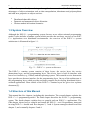
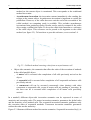
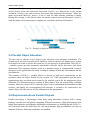
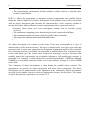
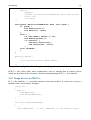
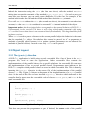
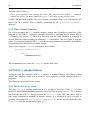
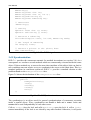
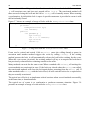
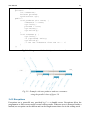
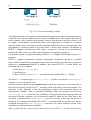
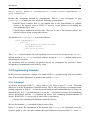
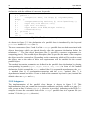
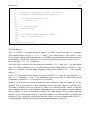
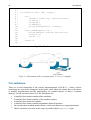
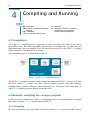
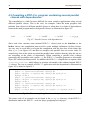
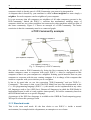
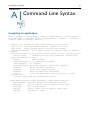




![j:j_"Xt$l"j:]:":,lg]:"r/Human Resources have been duty - e](http://vs1.manualzilla.com/store/data/005657435_1-26d97049bf04f0fd92265d73e45a9ab3-150x150.png)