1
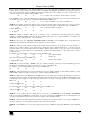
Your VS-5x5 5x5 Video Audio Matrix Switcher
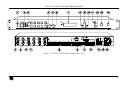
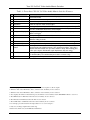
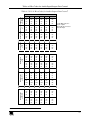
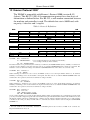
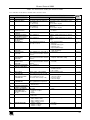
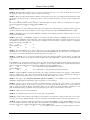
Table 1: Front Panel VS-5x5 5x5 Video Audio Matrix Switcher Features
#
1
2
3
4
5
6
7
8
9
10
11
12
13
14
Feature
IR Receiver
Function
The red LED is illuminated when receiving signals from the Infra-red remote
control transmitter
Power Switch
Illuminated switch for turning the unit ON or OFF
OUT Buttons
Select the output to which the input is switched
IN Buttons
Select the input to switch to the output
ALL Button
Pressing ALL followed by an INPUT button, connects that input to all outputs1
OFF Button
An OFF-OUT combination disconnects that output from the inputs; an
OFF-ALL combination disconnects all the outputs
2
3
7-segment Display
Displays the selected audio or video input switched to the output (marked
4
above each input)
5
VIDEO Button
When pressed actions relate to video
AFV Button
When pressed6 actions relate to video and audio channels. Audio channels
follow the video channels
7
AUDIO Button
When pressed actions relate to audio
8
STO (STORE) Button Pressing STO followed by an output button stores the current setting
RCL (RECALL)
Pressing the RCL button and the corresponding OUTPUT key recalls a
Button
setup from the non-volatile memory. The stored status blinks. Pressing a
9
different OUTPUT button lets you view another setup. After making your
choice, pressing the RCL button again implements the new status
TAKE Button
Pressing TAKE toggles the mode between the CONFIRM mode10 and the
AT ONCE mode (user confirmation per action is unnecessary)
LOCK Button
Disengages the front panel switches
1 For example, press ALL and then Input button # 2 to connect input # 2 to all the outputs
2 When the Audio button illuminates, that is, when the audio breakaway mode is selected
3 When the Video button illuminates, that is, when the video breakaway mode is selected
4 Also displays the number of IN and OUT ports, the firmware version number, and the MACHINE #. Refer to section 7.1
5 The VIDEO button is illuminated when the video breakaway mode is selected
6 The AFV button is illuminated when the AFV mode is selected
7 The AUDIO button is illuminated when the audio breakaway mode is selected
8 For example, press STO and then the Output button # 3 to store in Setup # 3
9 Only view, nothing is implemented at this stage
10 When in Confirm mode, the TAKE button illuminates
4
KRAMER: SIMPLE CREATIVE TECHNOLOGY