1
timeouts and packet loss can occur during normal Ethernet
operation, between 5 and 10 pings is suggested.
Times to Attempt Reboot
Limit the number of times a target device will be rebooted by
entering a value here. For example, entering 5 will reboot your
server up to 5 times before giving up and leaving it on.
Device Reboot Delay
After power cycling to reboot a device, a waiting period will occur
before the IP address is re-checked by Auto-ping. This delay
allows the device time to reboot. Most devices take some time
to reboot. Windows and Linux servers can force automatic file
system checks which may take several minutes to complete. To
allow for startup delays, enter a time delay in the Device Reboot
Delay period. For example, a reasonable value for a typical server
might be 10 minutes (600 seconds). Entering 600 would cause
the power controller to start checking the server for normal IP
operation 10 minutes after reboot.
Find a detailed explanation at: digital-loggers.com/Autoping.html
Auto-Ping Example
In this example, we use Auto-Ping to automatically reboot a DSL
router. Since the switch is connected inside the router, we select a
target IP of 8.8.8.8. This is a multi-cast address which connects to
a multidude of Google name servers. We can safely assume that if
none of them respond, we have lost network connectivity.
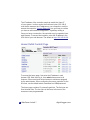
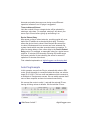
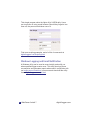
We connect the router to outlet 1, and add the external IP here,
leaving all timing values at defaults. We first add the IP here:
14 Web Power Switch 7
digital-loggers.com