1
It’s impossible, but we do it with assertions
The task Bound-T tries to solve is generally impossible to automate fully. Finding out how
quickly the target program will finish is harder than finding out if it will ever finish – the
famously unsolvable “halting problem”. For brevity and clarity, this manual generally omits to
mention the possibility of unsolvable cases. So, when we say that Bound-T will do such and
such, it is always with the implied assumption that the problem is analysable and solvable with
the algorithms currently implemented in Bound-T.
For difficult target programs, the user can control and support Bound-T's automatic analysis
by giving assertions. An assertion is a statement about the target program that the user knows
to be true and that bounds some crucial aspect of the program's behaviour, for example the
maximum number of a times a certain loop is repeated.
Approximations
Also bear in mind that Bound-T produces an upper bound for the execution time, which may
be different from the exact worst-case time. Various approximations in Bound-T's analysis
algorithms may give over-estimated, too conservative bounds. However, the bounds can be
sharpened by suitable assertions.
Context and place
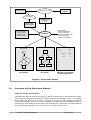
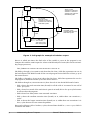
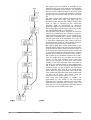
Figure 1 below illustrates the context in which Bound-T is used. The inputs are the compiled,
linked executable target program, an optional file of assertions, and command-line arguments
and options (not shown in the figure). The outputs are the bounds on execution time and stack
usage (optional), as well as control-flow graphs and call graphs (also optional).
Much depends on the target processor
Bound-T analyses the target program in its executable, machine-code form. This requires quite
a lot of target-specific knowledge, and so there is a different version of Bound-T for each type
of target processor. The proper version of Bound-T knows:
•
the format of the executable files for this target, and how to extract the code-memory
image, the constant data if any, and the symbolic debugging information from the file,
•
the binary encoding of the instructions for this target processor, and how to decode the
binary form into instructions,
•
the instruction set of this target processor, including which instructions control execution
flow (jumps, calls) and what each instruction computes,
•
the internal architecture of this target processor, and in particular how long it takes to
execute a given sequence of instructions (in the worst case, at least).
In some cases, Bound-T also has to know the calling protocols, register and stack usage conventions, and code-generation idioms of the cross-compiler(s) for the target processor.
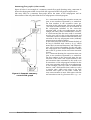
A host computer is necessary, a target computer is not
The Bound-T tool itself is installed and executed on a host computer – your PC or workstation.
Since Bound-T works entirely by static analysis, not by measurement or profiling, it needs no
access to the target computer. You can use Bound-T to analyse a target program before the
target computer even exists, and before the target program is complete enough to be executed
on the target computer. All you need is a cross-compiler and linker that can generate the
machine code for the target processor.
8
Introduction
Bound-T Reference Manual