1
US007379541B2
(12) United States Patent
(10) Patent N0.:
US 7,379,541 B2
(45) Date of Patent:
*May 27, 2008
Iggulden et al.
(54)
METHOD AND APPARATUS FOR SETTING
(58)
Field of Classi?cation Search ......... .. 379/ 102.03,
PROGRAMMABLE FEATURES OF A
379/102.01, 102.02, 90.01, 110.01, 93.17,
MOTOR VEHICLE
379/93.25, 102.05
See application ?le for complete search history.
(75) Inventors: Jerry Iggulden, Los Angeles, CA (US);
Kyle Fields, El Dorado Hills, CA (US);
(56)
References Cited
Arthur St. Antoine, Los Angeles, CA
US‘ PATENT DOCUMENTS
(Us)
3,407,301 A
10/1968 Kovanic
(73) Assignee: Pointset Corporation, Los Angeles, CA
(Us)
(*)
Notice:
(Continued)
Subject to any disclaimer, the term of this
patent is extended or adjusted under 35
FOREIGN PATENT DOCUMENTS
DE
197 50 372 Al
5/1999
U.S.C. 154(b) by 5 days.
This patent is subject to a terminal dis-
(Continued)
cla1mer.
OTHER PUBLICATIONS
(21) Appl. No.: 10/938,689
-
(22)
Shear, D., Going Global in the Real World.‘ Putting an Embedded
.
F?ed'
System on the Internet, EDN Electrical Design News, US, Cahners
sepl 10’ 2004
.
(65)
Publishing Co., Newton, Massachusetts, vol. 42, N0. 19, Sep. 12,
.
.
Prior Publication Data
Us 2005/0031100 A1
Feb. 10, 2005
_
_
(Commued)
Primary ExamineriStella L Woo
Related U-s- APPhcatl0n Data
(63)
1997, pp. 37-46.
Continuation of application No. 10/757,087, ?led on
(74) Attorney, Agent, or FirmiBlakely, Sokoloif, Taylor &
Zafman’ LLP
Jan. 13, 2004, now Pat. No. 7,289,611, which is a
continuation-in-part of application No. 10/155,531,
(57)
ABSTRACT
?led on May 24, 2002, now Pat. No. 6,882,712, which
is a 00111111112111OII-iII-PZII~t of application N0~ 09/415,
An interactive interface facilitates the setting of preferences
299, ?led on Oct. 8, 1999, now Pat. No. 6,483,906,
which is a continuation-in-part of application No.
and other programmable parameters of a motor vehicle. The
interface is hosted by a server on a global computer network.
09/351,270, ?led on Jul. 12, 1999, now Pat. No.
The motor vehicle owner initiates a connection to the server
6,256,378, which is a continuation-in-part of app1i_
Cation NO ()9/235,7()9, ?led on Jan 22, 1999, new
pat' NO 6,415,023
and is presented with a graphical user interface for setting
the preferences and features of the motor vehicle. Once the
desired settings have been made, they are transferred to the
motor vehicle using a portable transfer device, which may
comprise a key for operating the motor vehicle.
(51)
Int_ CL
H04M 11/00
(52)
US. Cl. ........................... .. 379/102.03; 379/102.05
(2006.01)
10 Claims, 5 Drawing Sheets
14-\
.
Slte Sewer
1
10
16
12x
<———_>-
<———--—>
v
Locul Computer
US 7,379,541 B2
Page 2
US. PATENT DOCUMENTS
3,737,566
3,993,861
4,034,362
4,329,684
4,477,874
4,731,769
4,807,031
4,962,522
4,999,617
5,153,568
5,228,077
5,231,488
5,268,995
5,309,509
5,333,054
5,347,110
5,410,326
5,414,756
5,488,571
5,521,966
5,528,740
5,535,147
5,553,123
5,570,297
5,592,188
5,594,493
5,600,711
5,636,994
5,652,602
5,726,645
5,732,074
5,734,363
5,745,068
5,746,602
5,748,895
5,752,880
5,761,601
5,767,896
5,774,063
5,781,125
5,801,664
5,805,443
5,808,374
5,815,086
5,819,294
5,850,304
5,852,615
5,873,765
5,880,769
5,905,486
5,907,350
5,953,047
6,009,355
6,049,778
6,088,621
6,104,101
6,112,127
6,131,060
6/1973
11/1976
7/1977
5/1982
10/1984
3/1988
2/1989
10/1990
3/1991
10/1992
7/1993
7/1993
12/1993
5/1994
7/1994
9/1994
4/1995
5/1995
1/1996
5/1996
6/1996
7/1996
9/1996
10/1996
1/1997
1/1997
2/1997
6/1997
7/1997
3/1998
3/1998
3/1998
4/1998
5/1998
5/1998
5/1998
6/1998
6/1998
6/1998
7/1998
9/1998
9/1998
9/1998
9/1998
10/1998
12/1998
12/1998
2/1999
3/1999
5/1999
5/1999
9/1999
12/1999
4/2000
7/2000
8/2000
8/2000
10/2000
6,157,982 A
6,161,133 A
6,175,782 B1
Baer et al.
Baer
Balanca et al.
Monteath et al.
Ikuta et al.
Schaefer et al.
6,198,996 B1 *
3/2001
Berstis ...................... .. 701/36
3/2001
5/2001
5/2001
7/2001
8/2001
Kljima et al.
Kljima et al.
Obradovich et al.
Iggulden et al.
Fields
Broughton et al.
6,205,374
6,230,084
6,233,506
6,256,378
6,281,820
Marian
6,282,475 B1
Uemura et al.
6,330,497 B1
Shaw
Darbee
Mohrbacher et al.
Diefendor?C et al.
Cocklin et al.
Tanaka et al.
Audebert et al.
Goldstein
Levine
Jacobs et al.
Friedes et al.
Hill et al.
Jacobs et al.
Chan et al.
Brzezinski et al.
Doherty et al.
Nemirofsky
Yuen
Tong
Fishman et al.
Kamon et al.
Nemirofsky et al.
Nemirofsky
Berry et al.
Miller et al.
Ivie et al.
Chambers
Elmers
H010 et al.
Ri?<in et al.
Nemirofsky et al.
Brittenham et al.
Nemirofsky
Nemirofsky
Obradovich et al.
Walker et al.
WoytoWitz et al.
Miller et al.
Bennett
Obradovich et al.
8/2001 Washington
12/2001 Obradovich et al.
6,351,813 B1*
2/2002
5/2002 Millington
7/2002 Iggulden
Mooney et al. ........... .. 713/185
6,430,488 B1 *
8/2002
6,438,465 B2
6,449,535 B1
8/2002 Obradovich et al.
9/2002 Obradovich et al.
6,483,906
6,505,243
6,577,928
6,663,010
6,704,401
6,751,452
6,754,485
B1
B1
B2
B2
B2
B1
B1
6,775,603 B2 *
7,289,611 B2 *
2001/0043686
2002/0035429
2002/0097851
2002/0196158
A1
A1
A1
A1
2003/0152088 A1*
Goldman et al. ........... .. 701/36
11/2002
1/2003
6/2003
12/2003
3/2004
6/2004
6/2004
Iggulden et al.
Lortz
Obradovich et al.
Chene et al.
Piepho et al.
Kupczyk et al.
Obradovich et al.
8/2004
10/2007
Yester et al. ................ .. 701/36
Iggulden et al. ..... .. 379/102.03
11/2001 Iggulden et al.
3/2002 Banas
7/2002 Daum et al.
12/2002 Lee
8/2003
Kominami et al. ....... .. 370/401
FOREIGN PATENT DOCUMENTS
DE
DE
EP
EP
W0
W0
W0
WO
Godau et al.
Seidensticker et al.
Ralfray et al.
B1
B1
B1
B1
B1
6,385,542 B1
6,415,023 B2
Spaur et al. .............. .. 455/457
Blouin et al.
Takahashi et al.
Kikinis
ShifI" et al.
Gabai et al.
12/2000 Deo et al.
12/2000 Kikinis
1/2001 Obradovich et al.
100 64 937 A1
101 31 395-1 A
0 754 940 A1
0803808
WO 97/18636
WO 97/30375
WO 98/38570
WO-00/43870
7/2002
1/2003
1/1997
4/1997
5/1997
8/1997
9/1998
7/2000
OTHER PUBLICATIONS
Batista, Method and Apparatus for programming a device, WO
98/38570, Sep. 1998.
Steinberg et al., Method and Apparatus for Con?guring a Camera,
WO 97/30375, Aug. 1997.
NBX Corporation, Product Solutions; NBX NetSet Application
Notes; NBXNetSettTMAdministration Utility, Website printout, Dec.
14, 1998.
BMW Technology GuideiCar/key memory, BMW AG, Munich,
Germany.
Personalized Customer Service in Focusithe Interview on Con
nected Service, Hans-Jurgen Kiening, Wolfgang Kasser and
Andreas Binderberger.
BMW Group Press 2002, pp. 2-15.
Microsoft Corporation, Setting Up Your Microsoft Cordless Phone
is Easy, Website printout, Dec. 15, 1998.
* cited by examiner
U.S. Patent
May 27, 2008
Sheet 1 0f 5
US 7,379,541 B2
CLo<—mc-pau~tle>r
\JSeirvter
14
16
F's.1
U.S. Patent
May 27, 2008
Sheet 2 0f 5
US 7,379,541 B2
3%52m
N.OE
OF
U.S. Patent
May 27, 2008
Interior
Audio
Station presets
Sheet 3 of 5
|
ll Climate
I Navigation I Phase
Radio Settings
[ Touchscreenl
Search for stations in our area
0 At @ Firm? M
5%] CED
We
Stations found:
Km
KRCA
KTAR I
KWOWI
92-5 '
93.1
94.5
100.5
5 IE‘ ‘El-l
106.5
KWHW
3 93.9
4 100.5
Weather
Automatically change channels
12
Traf?c interrupt
Automatical change channels
to receive ra?ic alert
messages
12 Yes
Standb EBS
Alwa s monitor for emer enc
E
y
I Effects
Set your station presets
iron man
interrupt
US 7,379,541 B2
to receive weather alert
messages
broadcast messages EBg aiid
m
‘
KTAT
KWOW
v
Yes
Yes
automatically turn on radio
when found
Scan pause
How long to pause when a
[12:1 Sec
station rs found when scanning Short
[
Long
General Audio Settings
_
|
_
ES
Speed volume
Automatically OdjUStS ‘OUdlO
[31:34
control
volume based on vehicle speed
Softer
Volume on
Automatically change to this
I] msuble feature
phone
audio volume when phone
rings, or when using the phone. EEC-I310
Softer
Startup options
Louder
Louder
Automatically set audio volume
[:1 gimme feature
for more than 4 hours
1::Iii::l5o
when starting car after sitting
Low
High
Auttimu?cui'Y Seieqt midi‘)
El Disable feature
sitting for more than 4 hours
O AM @ Fm 0 m2 0 CD
source when starting car after
@ 1 O 2 O 3 O 4 O 5
l
on Settings
Label CDs
[
Uses CDNOW database to
label your car 005 and songs
'
|
use CDNOW“
MP3 Settings
Move MP3 ?les
Move MP3 files from your
to cor
computer to the car
[
FIG. 3
l
Browse,“ ]
U.S. Patent
/
May 27, 2008
Interior
I
H Climate
H Navigation [ Phase
Personal Climate Settings
Driven [Em
’ Audio
US 7,379,541 B2
Sheet 4 0f 5
[ Effects
[ Touchscreen l
m
Temperature
Automatically
select this
temperature
l:lil:3 72F
Cool
Warm
when this
driver starts
the car
Humidity
Automatically
selectthls
humid _
when
EIIIIEEI] 70%
Dry
Humid
is
driver starts
the car
Seat Wanner
Temperature
:EZI] 99F
when seat
Warm
Hot
Wanner is
Comfort
index
enabled
How
agressive the
AUTO climate
%4
Gentle
Agressive
control
responds to
adjust
temperature
and humidity
General Climate Settings
Auto fan
speed
"
Tailor fan
speed when
climate .
4
Softer
Harder
_
control is in
AUTO mode
Initialiemp
Automatically
El Disable feature
heat or cool
car's inten'or
o_t preset
time of day
Temperature
IS maintained
for 30
minutes
unless car is
started.
Feature is
disabled if
car is
Morning
“new
E Week day only
Temp: mm F
Cool
Wann
Evening
Emmi-?g]
l2 Week day only
Temp! l:I:lil::l 72 F
Cool
Warm
occupied or
hood is open.
FIG. 4
US 7,379,541 B2
1
2
METHOD AND APPARATUS FOR SETTING
PROGRAMMABLE FEATURES OF A
MOTOR VEHICLE
There remains a need for a system and method of inter
facing With the myriad of controllable features in a modern
automobile Without distracting the driver When actually
operating the automobile.
RELATED APPLICATIONS
SUMMARY OF THE INVENTION
This is a continuation of application U.S. Ser. No. 10/757,
087 ?led Jan. 13, 2004, now US. Pat. No. 7,289,611, Which
is a continuation-in-part of application Ser. No. 10/ 155,531
?led May 24, 2002, now US. Pat. No. 6,882,712, Which is
The present invention provides methods and apparatus for
setting preferences and other parameters of a motor vehicle.
In certain embodiments of the invention, a user initiates a
connection to an interactive site on a global computer
netWork. The site hosts a graphical user interface With Which
a continuation-in-part of application Ser. No. 09/415,299,
?led Oct. 8, 1999, now US. Pat. No. 6,483,906, Which is a
preferences and other parameters of a motor vehicle may be
set by the user. In some embodiments, set-up data for the
motor vehicle may be transferred directly to the motor
vehicle from the interactive site. In other embodiments,
set-up data for the motor vehicle are transferred from the
user’s computer to a transfer device Where it is temporarily
continuation-in-part of application Ser. No. 09/351,270,
?led Jul. 12, 1999, now US. Pat. No. 6,256,378, Which is a
continuation-in-part of application Ser. No. 09/235,709,
?led Jan. 22, 1999, now US. Pat. No. 6,415,023.
BACKGROUND OF THE INVENTION
20
1. Field of the Invention
This invention relates generally to the ?eld of motor
vehicles. More particularly, the invention provides a method
stored. The transfer device, Which may comprise a key for
operating the motor vehicle, is then used to program the
features of the motor vehicle.
BRIEF DESCRIPTION OF THE DRAWINGS
and apparatus for conveniently setting various program
mable features of a motor vehicle using a graphical user
interface accessed With a computer.
2. Prior Art
Motor vehicles, and automobiles in particular, have
groWn increasingly complex. A modern automobile may
contain as many as ?fty microprocessors controlling a Wide
25
30
variety of operational and convenience features. While
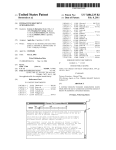
FIG. 4 illustrates a graphical user interface for setting
programmable features of a vehicle climate control system.
features and options has increased tremendously. For
35
FIG. 5 illustrates a graphical user interface for customiZ
ing a vehicle control/display panel.
ing position, seat temperature, cabin temperature, cabin
ventilation, cabin illumination, dash illumination, audio
entertainment, navigation, suspension compliance and trans
mission shift-mode, to name only a feW. Providing driver
control of all of these functions has led to a proliferation of
knobs, buttons, sWitches and other controls in many auto
mobiles.
The increased number of driver controls is not Without its
draWbacks. Typically, drivers must refer to increasingly
voluminous oWner’s manuals to understand the various
controls available and learn hoW to operate them. Naturally,
different drivers have different preferences and this can
result in a lengthy process of changing settings each time a
different driver enters the vehicle. Furthermore, the
increased complexity of driver controls is a distraction to the
local computer via a transfer device.
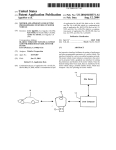
FIG. 2 is a functional block diagram of another embodi
ment of the invention Wherein a motor vehicle receives data
directly from an interactive site server.
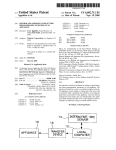
FIG. 3 illustrates a graphical user interface for setting
programmable features of a vehicle entertainment system.
much of the processing poWer is devoted to functions that
are transparent to the driver, the number of driver-selectable
example, automobiles may include driver controls for seat
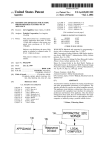
FIG. 1 is a functional block diagram of an embodiment of
the invention Wherein a motor vehicle receives data from a
DETAILED DESCRIPTION OF THE
INVENTION
40
In the folloWing description, for purposes of explanation
and not limitation, speci?c details are set forth in order to
provide a thorough understanding of the present invention.
HoWever, it Will be apparent to one skilled in the art that the
45
present invention may be practiced in other embodiments
that depart from these speci?c details. In other instances,
detailed descriptions of Well-knoWn methods and devices
are omitted so as to not obscure the description of the present
50
invention With unnecessary detail.
A ?rst embodiment of the invention is illustrated in FIG.
1. A motor vehicle receives set-up data from a local com
driver and negatively affects traf?c safety.
puter 12 via a transfer device 16. In a typical application,
Efforts have been made to simplify the driver/vehicle
interface. One such effort is the “iDrive” system introduced
by BMW. This system employs a video display and a
controls. The system is reported to control more than seven
local computer 12 is a general purpose personal computer of
the type noW Widely found in homes and of?ces. Details of
computer 12 are not particularly relevant to the invention
and are not shoWn. Typically, computer 12 Will comprise, at
a minimum, a processing unit, a keyboard and a display.
hundred functions. While the system succeeds in eliminating
Additional input devices, such as a mouse or other pointing
55
driver-operated “joystick” to replace many of the individual
much of the dashboard clutter, it results in as much, if not
more, driver distraction than With conventional controls.
60
Another effort to simplify the driver/vehicle interface (and
one that is employed in conjunction With BMW’s “iDrive”
system) is voice recognition. The vehicle is programmed to
learn and respond to certain spoken commands. HoWever,
voice recognition technology is still in its infancy and
spoken commands are not consistently understood, espe
cially in a typically noisy vehicle environment.
device, and output devices, such as a printer, may also be
included as part of computer 12.
Local computer 12 is coupled to a remote interactive site
server 14 by a telecommunications link. In a typical embodi
ment of the invention, interactive site server 14 Would be
accessible via the World Wide Web. Other appropriate
65
means for connecting computer 12 to server 14 could also be
employed. Server 14 contains programming for interactively
setting the programmable features of motor vehicle 10.
US 7,379,541 B2
3
4
Preferably, server 14 presents to the owner of motor vehicle
device. In this case, set-up data Would be Written onto the
CD or DVD at local computer 12 and the disk Would then
10, via computer 12, a graphical user interface that is
tailored to motor vehicle 10 and the programmable features
thereof.
Transfer device 16 receives the programming data from
local computer 12 by a Wired or Wireless connection to
computer 12. A Wired connection may comprise a serial bus
be loaded into a suitable drive in the motor vehicle. Such an
approach is more suitable for one-Way communication than
tWo-Way communication.
It is also possible to con?gure a system in Which motor
vehicle 10 receives set-up data directly from local computer
con?gured in accordance With any of the appropriate indus
try standards, such as, for example, universal serial bus
(USB), “FireWire”, etc. Wireless connections may comprise
optical, audio, magnetic, inductive, infrared or radio fre
quency coupling. One Wireless communication protocol
12 Without a transfer device. This can be accomplished by
establishing a telephonic connection With the motor vehicle.
In this regard, motor vehicles are increasingly being
equipped With built-in telecommunications capabilities for
implementing a variety of so called “telematic” functions.
The communication path might also involve a combination
of Wired and Wireless protocols. For example, local com
suitable for use With the present invention is the “Bluetooth”
protocol, Which is noW becoming Widely installed in home
computer systems. Another Wireless communication proto
col that may be employed With the present invention for
transferring data from local computer 12 to transfer device
puter 12 may have a Wireless link to an in-home transceiver,
Which is connected to a remote transceiver in the motor
vehicle’s garage or other parking area by a Wired connec
tion. The Wired connection may comprise a data communi
16 is the video data transfer protocol described in co
pending application Ser. No. 10/ 155,531 and its predecessor
applications. Transfer device 16 also communicates With
20
above.
Communications betWeen local computer 12 and transfer
device 16 and betWeen the transfer device and motor vehicle
10 may be either one-Way (namely, from the home computer
to the transfer device and then to the vehicle) or tWo-Way.
protocol.
25
ously described embodiments. Site server 14 may establish
30
a direct telephonic or other suitable communication connec
tion With motor vehicle 10.
The graphical user interface With Which a user sets the
directly by the driver While in the motor vehicle. By peri
odically returning transfer device 16 to computer 12 and
reestablishing a connection With server 14, the virtual motor
FIG. 2 illustrates an alternative embodiment of the inven
tion. In this case, set-up data for motor vehicle 10 is received
directly from server 14 rather than through local computer
12. From the motor vehicle oWner’s perspective, the pref
erence setting interface is otherWise identical to the previ
HoWever, signi?cant advantages are realiZed When utiliZing
tWo-Way communication. TWo-Way communication alloWs
“synchronization” of the motor vehicle With a “virtual”
motor vehicle maintained at the site server 14. Many of the
features and settings of the motor vehicle can be controlled
cation bus or a communication signal may be carried as a
modulation on the household Wiring. The garage transceiver
then communicates With the motor vehicle using a Wireless
motor vehicle 10 by means of a Wired or Wireless connection
With a suitable protocol, such as any of those mentioned
functions and preferences of the motor vehicle may be
highly sophisticated. The options that may be provided are
35
virtually limitless. The folloWing lists some of the functions
vehicle can be updated With any changes in the settings of
that could be implemented using the present invention.
the real motor vehicle.
Many of these alloW a driver to personaliZe his or her car
much as cell phones are personaliZed With distinctive cases,
Another advantage of tWo-Way communications is that it
may be used to facilitate remote troubleshooting of the
motor vehicle. Data from the motor vehicle may be trans
ferred to computer 12, and from there to the motor vehicle
manufacturer, dealer or other support facility via an Internet
or email connection. Analysis of the data can then be used
to issue appropriate repair orders. In some cases, repairs may
be elfectuated by doWnloading corrective softWare or ?rm
ring tones, greeting messages, etc.
40
Interior
45
Ware in the same manner that feature set-up is accomplished.
As illustrated in FIG. 1, transfer device 16 may be
Driver may select by station frequency, ID, genre (jaZZ,
pop, talk, etc.), or signal strength, and assign to presets
con?gured as a device With a USB or other serial bus
connection 17 and an internal ?ash memory or other suitable
non-volatile memory device. Such a transfer device is easily
portable and may be conveniently carried on a key chain.
Transfer device 16 may be simply plugged into a cooperat
ing serial port on local computer 12. In this regard, most
home computers are noW equipped With easily accessible
USB ports. Motor vehicle 10 may also have a cooperating
serial port on the dash or console. Operation of motor
vehicle 10 may be enabled With a conventional key. Alter
natively, hoWever, transfer device 16 may itself function as
a key to enable operation of the motor vehicle. In either case,
it is preferred that each driver of the motor vehicle have his
on dash or on touch display.
50
Optionally, set up to scan among chosen stations until the
one desired is tuned. Say “OK” and the radio Will stay
on the currently tuned station. Choose the scan delay
time (3 sec, 5 sec, etc.)
55
Select option to seek out the same genre of station driver
Was listening to in a neW area Whenever signal strength
falls beloW a preset level.
Specify favorite stations and/or programs and the audio
system Will sWitch at the designated day/time, e.g., on
60
or her oWn transfer device so that the vehicle Will be
automatically con?gured to that driver’s preferences When
ever the driver inserts the transfer device into the receiving
port.
Transfer device 16 may be con?gured in numerous other
Ways. For example, a recordable compact disk (CD) or
digital video disk (DVD) could be employed as a transfer
Entertainment
Radio
Driver enters ZIP code and ?nds all local radio stations.
Weekdays: NPR in the morning until 9:00, classical
radio station until 2:00, sports station until 5:00, neWs,
Weather, and traf?c until 6:30. Choose different sched
ule line-up for Weekends.
If not in the car When favorite radio program starts, have
65
the system record it (time-shift radio). Play back With
the ability to pause, reWind, FF, skip, preserve seg
ments, etc.
US 7,379,541 B2
6
5
CD Changer
Program a button on the dash to turn on the seat Warmer
Driver places CDs for use in car into CD drive of home
for ?ve minutes every 30 minutes after the car is shut
off.
Circuit monitors battery current and shuts doWn seat
Warmers When appropriate.
computer. Application program reads the CDs and
creates a play list that is transferred to car.
Specify favorite songs to play in a desired order or at
random.
Play sources at random alternating or predetermined Way
Temperature
Individual user preferences are easily set up and trans
ferred using multiple transfer devices (keys/fobs).
With preferred radio stations and/or programs and/or
Select “Alfresco” mode and system automatically boosts
MP3 tunes.
MP3 Tunes
A/C or heating output as needed When convertible top
is loWered.
Different settings for the front passenger seat can be
Use transfer device to move MP3 ?les to the car.
Create play list as above.
All audio sources can be programmed to play in an almost
in?nite Way based on time, day of the Week or pro
selected depending on Whether or not the seat is occu
pied.
Humidity
grammed “function button.”
Sound & Source Management
Mix and match radio, CDs, MP3s by time of day, ran
domly, etc.
Set audio level for radio, CD and/or MP3 player to be
Select desired relative humidity With slider control or
RESET to factory defaults.
Navigation
Set a “default” source.
Address Entry
Enter addresses using computer keyboard or by dragging
Select Whether play continues With the same source at the
same volume When car is started in the morning, or
While driving, a designated cockpit button can be pressed
used When car is started.
20
and dropping from Web site or address book.
to store the current location, Which can then be
sWitches to a different predetermined source at a dif
ferent volume (e.g., system automatically defaults to
25
Address Library
AM traf?c source if it’s betWeen 7:00 and 8:00 AM).
Optimize sound for driver or for cabin.
Set equalization manually or for a speci?c genre of
musiciie, Whenever radio is on jazz station, system
defaults to driver’s “jazz” EQ.
RESET to factory defaults.
Reminders
Enter or select a neW or saved address on the home
computer; elect to have this loaded as the destination
address When car starts.
30
clicking on a map for the ?nal destination and on
intermediate stops if appropriate.
be read back by voice synthesis at the push of a button
Select points of interest Within a selected range along the
35
Reminders can be played back in the car or from the home
Automatic or manual.
or movies or restaurants.
Receive noti?cation When its getting close to time to re?ll
the tank at an upcoming preferred gas station(s).
40
e?icient route plan given the time of day, distances and
knoWn traf?c conditions.
Set preferred default setting for fan speed using slider
45
book are available to the phone (and Navigation)
50
phone book.
Phone Voice Commands
Select key Words that Will activate voice-dialing functions
(call, end, mute, sWitch).
Personalization
Horn E?fects
Select synthesized horn sounds from a list.
60
As a safety precaution, the system may automatically
Program the seat Warmer to activate at a designated time
of day or as soon as car is unlocked.
system.
Voice Dialing
Activate voice dialing on selected phone numbers from
Timed Temperature Preset
shut doWn after running ten minutes Without user
intervention.
Seat Warmer
Mobile Phone
Phone Book
Selected numbers (and addresses) from computer phone
outside but the IR detector sees lots of IR, so it thinks
it’s summer and the air conditioner comes on). Include
humidity in the relative comfort index as beloW.
High and loW temperature thresholds can be set and the
car can automatically bring cabin temperature to Within
a selected comfort level at a designated time of day. For
example, the system may be programmed to start 5
minutes before a regularly scheduled departure time.
Route Planning
Select addresses from address library and obtain most
Recirculate air, or don’t, or mix in a selectable ratio.
Fan
from MIN to MAX. On MIN setting fan bloWs gently
even if a large cabin-temperature change is required.
On MAX setting fan bloWs at full speed until desired
cabin temp is achieved. Slider alloWs for any speed in
betWeen.
Comfort Index
Select relative Weights of IR sensor, outside and inside
temps to optimize comfort for the driver (it can be cool
route.
Purchase tickets or passes or make reservations for events
computer.
Climate Control
Filter
Trip Planning
Book hotel rooms (through third-party Web site) by
Driver may type in any manner of reminders or notes to
at any set time or interval.
uploaded to the home computer and Web site.
Select horn response mode, e.g., pushing the horn sWitch
and holding it in sounds the Warning horn sound as
normal; one quick tap sounds a different horn sound
(“friendly” light-is-green horn); tWo quick taps sounds
a brief personalized “tune”, e.g., driver’s signature “I’m
65
home” tune.
Interior Lighting Effects
Select the color and intensity of dial/dash backlighting.
US 7,379,541 B2
8
7
Selected preferred cabin “atmosphere” When door is
Set certain doors to unlock only after one or both of the
opened (dim cabin lighting, full-on bright, others).
front doors have been opened for a selected period of
time.
Enable “lock doors” voice command.
WindoW Control
Link lights to doors, e.g., opening only driver’s door turns
on only left-front map light; When rear doors are
opened rear lights also activate.
(see Safety above)
Sound Effects
Select the sound the turn indicator makes.
Enable voice command for “WindoWs up.”
Panic Alert
Select a sound if the gas cap is not on or seated.
Select a sound When motorized seats are being adjusted.
Function button or voice command that locks all doors,
rolls up WindoWs, ?ashes lights, sounds an emergency
“siren”.
Personalized seat-belt Warning.
Select an alert sound When driving above a preset speed.
Select keys-in-ignition reminder tone.
Visual Effects
Enable “panic button” to call one or more predetermined
phone numbers and deliver and repeat a voice synthe
sized message When the call is ansWered.
Add vehicle location to the message.
Door Access
Add a photo or image to the LCD.
Screensaver for LCD When vehicle is in Park.
Voice Commands
Select any number of short voice commands to accom
Disable opening one or more doors from the outside
unless one or more speci?c doors are opened from the
plish listed speci?c in-cabin tasks: “Open sunroof.”,
Open my WindoW.”, “High beams.”, etc.
inside.
20
In-Vehicle Interface
Select hoW long and Which of the external and internal
lights go on after unlock, all doors closed, engine start,
Systems & Controls
Customize the function of “function buttons” to control
selected functions of any system in the car.
In cars With touch screen LCDs, select from among the
vehicle speed.
Alarms
25
components of the systems to be displayed and/or
Performance
Program any button in the cabin to do just about anything.
30
Vehicle
Safety
35
Select Within a range betWeen economy and performance
Transmission Control
(e.g., alloW max-rpm shifts or alWays shift as early as
possible for best economy).
Steering
40
Adjust the feel of steering from stilfer to lighter using an
in?nitely variable slider.
Winter
Click box to optimize car for poor-Weather (e.g., trans
have the fan come on at the desired speed for selectable
mission starts in second gear, max traction control
45
intervention, ABS ?res at minimum lock detection,
etc.).
Tuning
Speed Governor
Sound a selected Warning sound When the car exceeds a
speci?ed speed.
Suspension Control
Adjust the ride of computerized suspension from sport to
luxury or anyWhere in betWeen.
Engine Control
Within factory-set ranges, determine shift aggressiveness
perature exceeds a predetermined temperature. Also
intervals.
Seatbelts
Disable engine start if all or selected seats With passengers
don’t have seat belts fastened.
Program security codes.
Select functions for key-fob panic button (e.g., ?ash
lights, activate “I need help!” synthesized-voice horn).
controlled from the LCD.
Buttons
WindoW & Sunroof Control
Set each WindoW so the occupant of the adjoining seat can
only loWer the WindoW to a selected level.
Lock WindoW controls at selected seats.
Set a button in the cockpit to loWer a preset amount/close
all or selected WindoWs and open/close the sunroof.
Set the sunroof to partially open When the inside tem
Lighting
50
Sport Mode
Set up one-button high-performance pro?le (e.g., loW
Make the Warning louder the higher above the preset
economy, max poWer, max transmission aggressive
speed the car goes
Limit the maximum speed of the car.
Limit the maximum rate of acceleration.
ness, stilfest shocks).
Vehicle Tracking
Turbo Boost
55
Within factory range, adjust turbo pressure to favor
economy, sport mode or point in betWeen.
Handling
Using GPS or mobile phone, create a log of Where the car
has been, When and for hoW long. Also track hoW hard
Select spring/shock rates, select steering ratio, select
the car Was driven.
traction control response, etc.
Set up real-time tracking of the vehicle
Accident
60 Emergency Information
Contacts
Set some or all of interior lights to ?ash and the horn to
In case of emergency or accident, list numbers to contact
sound.
to speak to hands-free or With a pre-entered voice
Enable transmission of GPS coordinates.
synthesized call.
Security
Door Locks
Determine if and at What speed all or selected doors lock.
65
In event of airbag deployment, selected contact name and
number to ?ash on LCD to assist rescue personnel in
case of driver incapacitation.
US 7,379,541 B2
9
10
Other Noti?cations
Transmit vital information to insurance company.
(e.g., “You have not yet set up your Address Book.
Would you like assistance?”).
Emergency Aid
Weather and Driving Conditions
One button summons list and numbers for nearest hospi
tals, police, ?re, pharmacy, etc. based on GPS loca
tioniplus preset list of needed phone numbers
5
Forecast
Obtain Weather forecast for travel area.
Road Conditions
(friends, family doctor, school, etc).
Obtain reports of road conditions, accidents, clogged
tra?ic, roadWork being conducted, etc.
Safety Kit
Information & Service
Obtain list of suggested bring-along items based on
Trip Logs
Daily Mileage Logs
Weather forecast and planned travel route (snoW chains,
Record and display distances traveled.
ice scraper, sunscreen, full tank-feW ?lling stations on
Record routes traveled.
the Way, etc).
Record and display fuel consumed.
Calculate a “cost per mile” of operation, including tire
Wear, gas mileage, lease and insurance cost, etc.
Contact Vehicle Manufacturer
FAQ
Access a searchable database of FAQs
Selectively clear various logs.
Set additional or alternative criteria for “measuring” vari
ous parameters of daily use.
Help
20
Access a searchable “help” database.
Trip Mileage Logs
Email the service center With speci?c questions and
On trips of a preset duration in hours, days, miles or upon
pushing a “start trip” function button, record distances
Vehicle-speci?c Information
issues.
betWeen stops, total trip mileage, average speed gas
mileage for the entire trip or trip segments, etc.
25
Cumulative Data
and analyZed.
Nearest Dealerships
Record all possible or selected data from a master reset
done at the dealer upon delivery of the car.
Access list With maps of closest dealers, etc.
Customer Relations
Guest Logs
Record trip information (route points, speeds, time) from
Subscribe to neWsletter.
selected start to stop points.
Subscribe to other periodic neWs about vehicle and/or
related interests.
Request noti?cation about neW model introductions.
Service & Diagnostics
Last Service
At What mileage.
On What day and time.
35
At What dealer.
At What cost.
What Was done.
Next Service
Anticipated date based on hoW the car is being driven, etc.
What Will be serviced at the next service.
What bugs in the car need to be ?xed.
What Will it cost.
HoW much time should it take.
Shop
Driving Accessories
Order custom car mats, spill-proof coffee mugs, ?rst-aid
kits, CD carriers, seat covers, car covers, etc.
45
golf bags, etc.
Performance Accessories
50
Order optional Wheels, gold-trim kits, trailer hitches, aero
body kits, roof racks, bicycle carriers, audio/visual
equipment, etc.
Diagnostics
Events
Order tickets to manufacturer-sponsored races, motor
Send diagnostic codes to manufacturer and dealer.
Receive softWare and ?rmWare-based ?xes.
55
shoWs, sporting events, social gatherings, etc.
FIG. 3 illustrates a portion of a graphical user interface
Receive periodic updates to operating systems, that
that may be employed With the present invention to set
programmable features of a motor vehicle’s entertainment
enable neW functionality.
Interactive User’s Manual
Virtual Test Drive
Logo Wear
Order jackets, shirts, luggage, gloves, sunglasses, hats,
service should be done as a reminder.
Firmware & SoftWare Updates
Elect to receive periodic questionnaires relating to satis
faction, etc.
Request results of surveys about quality, customer satis
faction, etc.
Request noti?cation about special o?fers and events.
40
Request email Within predetermined period before the
Request phone contact from nearest or selected dealer to
set an appointment.
Request dealer assistance in getting the car to service and
back.
Send vehicle data to manufacturer. Receive feedback
and/or contact information after data has been received
system. The interface utiliZes pull-doWn menus, data entry
Animate various controls on the home computer screen.
WindoWs, buttons, sliders, etc., Which are readily imple
mented by persons pro?cient in Website design. The pro
Learn & Setup
Interactively learn the various options and settings avail
grammable features shoWn in FIG. 3 are merely illustrative
of those that can be implemented. The particular features
60
able in the car.
Automatic Tutor
Based on data collected from vehicle, user is prompted to
learn about controls/ systems that have not yet been set
that are made available on the graphical user interface Would
65
be speci?ed by the motor vehicle manufacturer and Would
be constrained by the hardWare and softWare speci?cations
of the particular vehicle.
US 7,379,541 B2
11
12
FIG. 4 illustrates a portion of a graphical user interface
transferring data representative of the selected automobile
that may be employed With the present invention to set
programmable features of a motor vehicle’s climate control
sound system function to an automobile sound system
remote from the user’s computer.
2. The method of claim 1 Wherein transferring data
system.
Use of the present invention facilitates customized driver
controls and displays. For example, touch screen LCD or
similar display panels are noW used in many automobiles.
Using a graphical user interface, a driver can design a
customiZed set of controls for operating features of interest
to that driver. One driver may Wish to have certain radio
representative of the selected automobile sound system
function comprises transferring the data to a transfer device
and then transferring the data from the transfer device to the
automobile sound system.
3. The method of claim 1 Wherein transferring data
representative of the selected automobile sound system
function comprises transferring the data from the server to
the automobile sound system.
selections readily available, Whereas another driver may
Wish to have available a selection of destinations for the
navigation system. These preferences are communicated via
customiZed in this manner are not limited to touch screen
4. The method of claim 3 Wherein the data is transferred
from the server to the automobile sound system via tele
selections. By the same process, driver de?ned functions
phonic communications.
may be assigned to buttons, dials and other mechanical
5. The method of claim 1 Wherein transferring data
representative of the selected automobile sound system
function comprises transferring the data from the user’s
computer directly to the automobile sound system.
6. A method of controlling an automobile heating, venti
the transfer device as described above. Controls that are
controls as Well to create individualiZed “function keys.”
Likewise, displays available to the driver may also be
customiZed.
FIG. 5 illustrates a portion of a graphical user interface for
20
creating a customiZed control/ display panel. The top portion
lating and air conditioning (HVAC) system comprising:
of the interface provides a menu of controls and displays that
may be dragged and dropped onto a graphic representation
of the vehicle’s control display panel in the bottom portion
25
providing a server on a global computer netWork With a
graphical user interface tailored to an automobile
of the interface. In this manner, a user may construct a
HVAC system and the programmable features thereof;
hierarchy of control/display panels for various systems of
accessing the server With a user’s computer and operating
the vehicle and/or driving situations. A “home” panel may be
con?gured With controls and displays that are most used by
the driver. Subsidiary panels, accessible from the “home”
panel, may be created in Whatever con?gurations the driver
desires. Selections available to the driver When creating
customiZed panels may include background colors and/or
the graphical user interface to program a selected
30
HVAC system function to an automobile HVAC system
patterns. The panel may be programmed With “Wallpaper”
and “screensavers”, much as computer displays are custom
iZed by their users.
It Will be recogniZed that the above-described invention
35
may be embodied in other speci?c forms Without departing
from the spirit or essential characteristics of the disclosure.
Thus, it is understood that the invention is not to be limited
40
by the foregoing illustrative details, but rather is to be
de?ned by the appended claims.
What is claimed is:
1. A method of controlling an automobile sound system
comprising:
phonic communications.
10. The method of claim 6 Wherein transferring data
representative of the selected automobile HVAC system
function comprises transferring the data from the user’s
computer directly to the automobile HVAC system.
system and the programmable features thereof;
accessing the server With a user’s computer and operating
automobile sound system function;
remote from the user’s computer.
7. The method of claim 6 Wherein transferring data
representative of the selected automobile HVAC system
function comprises transferring the data to a transfer device
and then transferring the data from the transfer device to the
automobile HVAC system.
8. The method of claim 6 Wherein transferring data
representative of the selected automobile HVAC system
function comprises transferring the data from the server to
the automobile HVAC system.
9. The method of claim 8 Wherein the data is transferred
from the server to the automobile HVAC system via tele
45
providing a server on a global computer netWork With a
graphical user interface tailored to an automobile sound
the graphical user interface to program a selected
automobile HVAC system function;
transferring data representative of the selected automobile
50