1
TECHN
Mistral 360 user manual
PRINT
4.6 The main menu
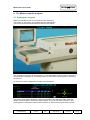
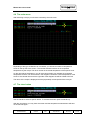
After selecting a recipe you will enter automaticly the main menu.
Depending of the type of Mistral oven connected, you will see a number of temperature
zones on the top left of the screen. The number between brackets is the requested
temperature by the recipe. The other number is the actual temperature of the specific zone.
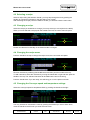
On the right side of the diagram, you will note colored balls, they indicate the requested
temperature as well. The colored lines in the diagram indicate the current temperature of the
zones. If the colored lines reach the right side of the diagram the will be shifted to the left.
The name of the recipe is displayed and the (requested) current speed of the conveyer.
4.7 The clear button
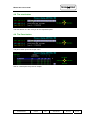
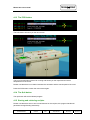
Use the handle to select a specific button. To activate the button push the handle up.
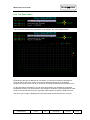
With the clear button you may clear the screen and the temperature measurement will start
on the left side again.
(c) TechnoPrint. Ermelo
The Netherlands
Mistral User
manual
Version:
2.00
Published by:
TechnoPrint
Date:
22.10.07
Page:
7 of 13