1
ProDVP-HD User Manual
Ta b l e o f c o n t e n t s
1.
Configuration
Page 3
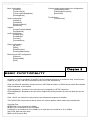
2. Basic functionality
Page 4
3. Input contacts
Page 5
4. Output relays
Page 6
5. Control via RS232 and Ethernet
6. Remote content updates
7. RS232 and Ethernet protocol
Page 6
Page 7
Page 8
8. Update procedures
Page 10
9. Encoding parameters
Page 10
10. Additional notes
Page 10
Chapter 1
Configuration
At startup the ProDVP-HD analyses the file ProDVP-HD2ini.dvp and configures the internal electronics
according to the output combinations required.
This internal configuration can take multiple resets to take effect - please be patient! Once the configuration has been set, it is retained until next changed by the ProDVP-HD2ini.dvp file.
The ProDVP-HD2ini.dvp file can be changed in notepad or any basic text editor.
The key fields in the ProDVP-HD2ini.dvp file are essential for the operation of the ProDVP-HDII. They
should not be modified.
The modification number (ModifNum) can be changed to differentiate between different configurations.
To add a remark, insert a semicolon (;) before the remark.
The different variables adjustable in the ProDVP-HD2ini.dvp file are: