1
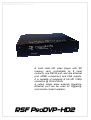
ProDVP-HD User Manual
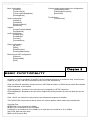
Basic functionality:
[LoopFile]
[TimerLoopFile]
[TimerLoopReadingMode]
[ReadingMode]
Video configuration :
[VideoOut]
[ViewMode]
[ResolutionMode]
[Resolution]
Images :
[ImagesTransitionMode]
[ImagesMode]
Audio configuration:
[AudioOutput]
[AudioMode]
[Volumes]
[VolumesSave]
Content update and media server configuration:
[TestUpdateContain]
[TestUpdateFrequency]
[ServerURL]
Touchscreen :
[TouchScreen]
Relay configuration :
[IN_OUT]
[Relay]
[RelayDuration]
[LastInputMemorised]
Ethernet and UDP configuration:
[Ethernet]
[EthernetAddr]
[UDP]
Chapter 2
Basic Functionality
At startup, if a file is specified in [LoopFile], the file indicated will play in a continuous loop. It can be interrupted by any clip, and will be reverted to at the end of the selected clip.
Clips can either be started by contact closures, UDP Ethernet codes, or RS232 serial codes. More details
are provided later in this manual.
If [ReadingMode] = Continuous, the clip can only be stopped by a STOP command
If [ReadingMode] = Breakable, the clip can be stopped by starting another clip (the clip itself can also be
restarted)
Clips 1 thru 4 can control the relay outputs (see subsequent chapters for details)
The ProDVP-HDII can access a remote server for content updates. More details are provided later.
Suported Files:
MPEG2-PS in mpg container at 19Mb/s
MPEG2-TS in ts container at 25 to 35Mb/S
H.264/AVC in ts container at 15 to 30Mb/s or in mp4 and mov container at 10 to 15Mb/s
Wav PCM 16bit and mp3 audio
BMP and JPG picture files