1
OrgPublisher 9 EChart Server Setup
OrgPublisher ECharts
OrgPublisher ECharts
The purpose of this document is to provide detailed information on
OrgPublisher’s ECharts and the information you need to deploy this feature.
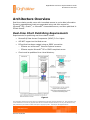
EChart publishing is designed to publish charts with a large number of records
and/or custom fields, or when you would like to publish secure charts based on
authentication methods (Microsoft® Active Directory or custom methods using
custom fields). ECharts are published in two ways: EChart Rich Client uses the
OrgPublisher PluginX discussed in this document. EChart Thin Client requires no
end user browser component add-on.
A Microsoft® IIS (ISAPI enabled) Windows® XP, Windows® 2003 Web server,
Windows® 2008 Web server or Apache™ HTTP Server 2.0+ running Windows®
operating system is required to display an EChart. A virtual directory with
execute permissions for scripts and executables must exist on the Web server.
The URL to the virtual directory is entered as part of an EChart publishing
definition.
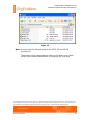
Several files are created when ECharts are published. These files can either be
published to the virtual directory folder, or published locally and then copied to
the virtual directory folder. OrgPublisher includes an FTP client that can be
configured in the publishing definition.
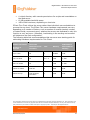
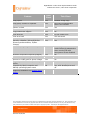
All files have the same name with different extensions:
• .ocp — Similar to a current OCP file except that it contains no records.
Instead, it contains information needed to contact the EChart server.
•
.dll — The ISAPI DLL file. This is the Web server control file that controls
loading and unloading of chart data into memory.
Note: The DLL file must be replaced if you upgrade OrgPublisher.
•
.htm — The standard htm file created when publishing. This is the file
used to access the org chart. PluginX is required to view a Rich Client
EChart.
•
.js — This is a Java Script file that is called by the HTM file. It checks the
codebase value and provides the code necessary to call the PluginX and
load the chart file.
•
cfg.xml — This file is used only by EChart Real-time charts and Thin
Client charts.
•
.odbx — This file indicates multiple data sources were used to create the
chart.
The information contained in this document is confidential and proprietary to Aquire Solutions, Inc. This information may
not be distributed or used for any purpose other than the evaluation of Aquire solutions, nor may it be disclosed to any
party without the prior written consent from Aquire. Copyright © 2001 - 2009 Aquire. All Rights Reserved.
Revised 10/20/09
2