1
VCL-ETH-E1
RION
E1
PWR
TELECOM
LOS
AIS
ETH
TEST
LINK
LOOP
MASTER
TEST
GFP/HDLC
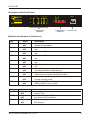
Description of the Front Panel
CONSOLE
OFF
NETWORKS
ON
www.oriontelecom.com
RA
VCL-ETH-E1
LOF
CV
FDX
Configuration
Switches
1
2
3
4
5
6
7
8
ERR
Configuration
Switches
Console Port
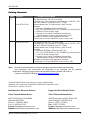
Definition of Indicators on Front Panel
LED
PWR
RA
LOS
LOF
AIS
CV
LINK
FDX
LOOP
ERR
Switch
MASTER
TEST
GFP/HDLC
Status
ON
OFF
ON
OFF
ON
OFF
ON
OFF
ON
OFF
ON
OFF
ON
OFF
ON
OFF
ON
OFF
ON
OFF
Status
ON
OFF
ON
OFF
ON
OFF
Description
Green, system is powered
System is not powered
Red, remote alarm indication
OK
Red, Loss of E1 alarm indication
OK
Red, Loss of E1 frame indication
OK
Red, AIS alarm idication
OK
Red, E1 code violation alarm indication
OK
Green, LAN port connection Normal
No LAN connection on Ethernet port
Green, Ethernet port is running in full-duplex mode
Ethernet port is running in half-duplex mode
Yellow, system is in test mode
Normal operation mode
Red, Error in BER test E1 Signal
BER test OFF or has no errors
Description
local timing
tracing E1 line
line error testing, Led “ERR” show the testing result
turn off line error test function
HDLC framing
GFP framing
Orion Telecom Networks Inc., 2014
9