1
Save
Read
1
Read
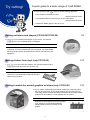
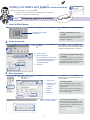
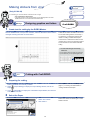
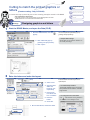
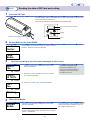
Reading the data of SD Card and cutting
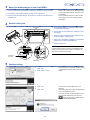
Insert the SD Card.
Press the Standby switch of Craft ROBO main unit, and verify that LED lamp (green color)
is lit on before inserting the SD Card.
Then, follow the instructions of Menu displayed on Operation panel.
Instruction Menu will be displayed.
OP
ENTER
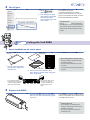
Insert the SD Card into SD Card Slot.
2
SHIFT
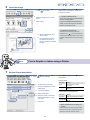
Set the Media on the Craft ROBO.
Load w/
Carrier
Set the Media, and verify that "Load w/ Carrier" or "Load
Media" is displayed, and press [ENTER].
or
Load
Media
3
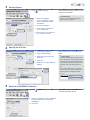
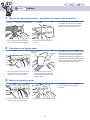
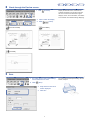
Operate according to the instruction displayed on the screen.
Select
File
Q ENTER
File001
25 100%
Q ENTER
Cut?
Yes
Q ENTER
Working . .
4
1 Verify that "Select File" is displayed on the screen,
and press [ENTER].
R Screen for selecting fle name
The fle name is displayed on top.
Cutting force and Enlarging/Shrinking
size (Scale) set for previous cutting,
2 Press OP to select the data fle name you need to
are displayed on bottom.
cut, and press [ENTER].
3 Press OP to select "Yes", and press [ENTER].
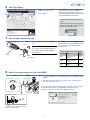
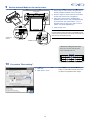
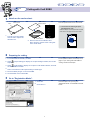
Take out the Media.
Unload
Media
Verify that "Unload Media" is displayed on the screen,
and press [ENTER].
CAUTION!
To insert or take out the SD Card, use either screen of "Load w/
Carrier" or "Load Media".
21
To end the operation, take out the SD Card from
Card slot, and press the Standby switch, and
then verify that LED lamp is off.