1
Retrieving Automatic Queries
To check the Queries that was Automatically Scheduled for Today
•
Click onto ‘Query Manager’
•
Scroll down to ‘Automatic Queries’
•
Check ‘Today’s Schedule’
If no queries are due to be run for that day, no window will display.
If queries do exist:
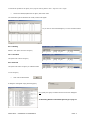
As you can see the query we have just created is now in the
‘Scheduled for Today’ list
•
A
Click ‘Next’ to run any query listed
‘Running
Query’
box
will
appear for a few seconds
Other wise close this window and go to ‘Retrieving Results of Automatic Queries’ (next page)
Retrieving Results of Automatic Queries
To see the results of the query that has just Ran
•
Click onto ‘Query Manager’
•
Scroll down to ‘Automatic Queries’
•
Click onto ‘Open Browser’
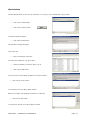
This window can also be accessed from within the published query view by clicking on the Binoculars icon.
•
Select query by clicking on the ‘+’ and any results of query run will be listed.
•
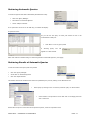
Select results to be printed to screen and click on the floppy disk icon
with a red arrow.
Results will now print to screen and can be printed to printer, saved or exported to excel.
SOPHTLOGIC – COMMERCIAL IN CONFIDENCE
PAGE: 12