1
3
LOW VOLTAGE
DISCONNECT
CHARGING
SOLAR LIGHTING CONTROLLER
D/D
6/2
TEMP. SENSE
2
12 Volts
10A Solar
10A Light
SOLAR
BATTERY
4
3
–
+
2
LIGHT
1
12 V
–
+
6
5
–
+
LIGHTING CONTROL
SEALED
OR
FLOODED
SELECT
OFF
1
2
4
6
4/2
3/1 10 8
TEST
Õ
UP
9
MORNINGSTAR
MADE IN USA
7
4
10
6
5
8
6.
7.
8.
9.
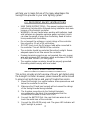
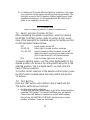
Connect the LIGHT last. If the red LED indicator lights, the battery capacity is low and should be charged before completing
the system installation (Refer to Section 6.4).
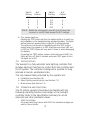
The controller is shipped with a terminal jumper installed. This
sets the controller for charging SEALED batteries.
If a FLOODED battery is being used, simply remove the jumper
to optimize the battery charging for a flooded battery. If the
jumper is connected again, the charging will return to the setpoints for a sealed battery (Refer to Section 6.4.)
For most effective surge protection, it is recommended that the
negative system conductor be properly grounded.
Turn the rotary LIGHTING CONTROL switch to the lighting
option desired (Refer to Section 7.1).
10. Press the TEST button and count the number of Red LED flashes
to verify the correct lighting control setting (Refer to Section 7.2).
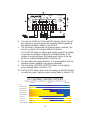
4.0 LIGHTING CONTROL OPTIONS
SUNSET
NIGHT
• OFF
• 2 HOURS ON
• 4 HOURS ON
• 6 HOURS ON
• 8 HOURS ON
• 10 HOURS ON
• 3 / OFF / 1
• 4 / OFF / 2
• 6 / OFF / 2
• DUSK-to-DAWN
3
SUNRISE