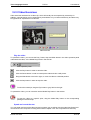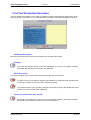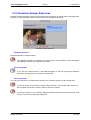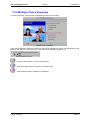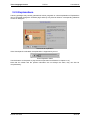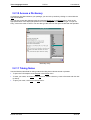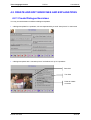
1
1. GETTING STARTED .................................................................................................................................... 3 1.1 Requirements........................................................................................................................................... 3 1.2 Changing Default Settings ...................................................................................................................... 3 2. ABOUT TLP PRO .......................................................................................................................................... 4 3. THE LEARNING MODE .............................................................................................................................. 5 3.1 GENERAL FUNCTIONS .................................................................................................................................. 5 3.1.1 Open a Learning Package ................................................................................................................... 5 3.1.2 Close a Learning Package ................................................................................................................... 6 3.1.3 Exit Telos Language Partner ............................................................................................................... 6 3.1.4 Menu Bar ............................................................................................................................................. 7 3.1.5 Tool Bar ............................................................................................................................................... 8 3.1.6 Special Characters............................................................................................................................. 10 3.1.7 Sound Recording Quality ................................................................................................................... 10 3.1.8 Help Facilities.................................................................................................................................... 10 3.1.9 History................................................................................................................................................ 10 3.2 PRACTICE AND LOOK-UP ACTIVITIES ......................................................................................................... 11 3.2.1 Dialogue Exercises ............................................................................................................................ 11 3.2.2 Text Comprehension Exercises .......................................................................................................... 16 3.2.3 Video Exercises .................................................................................................................................. 18 3.2.4 Text Production Exercises ................................................................................................................. 20 3.2.5 Question-Answer Exercises................................................................................................................ 22 3.2.6 Gap-filling Exercises.......................................................................................................................... 24 3.2.7 Select-Exercises ................................................................................................................................. 26 3.2.7 Drag&Drop Exercises ....................................................................................................................... 27 3.2.8 Multiple Choice Exercises.................................................................................................................. 28 3.2.9 Explanations ...................................................................................................................................... 29 3.2.10 Access a Dictionary ......................................................................................................................... 30 3.2.11 Taking Notes .................................................................................................................................... 30 4. THE EDITING MODE ................................................................................................................................ 31 4.1 GENERAL FUNCTIONS ................................................................................................................................ 31 4.1.1 Open and Edit an Existing Learning Package................................................................................... 31 4.1.2 Create a New Learning Package ....................................................................................................... 31 4.1.3 Add and Delete Pages ........................................................................................................................ 31 4.1.4 Enter a Title ....................................................................................................................................... 32 4.1.5 Import Pages...................................................................................................................................... 33 1997-2004 LINK Institut für Linguistik & Interkulturelle Kommunikation. All Rights Reserved. For further information, please contact: STZ SPRACHTRAINING UND KOMMUNIKATION E-Mail: [email protected] Website: www.teloslearning.com Telos Language Partner TLP Pro User Manual 4.1.6 Select Test Format ............................................................................................................................. 34 4.1.7 Save a Learning Package................................................................................................................... 34 4.1.8 Close a Learning Package ................................................................................................................. 35 4.1.9 Exit Telos Language Partner ............................................................................................................. 35 4.1.10 Switch to the Learning Mode ........................................................................................................... 35 4.1.11 Assign a Password ........................................................................................................................... 35 4.1.12 Menu Bar ......................................................................................................................................... 35 4.1.13 Tool Bar ........................................................................................................................................... 38 4.2 CREATE AND EDIT EXERCISES AND EXPLANATIONS ................................................................................... 40 4.2.1 Create Dialogue Exercises................................................................................................................. 40 4.2.2 Create Text Comprehension Exercises .............................................................................................. 45 4.2.3 Create Video Exercises ...................................................................................................................... 47 4.2.4 Create Text Production Exercises...................................................................................................... 49 4.2.5 Create Question-Answer Exercises.................................................................................................... 51 4.2.6 Create Gap-filling Exercises.............................................................................................................. 53 4.2.7 Create Select-Exercises...................................................................................................................... 55 4.2.8 Create Drag&Drop Exercise ............................................................................................................. 57 4.2.9 Create Multiple Choice Exercises...................................................................................................... 59 4.2.9.1 Multiple Choice Exercises Type B .................................................................................................. 60 4.2.10 Create Explanation Pages ............................................................................................................... 62 4.2.11 Create an Info Page ......................................................................................................................... 64 4.3 IMPLEMENT SOUND.................................................................................................................................... 65 4.4 INSERT PICTURES ....................................................................................................................................... 67 4.5 EDIT TEXT AND TEXT FIELDS .................................................................................................................... 68 4.6 CREATE HYPERLINKS ................................................................................................................................ 69 4.7 IMPLEMENT A DICTIONARY........................................................................................................................ 70 4.8 CREATE SUPPORT BOOK ............................................................................................................................ 72 4.9 EDIT THE CONTENTS PAGE ......................................................................................................................... 74 5. SUPPORT FACILITIES.............................................................................................................................. 76 5.1 AUDIO RECORDER ..................................................................................................................................... 76 5.2 NOTEPAD ................................................................................................................................................... 77 5.3 SPECIAL CHARACTERS ............................................................................................................................... 77 5.4 HELP FACILITIES ........................................................................................................................................ 78 5.5 HISTORY .................................................................................................................................................... 78 © LINK 1997-2004 2 of 78 Telos Language Partner TLP Pro User Manual 1. GETTING STARTED 1.1 Requirements Pentium PC 150 MHz, 32 MB RAM, HiColor graphics card, CD-ROM drive and a SoundBlaster compatible sound card with microphone and speakers; Microsoft Windows 95/98, Windows 2000, Windows XP. 1.2 Changing Default Settings If you want to change the default settings, select Settings from the Extras menu. In the Settings dialogue box, you can change the following default settings: • Default language: Language of the menu bar, status bar, and on-screen help. • Learner data directory: Directory where the learner data is saved (default directory for learner data is C:\TEMP). • Data directory: Directory which is shown when you open a learning package. Default settings It is necessary to restart the program in order to activate the new settings. © LINK 1997-2004 3 of 78 Telos Language Partner TLP Pro User Manual 2. ABOUT TLP PRO Telos Language Partner makes use of text, sound and picture and video capabilities of the current multimedia PC to support and motivate effective language learning. Telos Language Partner supports and integrates a range of prototypical language learning activities from dialogue practice, text comprehension, and text production to different kinds of exercises and grammatical or lexical look-up facilities. The program enables tutors to create customised learning packages for any language using the Roman alphabet. It can also be used for multimedia re-versioning of existing learning materials available as books or audio cassettes. The program has two modes of operation, a Learning Mode and an Editing Mode. The Learning Mode is used for self study learning which might be combined with direct teaching and/or tele-tutoring. Learners can practise with video, dialogues and texts in a flexible combination of listening, speaking/recording, reading and writing. Hyperlinks are used to supplement dialogue and text practice with lexical, grammatical and cultural explanations and corresponding exercises including question answering, gap-filling, and drag&drop. Learning activities are also supported by internal dictionaries. In the Editing Mode, tutors (and learners) can create and edit exercises using the following templates: • a video template for playing video clips supported by transcript, translation and look-up facilities; • templates for dialogue exercises (a basic dialogue template and a dialogue template with more sophisticated multimedia options); • text comprehension templates (with or without support of an image); • a text production template which can be used for a range for writing exercises (e.g. writing letters, faxes, memos, reports); • a flexible and open question-answer template for different kinds of written and/or oral tasks (from answering questions and free or guided picture descriptions to object naming or simulation of a presentation); • a gap-filling template for different kinds of exercises (from ordinary gap-filling to reformulation or sentence composition exercises); • a select-template with lists of choices; • drag&drop templates for drag and drop exercises; • multiple choice templates for true/false and multiple choice exercises; • templates for lexical, grammatical, pragmatic or cultural explanations. The Editing Mode also provides a facility to customise and integrate internal dictionaries as well as an option for creating hyperlinks between dialogues/texts and lexical, grammatical, pragmatic or cultural explanations or exercises. Tutors can use these functions to create and customise learning packages to meet the specific needs of their target learner groups. The Editing Mode can also be used by learners to explore communicative situations and to create their own exercises or their own dictionary. © LINK 1997-2004 4 of 78 Telos Language Partner TLP Pro User Manual 3. THE LEARNING MODE 3.1 GENERAL FUNCTIONS 3.1.1 Open a Learning Package Click on the button ”Open a Learning Package” (or select the command Open from the File menu) in order to open a learning package. Choose the subdirectory containing your learning packages and select and open the desired package. Opening page This will take you to the Contents page of the chosen package, listing all the exercises contained in the package. Contents page The Contents page can always be accessed by clicking the Telos button. © LINK 1997-2004 5 of 78 Telos Language Partner TLP Pro User Manual You can open and close the displayed folders and exercises of the Contents page with a double-click. Select an exercise of your choice and open it with a double-click, or click on OK. If an exercise consists of more than one page, access the exercise via the Contents page (using the Telos button), and then use the Forward and Backward buttons to navigate between the different pages of an exercise. 3.1.2 Close a Learning Package To close a learning package, select the Close command from the File menu. 3.1.3 Exit Telos Language Partner To exit the program, select the Exit command from the File menu. © LINK 1997-2004 6 of 78 Telos Language Partner TLP Pro User Manual 3.1.4 Menu Bar The menu bar displays the following main functions: File, Edit, Extras, Language, Help. File: New Creates a new, empty package. Open Opens an existing package. Close Closes a package. Exit Closes the program. Edit: Editing Mode Switches to the Editing Mode of the current learning package (Access to the Editing Mode can be restricted by a password). Extras: Notepad Opens the TLP-Notepad. Special Characters Opens Special Character box. Dictionary Opens a dictionary. Settings Opens box for changing default settings (language, opening tune, directory for learner data). Sound Data Format Opens box for changing the sound recording quality. Language: The Language menu enables you to change the language of the menu bar, status bar, and on-screen help. Help: Help Accesses the Help function History Accesses the History function, which provides an overview of all the pages you have worked with during a particular learning session. © LINK 1997-2004 7 of 78 Telos Language Partner TLP Pro User Manual 3.1.5 Tool Bar The tool bar includes push buttons and drag&drop buttons. To perform an action associated with a push button, you simply click on the button. To execute a command assigned to a particular drag&drop button, click on the button, drag it to the desired destination, and release it. The drag&drop function works with the majority of fields on a screen at any given time. If you drag a button to an undefined field, you will hear a beep. Push Buttons With the push buttons, you can perform the following actions: Open the Contents page of a learning package Go to the next dialogue page Go to the previous dialogue page Stop recording or playing sound Show hyperlinks Open text field with prompts concerning a given task Save text as text file Show score video/sound operation panel Start video/sound clip Pause video/sound clip Drag the Slide button to the left or right, to move the video/sound clip to a desired position. Stop video/sound clip. © LINK 1997-2004 8 of 78 Telos Language Partner TLP Pro User Manual Drag&Drop Buttons The following actions can be performed with drag&drop buttons: Listen to the auditory model Record yourself Listen to your recording Erase and/or enter text Show text Check the exercise Show a solution Show a translation © LINK 1997-2004 9 of 78 Telos Language Partner TLP Pro User Manual 3.1.6 Special Characters Select Special Characters in the Extras menu to open the Special Character dialogue box. Select a character and click on Paste in order to enter it into your text. 3.1.7 Sound Recording Quality If you want to change the sound recording quality, select Sound Data Format from the Extras menu. 3.1.8 Help Facilities The program provides an on-screen help facility. To access the help option, select the corresponding command from the Help menu. Use the Contents menu, the Previous or History buttons in order to navigate through the help facilities, or click on the green underlined key words for further information. To close the on-screen help function, select Exit from the File menu of the help window. 3.1.9 History Via the Help menu, you can also access a History, which provides an overview of all the pages you have viewed during a learning session. You can open a page by clicking on the title in the History. © LINK 1997-2004 10 of 78 Telos Language Partner TLP Pro User Manual 3.2 PRACTICE AND LOOK-UP ACTIVITIES 3.2.1 Dialogue Exercises There are two types of dialogue exercises providing the same practice functions, one with ”head pictures” (or names) for 2 speakers, and another one with a ”situation picture” and balloons for up to 5 speakers. Dialogue exercise with ”head pictures” Dialogue exercise with ”situation picture” How to do a dialogue exercise The following recommendations will help you to make good use of the flexible practice opportunities of the dialogue exercises. In the section directly after these recommendations, the functions of the buttons will be explained and you will learn how to perform the different practice activities. Listening to the dialogue • Hide the text and listen to the dialogue (or parts of the dialogue) as often as desired. Try to understand as much as you can without the support of the written text. • Make the dialogue text visible and listen again. Use the text in order to enhance your understanding of the dialogue. © LINK 1997-2004 11 of 78 Telos Language Partner TLP Pro User Manual Look-up • Look up words • Listen to and/or read the dialogue with the simultaneous support of the written translation (if available) to ensure that you fully understand the dialogue. • Activate hyperlinks and open linked explanations or exercises. • Use the TLP-Notepad for taking notes and writing down new words and phrases. Listening and Recording • Listen to the speaker turn of your choice. • Repeat and record the passage. • Compare your recording with the model. • Repeat the recording process until you are satisfied with your performance. Writing • Erase the dialogue. Listen to a section and enter what you heard into the corresponding field. • Compare what you have written with the model by dragging the Solution button to the field in question. • Erase individual or all dialogue sections and try to write them out again, this time without listening to the model. Role-play • Take over one role in the dialogue and record yourself. • Listen to your recording. • Compare the recording with the model. • Repeat the role-play until your performance is fluent and you are satisfied with the result. • Try the role-play again, but this time without the help of the text representing your part of the dialogue. Write your own dialogue • Using the dialogue you have been working with as a model, you can now try to write and record your own dialogue. You can do this alone or -- if possible -- together with a partner. • Discuss your dialogue with your teacher. In the following paragraphs, you are shown how to perform the different practice activities. The practice buttons are drag&drop buttons. To execute a command assigned to a particular drag&drop button, drag the button to the desired field and release it. If you drag a button to an undefined field, you will hear a beep. © LINK 1997-2004 12 of 78 Telos Language Partner TLP Pro User Manual Listening and recording You can listen to the whole dialogue, to one of the speaker turns, or to one of the two dialogue roles by dragging the Model Play button to the corresponding field: • to listen to the whole dialogue, drag the button to the background field (or situation picture); • to listen to a speaker turn, drag the button to the corresponding turn field; • to listen to a dialogue role, drag the button to the corresponding role field. You can record yourself by dragging the Record button to the dialogue section you want to record: • to speak & record a speaker turn, drag the button to the corresponding turn field; • to speak & record a dialogue role, drag the button to the corresponding role field or to the head of the respective dialogue partner. Speak into the microphone when the Stop button appears in the tool bar. Click on the Stop button when you have finished your recording. You can listen to your recording by dragging the Learner Play button to the dialogue section you want to listen to: • to listen to your recording of a speaker turn, drag the button to the corresponding turn field; • to listen to your recording of a dialogue role together with model utterances, drag the button to the corresponding role field or to the head of the respective dialogue partner in a situation picture (when the dialogue is illustrated by a ”situation picture”); • to listen to all your recordings, drag the button to the background field or to the situation picture. NOTE: If you are not satisfied with the sound quality, optimise the settings in the audio mixer of your sound card. Hide and show dialogue text You can hide the dialogue text by dragging the Erase & Write button to the dialogue section you want to hide: • to hide the whole dialogue, drag the button to the background field or to the picture (in cases where the dialogue is illustrated by a situation picture); • to hide a speaker turn, drag the button to the corresponding turn field; • to hide a dialogue role, drag the button to the corresponding role field or to the head of the respective dialogue partner. • You can now listen to the relevant dialogue section without the dialogue text being shown and then write the dialogue text into the empty text fields. © LINK 1997-2004 13 of 78 Telos Language Partner TLP Pro User Manual You can make the dialogue text visible again by dragging the Eye button to the dialogue section of choice: • to show the whole dialogue text, drag the button to the background field or to the picture (in cases where the dialogue is illustrated by a situation picture); • to show the text of a speaker turn, drag the button to the corresponding turn field; • to show the text of a dialogue role, drag the button to the corresponding role field or to the head of the respective dialogue partner. Write and compare with model You can enter your text into a field by dragging the Erase & Write button into a turn field, or by clicking onto the corresponding field. You can compare what you wrote with the model dialogue by dragging the Solution button to the dialogue section you wrote: • to compare a speaker turn, drag the Solution button to the corresponding turn field; • to compare the whole dialogue, drag the button to the background field or to the picture (in cases where the dialogue is illustrated by a situation picture). The solution, i.e. the model dialogue, will appear in a field above the dialogue. Access a translation If the Translation button is activated, you can access a written translation to ensure that you fully understand the dialogue. Drag the Translation button to the dialogue section for which you want to see a translation; the translation will appear in a field above the dialogue. Activate hyperlinks If the Hyperlink button is activated, certain words or passages in the text or dialogue, socalled hotwords, will be linked to explanations or exercises. Click on the Hyperlink button in order to activate the hotwords. If you move the mouse over a hotword, the title of the page linked to the hotword will be displayed under the title of the current page. If you click on the hotword, the explanation or exercise that is linked to the hotword will be displayed and a Back button will appear on the screen. The Back button will take you back to the page containing the hotword. Look up words If a dictionary has been linked to your package, you can look up words by clicking on a word with the right mouse button (see also chapter 3.2.8 Access a Dictionary). © LINK 1997-2004 14 of 78 Telos Language Partner TLP Pro User Manual Write and record your own dialogues Using the dialogue you have been working with as a model, you can now try to write and record your own dialogue. You can switch from the Learning Mode to the Editing Mode in order to write and record your own dialogues: • Select the command New from the File menu, to create a new learning package. • Click on the New Page button and select a template for a dialogue exercise from the displayed dialogue box. • To switch between the Editing and the Learning Mode, use the corresponding command from the Edit menu. For further help, see Create Dialogue Exercises in chapter 4.2.1. © LINK 1997-2004 15 of 78 Telos Language Partner TLP Pro User Manual 3.2.2 Text Comprehension Exercises The general purpose of the text comprehension exercises is to understand the presented text. Text comprehension exercise with bitmap Listen to the text without support of a transcript To listen to the text, drag the Model Play button to the grey field on the right. Listen to the text with support of a transcript To show the transcript, drag the Eye button to the grey field on the right. You can now listen again to the whole text or to particular parts of the text. You can now listen to the whole text or to particular parts of the text as often as desired. To listen to the text or a text passage, drag the Model Play button to the beginning of the text or to the text passage you want to start with. Speak and record the text If you want to record the text, drag the Record button to the text passage you want to start with. Speak into the microphone when the Stop button appears in the tool bar. Click on the Stop button each time you have finished recording a highlighted text passage. Click on Cancel in order to interrupt the recording. © LINK 1997-2004 16 of 78 Telos Language Partner TLP Pro User Manual Compare recording with model Listen to the model and to your recording in order to compare your recording with the model. To listen to your recording, drag the Learner Play button to the text passage you want to listen to. Click on the Stop button in order to stop the playback. To compare your recording with the model, drag the Model Play button to the text passage you want to listen to. Click on the Stop button in order to stop the playback. Access a translation If the Translation button is activated, you can access a written translation of the text to ensure that you fully understand the text. Drag the Translation button to a text passage. The translation will appear in a text field on the top of the page. Activate hyperlinks and look up words If the Hyperlink button is activated, certain words or passages in the text or dialogue, socalled hotwords, will be linked to explanations or exercises. Click on the Hyperlink button in order to activate the hotwords (see also Activate Hyperlinks in chapter 3.2.1). If a dictionary has been linked to your package, you can look up words by clicking on a word with the right mouse button (see also chapter 3.2.9 Access a Dictionary). © LINK 1997-2004 17 of 78 Telos Language Partner TLP Pro User Manual 3.2.3 Video Exercises Video exercises are based on a video clip, which will usually be accompanied by a transcript. In addition, comprehension may be supported by a translation or by an internal dictionary and there may be hyperlinks to explanations or exercises. Video exercise Play the video To operate the video, you can use the Play, Pause, Stop and Slide button in the video operation panel underneath the video, or the Model Play button in the tool bar. video operation panel Click the Play button in order to start the video. Click the Pause button in order to interrupt the video and view a still picture. Drag the Slide button to the left or right, to move the video to a desired position. Click the Stop button in order to stop the video. To show the transcript, drag the Eye button to grey field on the right. To operate the video, you can now also use the Model Play button in the tool bar. To start the video at a specific point, drag the Model Play button to the corresponding passage in the transcript. Speak and record the text You can speak and record the video text and compare your recording with the model (see Speak and record the text and Compare recording with model in chapter 2.2.2 Text comprehension exercise) © LINK 1997-2004 18 of 78 Telos Language Partner TLP Pro User Manual Access a translation If the Translation button is activated, you can access a written translation of the transcript to ensure that you fully understand the video. Drag the Translation button to a text passage of the transcript. The translation will appear in a text field on the top of the page. Activate hyperlinks and look up words If the Hyperlink button is activated, certain words or passages in the transcript, so-called hotwords, will be linked to explanations or exercises. Click on the Hyperlink button in order to activate the hotwords (see also Activate Hyperlinks in chapter 2.2.1). If a dictionary has been linked to your package, you can look up words by clicking on a word with the right mouse button (see also chapter 3.2.9 Access a Dictionary). © LINK 1997-2004 19 of 78 Telos Language Partner TLP Pro User Manual 3.2.4 Text Production Exercises The text production template can be used for all kinds of writing exercises like letter writing, faxes, memos, reports, summaries etc. The example below, for instance, illustrates a translation exercise. Text production exercise Read task description Read the instructions above and in the text field on the left side of the screen. Prompts If you click the Prompts button, a text field will appear on the top of the page containing information that will help you to perform the given task. Write and record To perform the given task, write into the text field on the right side of the screen. In order to record an oral answer, drag the Record button to the answer field, speak into the microphone, and click on Stop in order to stop the recording. If you want to listen to your recording, drag the Learner Play button to the answer field. Click on Stop, if you want to interrupt the playback. Save your performance as a text file By clicking on the Disk button, you can save your text as a text file on hard disk or diskette. The text file can be edited or printed with any word processor. © LINK 1997-2004 20 of 78 Telos Language Partner TLP Pro User Manual Access a model solution If the Solution button is activated, you can access a solution. If you drag the Solution button to the answer field, a model answer will appear in a text field at the top of the page. © LINK 1997-2004 21 of 78 Telos Language Partner TLP Pro User Manual 3.2.5 Question-Answer Exercises Question-answer exercises consist of an instruction and a visual aid on the left side of the page and a question (or task description) and an answer field on the right side of the page. Question-answer exercise Read the question Read the question or task description. If the Model Play button is activated, you can also listen to the question or task description by dragging the button to the respective text field. Access prompts If you click the Prompts button, a text field will appear on the top of the page containing information that will help you to perform the given task. Give the answer You can give the answer in a written and/or spoken form. Write the answer into the answer field. In order to record an oral answer, drag the Record button to the answer field, speak into the microphone, and click on Stop in order to stop the recording. If you want to listen to your recording, drag the Learner Play button to the answer field. Click on Stop, if you want to interrupt the playback. © LINK 1997-2004 22 of 78 Telos Language Partner TLP Pro User Manual Access a solution If the Solution button is activated, you can access a solution. Drag the Solution button to the answer field. A solution will appear in a text field at the top of the page. To access an oral solution, drag the Model Play button to the answer field. © LINK 1997-2004 23 of 78 Telos Language Partner TLP Pro User Manual 3.2.6 Gap-filling Exercises The gap filling exercises can be used for a wide range of learning activities from listening comprehension to grammatical and lexical exercises. Gap-filling exercise Fill in all the gaps of the selected gap-filling exercise. To fill in a gap, click onto the gap and fill in the missing word(s) or letters. Press the Tab key to go to the next gap. If the Sound Operation Panel is activated, the exercise is supported by sound. Use the buttons on the panel, to play the sound and follow the course instructions (see also Push buttons in chapter 3.1.5). Sound Operation Panel To check your answers, drag the Check button and either place it onto the text field or directly onto an entry. Your entry will turn green if it is correct; in case it differs from the expected answer, the deviating letters will be marked in red. Entries that are marked in red do not correspond to the expected solution. To delete an entry, drag the Erase button to the entry and try again. If you drag the Erase button onto the text field, all entries will be deleted. To see the expected answer, drag the Solution button onto the text field or onto an entry. Click on the Scoring button to see what score you have reached. © LINK 1997-2004 24 of 78 Telos Language Partner TLP Pro User Manual Create your own gap-filling exercises You can also create own gap-filling exercises in the Editing Mode. • Select the command New from the File menu in order to create a new package. • Click on the New Page button and select the option Gap-Filling Template from the displayed dialogue box. For further help, refer to the on-screen Help function found in the Editing Mode or see chapter 4.2.6 in this manual. To switch between the Editing and the Learning Mode, use the corresponding command from the Edit menu. © LINK 1997-2004 25 of 78 Telos Language Partner TLP Pro User Manual 3.2.7 Select-Exercises The select-exercises are a variant of the gap-filling exercises. However, here the learners do not write in the gaps, rather they have to select the correct answer from a list of possible choices. Click on the small arrow next to the gap, and a list of possible answers will appear. To choose an answer, click on the desired solution and it will appear in the gap. Select-exercise If the Sound Operation Panel is activated, the exercise is supported by sound. Use the buttons on the panel, to play the sound and follow the course instructions (see also Push buttons in chapter 3.1.5). Sound Operation Panel To check your answers, drag the Check button and either place it onto the text field or directly onto an entry. Your entry will turn green if it is correct; in case it differs from the expected answer, the deviating letters will be marked in red. Entries that are marked in red do not correspond to the expected solution. To delete an entry, drag the Erase button to the entry and try again. If you drag the Erase button onto the text field, all entries will be deleted. To see the expected answer, drag the Solution button onto the text field or onto an entry. Click on the Scoring button to see what score you have reached. © LINK 1997-2004 26 of 78 Telos Language Partner TLP Pro User Manual 3.2.7 Drag&Drop Exercises Select a text button from the right side of the page and drag it into the correct space in the text field. Drag&Drop exercises If the Sound Operation Panel is activated, the exercise is supported by sound. Use the buttons on the panel, to play the sound and follow the course instructions (see also Push buttons in chapter 3.1.5). Sound Operation Panel To check your answers, drag the Check button to an entry or onto the text field. Your entry will turn green if it is correct; in case it differs from the expected answer, it will be marked in red. To delete an entry, drag the Erase button to the entry and try again. If you drag the Erase button onto the text field, all entries will be deleted. To see the correct answer, drag the Solution button onto the text field or onto an entry. Click on the Scoring button to see what score you have reached. © LINK 1997-2004 27 of 78 Telos Language Partner TLP Pro User Manual 3.2.8 Multiple Choice Exercises To select an answer, click onto the corresponding multiple choice button. Multiple Choice exercise If the Sound Operation Panel is activated, the exercise is supported by sound. Use the buttons on the panel, to play the sound and follow the course instructions (see also chapter 3.1.5). Sound Operation Panel Click the Check button to check your selections. Click the Solution button to see the correct selections. Click the Erase button to delete your selections. © LINK 1997-2004 28 of 78 Telos Language Partner TLP Pro User Manual 3.2.9 Explanations Learning packages may contain grammatical, lexical, pragmatic or cultural explanations. Explanations can be accessed through the Contents page and they may also be linked to corresponding elements of texts or dialogues. Grammatical explanation If the Sound panel is activated, the explanation is supported by sound. Sound Operation Panel Use the buttons on the panel, to play the sound (see also Push Buttons in chapter 3.1.5). Note that the written and the spoken information are not always the same; they can also be complementary. © LINK 1997-2004 29 of 78 Telos Language Partner TLP Pro User Manual 3.2.10 Access a Dictionary If a dictionary has been linked to your package, you can look up words by clicking on a word with the right mouse button. You can also access the dictionary with the command Dictionary in the Extras menu. Click on the appropriate letter of the displayed alphabet and scroll through the word list on the right. To open an entry, click on the word of choice. You can also type the word into the space underneath the alphabet. Dictionary entry 3.2.11 Taking Notes Use the Windows WordPad for taking notes and writing down relevant words or phrases. • To open the TLP-Notepad, click Notepad in the Extras menu. • To save your notes, click Save in the File menu, select a directory, enter a file name and click OK (or Save). • To print your notes, click Print in the File menu. © LINK 1997-2004 30 of 78 Telos Language Partner TLP Pro User Manual 4. THE EDITING MODE 4.1 GENERAL FUNCTIONS 4.1.1 Open and Edit an Existing Learning Package Click on the button ”Open a Learning Package” (or select the command Open from the File menu) in order to open a learning package. Choose the sub-directory containing your learning packages, and select and open the desired package. This will take you to the Contents page listing all the exercises contained in the package. You can open and close the displayed folders of the menu with a double-click. Select an exercise of your choice and open it with a double-click, or click OK. If you want to edit a learning package, select Editing Mode from the Edit menu. In the Editing Mode, you can • edit exercises (see chapter 4.2); • add or delete exercises (see 4.1.3 Add and Delete Pages); • import exercises from other learning packages (see 4.1.5 Import Pages). NOTE: Do not make a learning package too large in order to keep it simple and easy to handle. 4.1.2 Create a New Learning Package Starting from the Opening Page of the program, click on the button ”Create a New Learning Package” (or use the command New from the File menu) in order to create a new learning package. This will take you to the Contents page of the Editing Mode. At this stage, you can either call up a template (see 4.1.3 Add and Delete Pages) and fill it with content or start to create Folders to organise your package (see Add and Delete Folders in chapter 4.9 ”Edit the Contents page”.) Save the new learning package by giving it an appropriate file name with the extension "*.dia" (see 4.1.7 Save a Learning Package.) 4.1.3 Add and Delete Pages If you want to add a page to your learning package while you are on the Contents page, select the title of the exercise after which you want to add the new page. You can also add a new page from the page of an exercise. The title of the added page will then appear on the contents list directly after the current page. It can, however, also be moved to a different place later (see Move and Indent Titles in chapter 4.9). To add a page to your learning package, click the New Page button (or use the Select Template command in the Templates menu). © LINK 1997-2004 31 of 78 Telos Language Partner TLP Pro User Manual Select one of the following templates from the displayed dialogue box and click OK. • Dialogue template with ”head pictures”: Template for 2 speakers represented by small ”head pictures” or names • Dialogue template with ”situation picture”: Template with a ”situation picture” and balloons for up to 5 speakers • Video template: Template for playing video clips supported transcript and translation • Text template with picture/without picture: Template for listening comprehension with transcript and translation • Text production template: Template for oral and written exercises including translations, summaries, faxes, memos, and reports. • Question-Answer template: Template for oral and written exercises with visual aid, from answering questions and describing pictures to simulating a presentation • Gap-filling template: Template for different kinds of exercise from gap-filling to reformulation and sentence composition • Drag&Drop templates: Templates for drag&drop exercises • Multiple choice templates: Templates for multiple choice or true/false exercises • Explanation template with one field/with two fields/with picture: Template for lexical, grammatical, pragmatic or cultural explanations which can be linked to dialogue, text or video exercises via hyperlinks • Info page template: Template for information introducing an exercise or learning package Enter a title into the displayed title box, and then fill the template with content (see chapter 4.2). To delete a page from your package, click the Delete Page button or use the Clear Page command in the Edit menu. On the Contents page, you can also use this button to delete folders. Select the folder or title of the exercise you want to delete and click on the button Delete Page or Folder. 4.1.4 Enter a Title When you call up a template, it is displayed together with the Enter Title dialogue box. Enter Title dialogue box You can also click on the Title button in order to open the Enter Title dialogue box. © LINK 1997-2004 32 of 78 Telos Language Partner TLP Pro User Manual Use the box to enter a new title for your exercise or to change the old one. If you need characters that are not available on your keyboard, click on Special Characters in the Extras menu. The title appearing in the title bar at the top of the screen will automatically be inserted in the contents list of the learning package. Suppress title Exercises may consist of more than one page. To suppress the titles of the subsequent pages of an exercise on the Contents page of the Learning Mode, select the respective feature in the Enter Title dialogue box. Titles of pages that have been suppressed, will not appear on the Contents page of the Learning Mode. They will instead be accessible by the Forward button from the first page of the exercise. Learners, therefore, access the first of several pages of an exercise via the Contents page and then use the Forward and Backward buttons to navigate between the different pages of an exercise. Set test format Most templates can be used for practice and testing purposes. Select the feature ”Test Format” in the Enter Title box if you want to use a template for testing purposes (see also chapter 4.1.6). Hide hyperlink button If you select the feature “Hide hyperlink button”, the hyperlink button will not be visible on the current page of the package. 4.1.5 Import Pages To import pages from other learning packages, • use the command Import in the File menu; • select the file name of the package from which you want to import pages and click OK; • select ALL if you want to import the whole learning package, or select PAGES if you want to import specific pages; • select the pages, you want to import and click OK. Import Pages dialogue box Go to the Contents page to integrate the imported pages into the structure of your learning package (see chapter 4.9 Edit the Contents page). © LINK 1997-2004 33 of 78 Telos Language Partner TLP Pro User Manual 4.1.6 Select Test Format Most templates can be used for practice and testing purposes. In self-controlled self-study sessions, learners can check their answers and compare them with a given solution. If the test format is selected, learners cannot access any solutions or check which of their entries are right or wrong. The test format can be selected or de-selected either for individual exercises or for a whole learning package. Select/de-select test format for individual exercises This option allows you to create ”mixed” packages with both practice and testing components. Click on the Title button to open the Enter Title dialogue box(see also chapter 4.1.4). Select/de-select the feature ”Test Format” and click OK. Select/de-select test format for entire learning package This option allows you to use the same learning package alternatively for practice or testing purposes by selecting the respective feature. Click on Select/De-Select Test Format in the Extras menu. Select one of the following options and click OK: 1. Test format selected for individually specified exercises (= default setting: the test format is only activated for those exercises for which it has been specified individually via the Enter Title dialogue box); 2. Select test format for all exercises of a package regardless of what has been specified for individual exercises; 3. De-select test format for all exercises of a package regardless of what has been specified for individual exercises. 4.1.7 Save a Learning Package To save a learning package, select the Save command from the File menu. Select a directory, enter a file name using the extension "*.dia", and click OK (or Save). After extensive editing (especially after deleting pages), it is advisable to save a package (under the given or under a different name) using the Save As command. Executing this command compacts the file. NOTE: • Create a new directory in the Windows Explorer (File Manager) for each new learning package. • All data belonging to a learning package (i.e. the learning package file with the extension *.dia, all sound files and the bitmaps of implemented graphics) must be stored in the same directory. If you implement sound or pictures the files will automatically be copied into the current directory. • If you want to store a package in a different place make sure to copy or move all the files belonging to the learning package. • If you want to store a package using the Save As command into a different directory, all sound files and bitmaps belonging to that package will automatically be copied into the new directory. © LINK 1997-2004 34 of 78 Telos Language Partner TLP Pro User Manual 4.1.8 Close a Learning Package To close a learning package, select the Close command from the File menu. 4.1.9 Exit Telos Language Partner To exit the program, select the Exit command from the File menu. 4.1.10 Switch to the Learning Mode You can always switch from the Editing Mode to the Learning Mode in order to test the package you are editing. To switch between the two modes, use the respective command from the Edit menu. Access to the Editing Mode can be restricted by means of a password. 4.1.11 Assign a Password To restrict access to the Editing Mode of a learning package, you can assign a password to it. Select the Password command from the Edit menu. Enter a password into the first text field of the dialogue box and retype the password to confirm that this is indeed the one you want. Click OK. You also have to use the Password command in order to change or delete the password. 4.1.12 Menu Bar The menu bar of the Editing Mode displays the following main functions: File, Edit, Templates, Hyperlinks, Extras, Language, and Help. File: New Opens a new, empty package. Open Opens an existing package. Close Closes current learning package. Save Saves a package under its specified file name. If the package has not yet been saved and named, the Save command displays the Save As dialogue box. Save As Displays the Save As dialogue box. Allows you to save the current package as a new file. Executing this command also compacts the file. Import Imports pages from other learning packages. Exit Closes the program. © LINK 1997-2004 35 of 78 Telos Language Partner TLP Pro User Manual Edit: Undo Reverses an action. Cut Removes a selected segment and places it on the Windows Clipboard. Copy Places a copy of a selected segment on the Windows Clipboard. Paste Pastes content of the Windows Clipboard onto current text field. Clear Deletes current selection without placing it on the Windows Clipboard. Delete Page Deletes current page. Learning Mode Switches to the Learning Mode. Password Displays a Password dialogue box for allocation of a password that restricts access to Editing Mode. Templates: Select Template Displays Select Template dialogue box. Hyperlinks: Create Hyperlinks Displays Hyperlink dialogue box for the creation of hyperlinks between text items and explanations or exercises. Dictionary Displays Lexical Link dialogue box allowing you to link a dictionary to a learning package, create a new dictionary, edit a dictionary, or remove a link to a dictionary. Support Book • New Support Book • Creates a new support book. • Open Support Book • Opens an existing support book. Extras: Notepad Opens the TLP-Notepad. Special Characters Opens Special Character Box. Audio Recorder Opens Audio Recorder. Select/De-select Test Format Opens box for activating/de-activating the Test format Settings Opens box for changing default settings (language, opening tune, directory for learner data) Sound Data Format Opens box for changing the sound recording quality. Language: The Language menu enables you to change the language of the menu bar, status bar, and on-screen help. © LINK 1997-2004 36 of 78 Telos Language Partner TLP Pro User Manual Help: Help Opens Help option of the Editing Mode. History Displays a list of all the pages you have viewed during a particular working session. © LINK 1997-2004 37 of 78 Telos Language Partner TLP Pro User Manual 4.1.13 Tool Bar In the Editing Mode, the tool bar includes the following buttons: Push Buttons To perform an action associated with a push button, you simply click on the button. With the push buttons, the following actions can be performed: Play the demo Go to the next page Go to the previous page Open Contents page of a learning package Adapt text fields Select a picture Stop recording or playing sound Enter prompts helping the learner to perform a given task Create gap/drag-object Add additional drag object in drag&drop exercise Shuffle drag objects in drag&drop exercise Enter or change a title of a page Add a new page Delete a page Rearrange titles on the Contents page of a learning package © LINK 1997-2004 38 of 78 Telos Language Partner TLP Pro User Manual Add folder Check indents Open the Colour Tray Video operation panel Start the video/sound clip Pause video/sound clip Set video index Drag the Slide button to the left or right, to move the video/sound clip to a desired position Stop video/sound clip Drag&Drop Buttons To execute a command assigned to a particular drag&drop button, click on the button, drag it to the desired destination, and release it. The drag&drop function works with the majority of fields on a screen at any given time. If you drag a button to an undefined field, you will hear a beep. With the drag&drop buttons, the following actions can be performed: Record sound using the microphone Implement a sound file Listen to auditory model Delete text Enter a translation Delete gap/drag-object © LINK 1997-2004 39 of 78 Telos Language Partner TLP Pro User Manual 4.2 CREATE AND EDIT EXERCISES AND EXPLANATIONS 4.2.1 Create Dialogue Exercises You may choose between two different dialogue templates: • a dialogue template for 2 speakers, who are represented by a small ”head picture” or their name • a dialogue template with a ”situation picture” and balloons for up to 5 speakers Role field Turn field Fields for initials or names © LINK 1997-2004 40 of 78 Telos Language Partner TLP Pro User Manual Enter a title When you call up a template, it is displayed together with the Enter Title dialogue box. Enter Title dialogue box You can also click on the Title button in order to open the Enter Title dialogue box. Use the box to enter a new title for your exercise or to change the old one. If you need characters that are not available on your keyboard, click on Special Characters in the Extras menu. The title will appear in the title bar at the top of the screen will automatically be inserted in the contents list of the learning package (see also 4.1.4 Enter Title). Enter dialogue text If you are using a template with a picture, you have to enter the initials of the respective speaker in front of a text field (see also Determine Speaker Roles below). Enter your dialogue text into the grey text fields, using different fields for different speaker turns. If you need characters that are not available on your keyboard, click on Special Characters in the Extras menu. Longer speaker turns may be subdivided into two or three parts by writing each part in a new field. This will make it easier for learners to practice the dialogue. To facilitate the process of entering the text, it is strongly recommended to write the dialogues with a word processor and to copy it into the template in the following way: • Use the character ”#” to separate speaker turns and to indicate that after each ”#” character the text should be entered into a new text field. • Select the text and copy it into the Windows clipboard. • Switch to your learning package (using the Alt+Tab keys), click into the turn field in the dialogue template where you want to fit in the copied text, and use <Shift>+<Ins> to paste the copied text into the template. The text will assigned to the individual text fields according to the separations indicated by the ”#” character. Adapt text fields Since the speaker turns of a dialogue may vary in length, it will be necessary to adapt the size of the text fields. This is done by clicking the button Adapt Text Fields after you have entered the text. © LINK 1997-2004 41 of 78 Telos Language Partner TLP Pro User Manual A text field belongs to one of the two dialogue participants, i.e. either A or B. Depending on which field belongs to which participant role, the field can be positioned to the left or the right of the page. The starting position for all text fields is to the left of the page. To move a Speaker Turn Field from the left side to the right (or back again), click on the turn field using the right mouse button. Insert head pictures or names If you have chosen a dialogue template for 2 speakers, represented by a small ”head picture” or their name, distribute the speaker turns as described above and enter head pictures or names into the role fields. Distinguish Dialogue Partners by Name You can distinguish the two dialogue partners by giving them names. Click on the Role Fields in the left and right corners above the dialogue field type in the respective names. Distinguish Dialogue Partners by Pictures Instead of entering the names of the dialogue partners, you can also use pictures. Click on the Picture button in order to insert pictures representing the dialogue partners. The Picture box will appear. Select one of the displayed pictures, decide which dialogue role you want to use it for (left or right), and click OK. Repeat this procedure for the second person as well and then close the dialogue box. Role Field Dialogue Template with Picture Box You can also import and enter your own pictures. Import additional head pictures If you want to implement your own additional head pictures, you need appropriate pictures (BMPformat; size 75x60 pixels; 256 colours). If the pictures are smaller than 75x60 pixels, they will be centred within the role field; if they are bigger, the right and lower part of the picture will be cut off. Click on the Picture button in order to open the dialogue box ”Select graphic”. © LINK 1997-2004 42 of 78 Telos Language Partner TLP Pro User Manual Select the record card ”Custom”. Click Import, select a bitmap, and click OK. Repeat the procedure if you want to import further pictures for the current learning package. To enter a picture into a dialogue template, select one of the imported pictures, indicate whether you want to use it for the role field on the left or the right side, and click OK. Repeat the procedure for the other role field and then close the dialogue box. Saving the learning package ensures that links to pictures that have been inserted into role fields will be saved as part of the package. The pictures themselves will automatically be copied into the package sub-directory. Insert situation picture If you want to use a dialogue template with a situation picture and balloons, you need appropriate pictures of dialogue situations in the form of bitmaps (with 256 colours). You can either make your own pictures and have them digitised, or you can scan in visual aids. Click on the Picture button in order to select and implement the bitmap you want to use. The bitmap is automatically adjusted to the required size of 320X240 pixels. To avoid a distortion of the picture use bitmaps with proportions of 4:3 (width : height). For further information see Insert Picture in chapter 4.4. Determine speaker roles (template with situation picture) By the total number of initials or names you use (see the letters A and B in the template), you determine the number of partners in a dialogue. The template is designed for a maximum of 5 speakers. To enter the initials of a speaker, click on the respective field for the initials, enter the initials or a short name into the displayed dialogue box and click OK. The initials or names will also be displayed in the Role Fields positioned on the picture. Drag the Role Fields to the corresponding heads of the speakers in the picture. Drag the Balloon button onto a Role Field, select an appropriate balloon, click OK and drag the balloon into the right position. Repeat the procedure for all speakers and then close the dialogue box. Role Field Dialogue template with situation picture Enter a translation © LINK 1997-2004 43 of 78 Telos Language Partner TLP Pro User Manual To enter a translation, drag the Translation button to the desired text field, enter a translation for the respective passage and click OK. If you need characters that are not available on your keyboard, choose Special Characters in the Extras menu. Repeat this procedure for all the text fields in question. To facilitate the process of entering a translation, it is strongly recommended to write the translation with a word processor and to copy it into the template in the following way: • Use the character ”#” to separate speaker turns and to indicate that after each ”#” character the text should be assigned to a new dialogue section (corresponding to a text field). • Select the text and copy it into the Windows clipboard. • Switch to your learning package (using the Alt+Tab keys), drag the Translation button to the turn field where you want to start to fit in the copied text, click into the displayed translation box, and use <Shift>+<Ins> to paste the copied text into the box. The translation will assigned to the individual dialogue sections according to the separations indicated by the ”#” character. Record/implement sound To record the dialogue, drag the Record button onto the speaker turn you want to record and continue as described in Record Sound in chapter 4.3. You can also implement an existing sound file. To implement a sound file, drag the Implement Sound File button onto the background or turn field and continue as described in Implement Sound File in chapter 4.3. Listen to your recording To listen to your recording, drag the Model Play button to the respective speaker turn or to the dialogue background in question. Create hyperlinks You can create links between words or passages in the dialogue and lexical, grammatical, pragmatic or cultural explanations of exercises. You can, for instance, create a link between a conjunction in a text and a corresponding grammatical explanation. You can also, for example, create a link between an adjective and a gapfilling exercise where learners have to fill in adjective endings. In the same way, you can select specific words and link them to lexical or cultural information. For further information see chapter 4.6 Create Hyperlinks. © LINK 1997-2004 44 of 78 Telos Language Partner TLP Pro User Manual 4.2.2 Create Text Comprehension Exercises Click on the New Page button and select a text template from the displayed dialogue box. You can choose between a text template with picture and a text template without picture. Enter a title into the displayed Title box and click OK. Enter text Type or copy the text into the grey text field (To copy text from a text file produced with a word processor, press <Ctrl>+<C> for copying and <Shift>+<Ins> for pasting). Text comprehension template with bitmap You can edit the text and change the text and/or field colour if you like (see chapter 4.5). Subdivide text into listening units To subdivide the text into listening units, use the character ”#”. Record/implement sound To record the text, drag the Record button onto a listening unit and continue as described in Record Sound in chapter 4.3. You can also implement an existing sound file. To implement a sound file, drag the Implement Sound File button onto the empty space after the text and continue as described in Implement Sound File in chapter 4.3. Enter a translation To enter a translation, drag the Translation button to the desired listening unit, enter a translation for the respective passage, and click OK. If you need characters that are not available on your keyboard, choose Special Characters in the Extras menu. © LINK 1997-2004 45 of 78 Telos Language Partner TLP Pro User Manual Insert a picture When using a text template with picture, you can support the text by a visual aid (see 4.4Insert Picture). Create hyperlinks You can create links between words or passages in the text and lexical, grammatical, pragmatic or cultural explanations of exercises (see chapter 4.6 Create Hyperlinks). © LINK 1997-2004 46 of 78 Telos Language Partner TLP Pro User Manual 4.2.3 Create Video Exercises Click on the New Page button and select the video template from the displayed dialogue box. Enter a title into the displayed Title box and click OK. Implement a video Click on the Picture/Video button, choose a video format (*.avi, *.mov, or *.mpg), select a video file, and click OK. Enter transcript Type or copy the transcript of the video clip into the text field on the right (to copy text from a text file produced with a word processor, press <Ctrl>+<C> for copying and <Shift>+<Ins> for pasting). Video template You can edit the text and change the text and/or field colour if you like (see chapter 4.5). Synchronise transcript and video You can synchronise the transcript and video in such a way that the corresponding passage in the transcript will be highlighted while the video is playing. To synchronise transcript and video, follow the following steps: 1. Subdivide the transcript into units using the character ”#”. 2. Start the video by clicking the Play button in the video operation panel. , when the video has reached the end of the first transcript unit 3. Click the Pause button (indicated in the transcript by the first # character). 4. Click the Index button © LINK 1997-2004 in the video operation panel, and an Index box will appear. 47 of 78 Telos Language Partner TLP Pro User Manual Index box 5. Click on “Add to index list” and then on Close. 6. Click on the Play button in order to continue the video, and click the Pause button when the video has reached the end of the second transcript unit (indicated by the second # character). Continue as described in step 3. To remove an index, click on the Index button, select the index you want to remove from the index list, and click on Remove. If you are not sure which index you want to remove, play the video and look for the movie position in the index box. If you only want to use part of the video clip, you can set a start and end position. • Set start position: Start the video by clicking the Play button in the video operation panel. Click the Pause button when the video has reached the chosen start position. Click the Index button Index box. • in the video operation panel, and then click on “Set start position” in the Set end position: Play the video clip until it has reached the chosen end position. Click the Pause button and then the Index button. Then click on “Set end position” in the Index box. You can also set or modify the start and end positions by clicking into the white boxes under “Start position” and “End position” in the Index box and by entering the required position number into the displayed dialogue box. Enter a translation To enter a translation, drag the Translation button to the desired transcript unit, enter a translation for the respective passage, and click OK. See also the facilitated process of entering a translation in Enter a translation in chapter 4.2.1. Create hyperlinks You can create links between words or passages in the transcript and lexical, grammatical, pragmatic, or cultural explanations and exercises (see chapter 4.6 Create Hyperlinks). © LINK 1997-2004 48 of 78 Telos Language Partner TLP Pro User Manual 4.2.4 Create Text Production Exercises The text production template can be used for all kinds of writing (but also for oral) exercises like letter writing, faxes, memos, reports, summaries etc. Text production template Enter task description Enter a task description into the grey text field on the left of the template. A task description could, for instance, consist of a specification of what the learner should write or write about; it could also be the beginning of a story which the learner should continue; or a text, which has to be translated. You can edit the text and change the text and/or field colour if you like (see chapter 4.5). Enter info text General info or instructions pertaining to the exercise can be given in the space above the task description field on the left. You can edit the text and change the text colour if you like (see chapter 4.5). Enter a model solution Enter a model solution into the text field on the right. Record/implement sound To record the text, drag the Record button into the task or answer field and continue as described in Record Sound in chapter 4.3. If available, you can also implement an existing sound file. To implement a sound file, drag the Implement Sound File button into the task or answer field and continue as described in Implement Sound File in chapter 4.3. © LINK 1997-2004 49 of 78 Telos Language Partner TLP Pro User Manual Enter prompts To support the learner, you can enter prompts or lexical information helping the learner to perform the given task. To enter prompts, click the Prompts button. Enter the support information and click OK. © LINK 1997-2004 50 of 78 Telos Language Partner TLP Pro User Manual 4.2.5 Create Question-Answer Exercises The question-answer template can be used very flexibly for a variety of different exercises, e.g.: • • • • • • text/dialogue comprehension questions topical/factual questions free or guided picture descriptions describing a picture object naming simulation of a presentation Click on the New Page button and select the question-answer template from the displayed dialogue box, enter a title, and click OK. Question-answer template Enter info text General info or instructions pertaining to the exercise can be given in the space above the picture field on the left. You can edit the text and change the text colour if you like (see chapter 4.5). Enter a question Enter a question or task description into the top text field on the right. You can edit the text and change the text and/or field colour if you like (see chapter 4.5). Enter a model answer Enter a model solution into the lower text field on the right. You can edit the text and change the text and/or field colour if you like (see chapter 4.5). Record/implement sound To record the text, drag the Record button into the question field or model answer text field and continue as described in Record Sound in chapter 4.3. If available, you can also implement an existing sound file. © LINK 1997-2004 51 of 78 Telos Language Partner TLP Pro User Manual To implement a sound file, drag the Implement Sound File button into the text field and continue as described in Implement Sound File in chapter 4.3. Enter prompts To support the learner, you can enter prompts or lexical information helping the learner to perform the given task. To enter prompts, click the Prompts button. Enter the support information and click OK. Insert a picture Click on the Picture button in order to select a bitmap supporting the exercise (see 4.4 Insert Picture). © LINK 1997-2004 52 of 78 Telos Language Partner TLP Pro User Manual 4.2.6 Create Gap-filling Exercises The gap-filling template can be used for different kinds of exercises from ordinary gap-filling to reformulation or sentence composition exercises. If you want to create a gap-filling exercise, click on the New Page button (or choose the command New Template from the Templates menu), and select the Gap-Filling Template from the displayed dialogue box. Enter a title for your gap-filling exercise into the displayed dialogue box. Enter text Type or copy the text you want to use for the gap-filling exercise into the grey text field. (To copy text from a text file produced with a word processor, press <Ctrl>+<C> for copying and <Shift>+<Ins> for pasting). Specify instruction If necessary, change the instructions above the text field. Create gaps To create a gap, select the words or letters you want to replace by a gap, and click the Create Gap button. A window will appear with two text fields. The answer will be displayed in the gap above. In the gap below you may enter alternative solutions that fit in the context, but are not the required answer. Alternative solutions are separated from each other by using enter (or return). Repeat this procedure for each new gap you want to create. Delete gaps To remove a gap, drag the Delete Gap button to the gap you want to remove and click OK. Record/implement sound You can also record or implement sound in order to use the template for listening comprehension or dictation tasks. To record a text, drag the Record button into text field and continue as described in Record Sound in chapter 4.3. If available, you can also implement an existing sound file. To implement a sound file, drag the Implement Sound File button into the text field and continue as described in Implement Sound File in chapter 4.3. © LINK 1997-2004 53 of 78 Telos Language Partner TLP Pro User Manual Insert background picture You can also insert a picture into the gap-filling template. The picture will be displayed in the background of the text field. Click on the Picture button and select the bitmap you want to use. To cover the whole text field, create and use bitmaps of the size 605 x 297 pixels. If the bitmap is smaller than this, it will automatically be centred. © LINK 1997-2004 54 of 78 Telos Language Partner TLP Pro User Manual 4.2.7 Create Select-Exercises The select-template is a variant of the gap-fill template. For exercises that are to be created with the select-template, the learner does not have to write in the gap, but has to choose the desired answer from a list of possibilities. If you want to create a select-exercise, click on the New Page button (or on the Select-Template option in the Template menu), choose the select-template from the displayed dialogue box, and enter a title. Enter a title for your gap-filling exercise into the displayed dialogue box. Enter text Type or copy the text you want to use for the gap-filling exercise into the grey text field. (To copy text from a text file produced with a word processor, press <Ctrl>+<C> for copying and <Shift>+<Ins> for pasting). Specify instruction If necessary, change the instructions above the text field. Create gaps To create a gap, mark the text that you want to replace with a gap; this text will be the answer in the learning mode. Click on the Create Gap button. A window will appear with two text fields. The answer will be displayed in the gap above. In the gap below you must enter alternative solutions that don’t fit into the context. Alternative solutions are separated from each other by using enter (or return). Repeat the procedure for all of the gaps you want to create. Delete gaps To remove a gap, drag the Delete Gap button to the gap you want to remove and click OK. Record/implement sound You can also record or implement sound in order to use the template for listening comprehension or dictation tasks. To record a text, drag the Record button into text field and continue as described in Record Sound in chapter 4.3. If available, you can also implement an existing sound file. To implement a sound file, drag the Implement Sound File button into the text field and continue as described in Implement Sound File in chapter 4.3. Insert background picture © LINK 1997-2004 55 of 78 Telos Language Partner TLP Pro User Manual You can also insert a picture into the gap-filling template. The picture will be displayed in the background of the text field. Click on the Picture button and select the bitmap you want to use. To cover the whole text field, create and use bitmaps of the size 605 x 297 pixels. If the bitmap is smaller than this, it will automatically be centred. © LINK 1997-2004 56 of 78 Telos Language Partner TLP Pro User Manual 4.2.8 Create Drag&Drop Exercise If you want to create a drag&drop exercise, click on the New Page button (or choose the command New Template from the Templates menu), and select a Drag&Drop template from the displayed dialogue box. You have the choice between two different Drag&Drop templates: a standard Drag&Drop template (with fixed drag objects that cannot be changed) and a Drag&Drop template with flexible drag objects, whose position, size and colour can be changed. Enter a title into the displayed dialogue box. Enter text Type or copy the text you want to use for the drag&drop exercise into the grey text field. (To copy text from a text file produced with a word processor, press <Ctrl>+<C> for copying and <Shift>+<Ins> for pasting). Specify instruction If necessary, change the instructions above the text field. Create gaps and/or drag&drop objects To create a gap, select the words or letters you want to be replaced by a gap, and click the Create Gap button. When you create a gap, the removed text will automatically appear on a drag&drop object on the right side of the text field. Repeat the procedure for each new gap you want to create. Delete gaps and/or drag&drop text objects To remove a gap and/or drag&drop object, drag the Delete button onto the gap and/or drag&drop object you want to remove and click OK. Add additional drag&drop objects To make the task more difficult for the student, you can add additional drag&drop objects. Click on the Add Drag Object button, enter the text for the additional drag&drop object into the displayed box, and click OK. Shuffle drag&drop objects (for the standard drag&drop template only) If you are using the Standard Drag&Drop Template, you can change the order of the drag objects automatically. To shuffle the drag&drop objects, click the Mix Drag Objects button as often as you like. © LINK 1997-2004 57 of 78 Telos Language Partner TLP Pro User Manual Edit and move drag&drop objects (for drag&drop template with flexible drag objects only) Move drag&drop objects: If you are using the drag&drop template with flexible drag objects, you can move and arrange the drag objects on the text field. Click on a drag object and drag it to a place of your choice. Change size of drag objects: Select a drag object, and use the mouse to change it to the right size. Change colour of drag objects: Open the Colour Tray from the menu Extras. Then click on the drag object and select a fill colour. Change text colour of drag objects: Open the Colour Tray from the menu Extras. Then click on the drag object and select a text colour. Record/implement sound You can also record or implement sound. To record the text, drag the Record button into the text field and continue as described in Record Sound in chapter 4.3. If available, you can also implement an existing sound file. To implement a sound file, drag the Implement Sound File button into the text field and continue as described in Implement Sound File in chapter 4.3. Insert background picture You can also insert a picture into the drag&drop template. The picture will be displayed in the background of the text field. Click on the Picture button and select the bitmap you want to use. To cover the whole text field, create and use bitmaps of the size 487 x 297 pixels (standard drag&drop template) or 605 x 297 pixels (drag&drop template with flexible drag objects). If the bitmap is smaller than this, it will automatically be centred. © LINK 1997-2004 58 of 78 Telos Language Partner TLP Pro User Manual 4.2.9 Create Multiple Choice Exercises Write the task and the multiple choice answers or true/false statements into the grey text field. Multiple Choice template Enter text Enter questions and multiple choice answers into the grey text field on the right hand side of the template. You can edit the text and change the text and/or field colour if you like (see chapter 4.5). Insert and edit multiple choice buttons To insert a multiple choice button, click into the text at the position of your choice and click the Multiple Choice button. For further editing, click onto the multiple choice buttons with the right mouse button. A menu with the following options will be displayed. MC-menu correct Select this option, if the corresponding answer is correct. incorrect Select this option if you want to specify an answer as incorrect that has previously been specified as correct. select partner Use this option if only one of the choices of a multiple choice exercise is correct. With the "select partner" option you can specify the alternative answers of a multiple exercise as partners. If you select this option, the cursor will transform into a cross. To select a partner, click on multiple choice button of a partner answer with the right mouse button. Repeat the process, if you want to select more than one partner. © LINK 1997-2004 59 of 78 Telos Language Partner TLP Pro User Manual deselect partner Select this option to deselect individual partners. Select the option and then click onto the partner you want to deselect with the right mouse button. deselect all partners Select this option to deselect all partners. Note: If you create exercises with more than one correct answer, you cannot use the select partner function. In these cases you must use a separate page for each multiple choice question. Delete multiple choice buttons To delete a multiple choice button, use the Delete or Back Space key of your keyboard. Insert a picture Click on the Picture button in order to select a bitmap supporting the exercise (see 4.4 Insert Picture). Record/implement sound You can also record or implement sound in order to use the template for listening comprehension or dictation tasks. To record a text, drag the Record button into text field and continue as described in Record Sound in chapter 4.3. If available, you can also implement an existing sound file. To implement a sound file, drag the Implement Sound File button into the text field and continue as described in Implement Sound File in chapter 4.3. 4.2.9.1 Multiple Choice Exercises Type B Note: This type of multiple choice task can only be used online in connection with the Telos WebBase. The template may be used for the type of tasks known from psychological tests: users are given a question with a set of possible answers (options). Each option has a specific score, depending on how appropriate it is. Select a multiple choice set To select a multiple choice set, click into the text field and then click on the multiple choice button . Select the required number of options for your multiple choice set in the displayed dialog box. © LINK 1997-2004 60 of 78 Telos Language Partner TLP Pro User Manual Decide whether the user should be able to select only one (Single select) or several (Multi select) options. In general only one option should be selectable, which is the default setting. Confirm your selection by clicking OK. Enter text and scores Enter your text for the different options and specify the scores inside the white fields in front of the options. © LINK 1997-2004 61 of 78 Telos Language Partner TLP Pro User Manual 4.2.10 Create Explanation Pages Use the explanation template if you want to enter grammatical, lexical, pragmatic or cultural explanations. To call up an explanation template, click on the New Page button and select an explanation template from the displayed dialogue box. You can choose from explanation templates • with 1 text field and with or without a picture, or • with 2 text fields (without a picture). Enter a title and click OK. Enter text Type or copy an explanation text and/or examples into the grey text field(s) (To copy text from a text file produced with a word processor, press <Ctrl>+<C> for copying and <Shift>+<Ins> for pasting). Explanation template with one text field (with or without picture): Enter explanations and/or examples into the grey text field. Explanation template with two text fields: Use one of the text fields for explanations and the other text field for illustrating examples. You can edit the text and change the text and/or field colour if you like (see chapter 4.5). Record/implement sound You should also enter a spoken version of the text, so that the learner cannot only read, but also listen to the explanation. It is also possible to present the learner with an abbreviated written explanation, but provide a more detailed spoken explanation. To record the text, drag the Record button into the text field and continue as described in Record Sound in chapter 4.3. If available, you can also implement an existing sound file. To implement a sound file, drag the Implement Sound File button into the text field and continue as described in Implement Sound File in chapter 4.3. Insert a picture When using a template with a picture, you can support the explanation by an image (see Insert Picture in chapter 4.4). Insert background picture You can also use a picture with the explanation template with one text field. The picture will be displayed in the background of the text field. Click on the Picture button and select the bitmap you want to use. To cover the whole text field, create and use bitmaps of the size 615 x 310 pixels. If the bitmap is smaller than this, it will automatically be centred. © LINK 1997-2004 62 of 78 Telos Language Partner TLP Pro User Manual Hyperlinks to explanations Explanations can be linked to words or passages in a text or dialogue. To create a link between explanations and words or passages in a text or dialogue, you must first call up the text, dialogue or exercise to which you would like to link an explanation. You can then select the word(s) from which you want to access a specific explanation or exercise, and use the command Create Hyperlink from the Hyperlinks menu to select the target page (for further information see chapter 4.6 Create Hyperlinks). © LINK 1997-2004 63 of 78 Telos Language Partner TLP Pro User Manual 4.2.11 Create an Info Page You can place an Info Page with explanations, instructions or other specific information in front of your exercises or at the beginning of a learning package. If you want to create an Info Page, click on the New Page button (or choose the command New Template from the Templates menu), and select the template Info Page from the displayed dialogue box. Enter a title for the Info Page into the displayed dialogue box, click OK, and enter your information text into the text field. © LINK 1997-2004 64 of 78 Telos Language Partner TLP Pro User Manual 4.3 IMPLEMENT SOUND You can record sound with a microphone or implement an already existing sound file. Record sound To record sound with a microphone, drag the Record button to a text field or listening unit. At this point, a Stop button will appear in the tool bar. You may now speak into the microphone and click on the Stop button when you have finished your recording. To listen to your recording, drag the Play button to the text field. Link sound file to exercise You can implement sound files available in WAV format. If you have recorded data on audio cassette, CD, or in DAT format, you can transform it into WAV format (using the integrated Audio Recorder or a corresponding software). To link a sound file to a text field, drag the Implement Sound File button to the respective field: To link a sound file to a dialogue, a text or text field, drag the Implement Sound File button to the background field of a dialogue (dialogue template), to the empty space after the text (text comprehension template), or to the required text field (other templates). Select the option Import from the dialogue box Implement Sound File in order to select an already existing sound file (e.g. the recording of a dialogue available as a WAV file). The Select Sound File dialogue box appears. Select the appropriate sound file and click OK. Link a specific part of a sound file to a text field Drag the Implement Sound File button to an individual text field or listening unit in order to assign the appropriate sound segment to the text. Select the option Edit in the dialogue box Implement Sound File to open the Clip Editor and proceed in the following way: • Start to play the selected media source from the beginning using the Play button on the left and click Stop when you have reached the point where the clip for the respective text field should start. • Set the green Start Point Indicator to the starting point of the clip (i.e. the current position of the media source indicated by the red indicator). • Continue to play the media source. Use the Play button on the right hand side in order to start playing the media source from the selected starting point. • Click Stop after reaching the point where the clip for the respective text field should end. • Set the green End Point Indicator to the ending point of the clip. • Click the right Play button in order to test the clip and adjust the starting and ending points if necessary. • Click OK in order to link the clip to the text field and to close the Clip Editor. © LINK 1997-2004 65 of 78 Telos Language Partner TLP Pro User Manual Start point indicator End point indicator Clip editor Plays whole clip Plays clip from current position Sets start point indicator to current position of clip Plays selection Sets end point indicator to current Create a new sound file: If the required sound file does not yet exist, you can create a new sound file by recording the sound from an audio CD or audio cassette. Click on New to open the Audio Recorder. You can also call up the Audio Recorder from the Extras menu. (For further help, see chapter 5.1). Delete a sound link In order to delete a link between a text field and a sound file, click Delete in the Sound File dialogue box. © LINK 1997-2004 66 of 78 Telos Language Partner TLP Pro User Manual 4.4 INSERT PICTURES To support a learning package with images, you need appropriate visual material in the form of bitmaps (with 256 colours). Click on the Picture button in order to select the bitmap you would like to use. The bitmap is automatically adjusted to the required size of 320 x 240 pixels. To avoid a distortion of the picture, use bitmaps with proportions of 4:3 (width x height). How to create suitable bitmaps You can either make your own pictures and have them digitised, or can scan in available pictures or graphics. You can also use a presentation software (like Asymetrix Compel or Microsoft PowerPoint) to create ”transparencies” (e.g. showing thematic key words). By pressing the PRINT SCREEN key on your keyboard, these graphics can be copied into the Windows clipboard. They can then be inserted into a graphics software (like e.g. Paintbrush) that allows you to save them as bitmaps which can then, for instance, be used for a text comprehension exercise. In the same way (and with suitable software) you can create tables, diagrams or figures and transform them into bitmaps. NOTE: Pictures may slow down the application. If the implementation of graphics makes the application significantly slower, try the following: a) Increase the number of colours displayed on the screen - the higher the number of displayed colours, the faster the graphics will be handled. b) In case your graphic card or display do not allow you to increase the number of colours, try to adapt the bitmaps to the palette TELOS192.PAL (which you will find in your TELOS directory). © LINK 1997-2004 67 of 78 Telos Language Partner TLP Pro User Manual 4.5 EDIT TEXT AND TEXT FIELDS Changing text fonts In most text fields, you can edit the fonts, size, and style of the text in the following way: 1. Click into the text field for which you would like to change the text format, or select the text or text passage you want to format. 2. Choose Character from the Text menu. 3. Select the font, style, and size you want. Font Sets the font or typeface. Font Style Sets the style, such as regular, italic, bold, or bold italic Size Sets the size of the font in points. Effects Formats the text as strikeout, underlined, superscript, or subscript. Sample Displays a sample of the font, font style, and size. 4. Click Apply to try different effects without actually setting them. You will see what your text will look like in the Sample box. 5. Click OK. Formatting paragraphs 1. To format a paragraph, click into the field you want to format and choose Paragraph from the Text menu. 2. Select settings for alignment, line spacing, tabs, and indents. 3. Click OK. Paragraph formatting always applies to an entire field, unlike character formatting, which can be used to format either an entire field or selected text only. NOTE: To set Tabs in a text, use the Tabs Key together with the Control Key <Ctrl>. Changing text or field colour To change the colour of the text or text field, click on the Colour button to open the Colour Tray. Change the colour of the text: Select the text you want to change, then click the Stroke Color button and select a colour. Change the colour of a text field: Click into the text field, then click on the Fill Color button and select a colour. © LINK 1997-2004 68 of 78 Telos Language Partner TLP Pro User Manual 4.6 CREATE HYPERLINKS You can create links from words or passages in a text field to other pages of a learning package, to support books (see chapter 4.8), to a web site, or to a file of your choice (e.g. an html file, a sound or a video file). You can, for instance, create a link between a conjunction in a text and a corresponding grammatical explanation or between an adjective and a gap-filling exercise where learners have to fill in adjective endings. In the same way, you can select specific words and link them to lexical or cultural information. How to create a link To create a link, select the word(s) from which you want to access a specific explanation or exercise, and select the command Create Hyperlink from the Hyperlinks menu. The Hyperlink dialogue box will be displayed. Hyperlink dialogue box Select one of the options from the Hyperlink dialogue box: • Page in this package: With this option, you can create a link to another page within the same learning package. Select the title of the target page from the list displayed in the dialogue box and click OK. • External page: With this option, you can create a link to page of a different learning package. Select the file name of the target package (a file with the extension *.dia) and click OK. Then select the title of the target page from the list displayed in the Hyperlink dialogue box and click OK. • Internet: With this option, you can create a link to a web site. Enter the web address into the white field and click OK. • Support book: With this option, you can create a link to a support book (see chapter 4.8). Select the file name of the support book (a file with the extension *.sup) and click OK. Then select the title of the target page from the list displayed in the Hyperlink dialogue box and click OK. • File: With this option, you can create a link to a file of your choice (e.g. an html file, a sound or a video file). Select the file and click OK. Delete a Hyperlink If you want to delete a link, select the target page option <none> in the dialogue box Hyperlink, click OK and close the dialogue box. © LINK 1997-2004 69 of 78 Telos Language Partner TLP Pro User Manual 4.7 IMPLEMENT A DICTIONARY Select the Dictionary command from the Hyperlinks menu if you want to link a learning package with a dictionary or if you want to create or edit a dictionary. The dialogue box Lexical Link will be displayed, offering the following options: Select dictionary Select an existing dictionary New Create a new dictionary Edit Edit a dictionary Remove link Remove link to a dictionary Select existing dictionary Click on Select dictionary in the dialogue box Lexical Link in order to select an existing dictionary and link it to the current learning package. Create and edit a dictionary Click on New in the dialogue box Lexical Link in order to create a new dictionary. Enter the base form for the lexical entry above the white text field on the left. Enter lexical information and examples under the corresponding headings in the white text field. Change or delete a heading if necessary. Enter additional search forms of the base word into the grey text field on the right. When a learner clicks on a word in a text or exercise with the right mouse button, a search routine will match this word with all the base forms and with all the additional search forms. Click on the New Page button in the dictionary in order to open a page for a new entry. If you want to delete a page, click the Delete Page button. To edit an existing dictionary which is linked to the current learning package, click on Edit in the dialogue box Lexical Link. You can change, add or delete entries. With the Save or Save as command in the File menu of the dictionary, you can save a dictionary under a given name or a new one. Import dictionary entries To facilitate the creation of a new dictionary, you can also write the entries with your word processing software, and then import the text file into the dictionary. Write the entries in the following format: The main entry (see ”Abend” in the example below) and all additional search items (see ”abends” in the example) are separated from each other by blanks. Search items and explanations are separated by the character ”#” (see example). Within the explanation text, RETURNS are indicated by the character ”§” (see example). Example: Abend abends#der (-s, die Abende)§evening§§am Abend (in the evening)§abends (in the evening)§heute abend (this evening) The beginning of a new lexical entry is indicated by a single RETURN. Before the text file is imported into the dictionary, it has to be converted into TEXT ONLY format. © LINK 1997-2004 70 of 78 Telos Language Partner TLP Pro User Manual You can now open the dictionary. Select the Dictionary command from the Hyperlinks menu of Telos Language Partner, and click on New in the Lexical Link dialogue box in order to create a new dictionary. Select Import in the File menu of the dictionary. Select the text file with your dictionary entries and click OK. Click on Save in the File menu of the dictionary and save the dictionary under a name of your choice using the extension *.lex. Remove link to dictionary Click on Remove link in the dialogue box Lexical Link in order to remove a link between a dictionary and the current learning package. © LINK 1997-2004 71 of 78 Telos Language Partner TLP Pro User Manual 4.8 CREATE SUPPORT BOOK You can create separate support books, which can be linked to a learning package via hyperlinks. These support books can, for instance, be used for pedagogic support or for lexical, grammatical or cultural explanations. To create a support book, select Support Book and then New Support Book in the Hyperlink menu. Title bar Enter title for page Enter text Enter title Enter a page title into the yellow text field of the support book. The title will serve as the target page title for the creation of hyperlinks from the learning package to the support book. Enter text Write the explanations into the white text field. To format the text, use the options Character and Paragraph in the Text menu. If you want the change the text colour, click on Colour tray in the Text menu. Enter graphic If you want to import pictures into the text field, select the option Import Graphic in the Text menu and select the bitmap you want to import. Create and delete pages Click on the © LINK 1997-2004 and icons to add or delete pages. Use the arrow icons to switch between pages. 72 of 78 Telos Language Partner TLP Pro User Manual Create hyperlinks Within the support book, you can create hyperlinks from one page to another. Highlight the word or passage, from which you want to create a hyperlink, select the option Hyperlinks from the Hyperlinks menu, select Page in the Hyperlink dialogue box, select the target page and click OK. Save support book To save the support book, select Save in the File menu. The file name of the support book will be displayed in the title bar at the very top of the support book. You should therefore use a file name that helps the learner to identify the purpose of the support book. Important: The support book (with the extension ".sup") has to be in the same directory as the learning package to which it belongs. © LINK 1997-2004 73 of 78 Telos Language Partner TLP Pro User Manual 4.9 EDIT THE CONTENTS PAGE Contents page in the Editing Mode Add and delete folders To organise a learning package thematically, you can add folders as headers for subsequent exercises. Click on the Telos button to go to the Contents page. Select the folder or title after which you want to insert a new folder. Click the Insert Folder button to add a folder. Enter a title for the selected folder into the displayed dialogue box and click OK. Select the Title button in order to change a title. To delete a selected folder, click the Delete Page or Folder button. Using this button you can also delete a title and the corresponding page of a selected exercise. Move and indent titles of exercises and folders To give your learning package the desired content structure, you can not only add folders, but you can also move and indent folders and titles of exercises or info pages. Click on the Telos button to go to the Contents page. When clicking the Move Title button, an "arrow" box will be displayed. Select the folder or title of your choice from the Contents page and use the arrows in order to move them up or down or to the left and right until they are in the right position. In order to make the hierarchical structure of the folders and the exercises visible, indent the folders or titles you want to subordinate to the right. Titles of exercises following a folder have to be indented to the right by exactly one step. © LINK 1997-2004 74 of 78 Telos Language Partner TLP Pro User Manual If you click on the Check Indents button, all exercise titles directly under a folder will automatically be indented to the right by one step. Suppress titles in the contents page You have the option to suppress titles of exercises on the Contents page of the Learning Mode. This will be useful if an exercise consists of several pages sharing the same title. In order to suppress the title of one or several subsequent pages of an exercise, select the respective feature in the dialogue box Enter Title (see also 4.1.4 Enter a Title). Titles of pages that have been suppressed, will not appear on the Contents page of the Learning Mode. They will instead be accessible by the Forward button from the first page of the exercise. © LINK 1997-2004 75 of 78 Telos Language Partner TLP Pro User Manual 5. SUPPORT FACILITIES 5.1 AUDIO RECORDER With the Audio Recorder you can record sound with a microphone, from an audio CD via the CD ROM drive or from an external audio source (e.g. an audio CD player or an audio cassette player). Audio recorder NOTE: With the integrated Audio Recorder, you can currently only record sound files with 8 Bit and 11025 Hz. You should therefore only use the Audio Recorder if you do not have a more powerful software which usually comes with your sound card. Open the audio recorder: Call up the Audio Recorder from the Extras menu or select New from the dialogue box Implement Sound File (see Implement Sound Files in chapter 4.3). Recording via CD ROM drive: • Insert the CD into your CD ROM drive and click on the label "CD" on the right hand side of the bottom of the Audio Recorder. • Click New in the File menu of the Audio Recorder. • Select a title on your CD using the number keys or the keys ”Select Next Title” or ”Select Previous Title”. Click the red Record Button in order to start recording. • Click the Stop Button in order to stop recording. Recording from an external audio source: • Make sure that the external audio source is properly connected to your computer . • Click New in the File menu of the Audio Recorder. • Select a title of your choice on the external audio source (e.g. CD player, cassette player) and start playing the title. • Click the red Record button in order to start recording. • Click the Stop button in order to stop recording. © LINK 1997-2004 76 of 78 Telos Language Partner TLP Pro User Manual Listen to your recording Click the Playback button in order to listen to your recording. NOTE: If you are not satisfied with the sound quality, optimise the settings in the audio mixer of your sound card. Delete parts of a recording Use the green starting point and ending point indicators to select that part of the sound file you want to delete. Select Delete in the Edit menu. Save a sound file Select Save in the File menu in order to save a sound file. 5.2 NOTEPAD You can use the TLP-Notepad for taking notes. • to open the notepad, click Notepad in the Extras menu; • to save your notes, click Save in the File menu, select a directory, enter a file name and click OK ; • to print your notes, click Print in the File menu. 5.3 SPECIAL CHARACTERS Select Special Characters in the Extras menu to open the Special Character dialogue box. Enter a special character into a text field: Select a character and click Paste in order to enter it into your text. Enter a special character into a dialogue box: (Title box or translation box): Select a character, click Copy, and press <Shift> + <Ins> in order to insert the character. You can also use the indicated short cuts. © LINK 1997-2004 77 of 78 Telos Language Partner TLP Pro User Manual 5.4 HELP FACILITIES Help The program provides on-screen help facilities for both the Editing Mode and the Learning Mode. To access the help option, select the corresponding command from the Help menu. Use the Contents menu, the Previous or History buttons in order to navigate through the help facilities, or click on the green underlined key words for further information. To close an on-screen help function, select Exit from the File menu of the help window. Manual On the CD-ROM, you will also find a manual. To open and print the manual, select the WORD file in the directory MANUAL. 5.5 HISTORY Via the help menu, you can also access a History, which provides an overview of all the pages you have viewed during a working session. You can open a page by clicking on the title in the History. © LINK 1997-2004 78 of 78