1
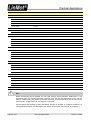
Practical Applications
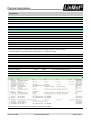
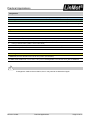
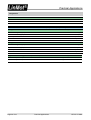
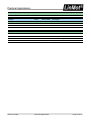
Configuration
Function
Value
E1100 (UPID)
Set Homing Mode
B1100 (UPID)
Description
\Parameters\Motion Control SW\State Machine Setup\Homing
Actual Position
On
13C4h
61E8h
Homing-Mode “Actual Position”
Disable
On
13D8h
61F3h
Deactivate Auto on Homing
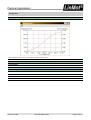
Sequence to initialize the drive
1.
Turn on controller
2.
Enable Motor
3.
PLC reads current position of the absolute sensor
4.
Write home position (current position of the absolute sensor) UPID 13C7h (E1100) / F0F5h (B1100)
5.
Write Slider Home Position (see below) UPID 13CAh (E1100) / F0F8h (B1100)
6.
Homing to Actual Position (set Bit 11 in the Control Word)
7.
As soon as Bit 11 (Homed) in the Status Word is set, erase Bit 11 in the Control Word again
8.
Drive is ready
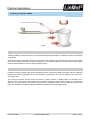
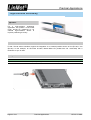
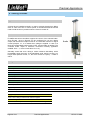
Determining the Slider Home Position
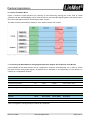
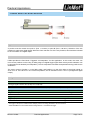
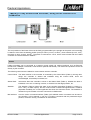
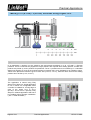
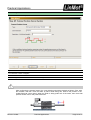
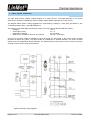
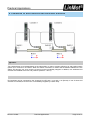
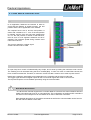
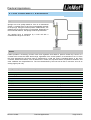
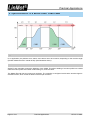
In order to ensure correct initialization of the drive, it must first be determined how far the slider extends out of the stator
(= distance k) when the absolute sensor is at the zero position. (See illustration)
The Slider Home Position that must be written in Step 5 is the current position of the absolute sensor plus the distance k.
Note
If changes are made to the mechanics, then k may need to be determined again.
NTI AG / LinMot
Practical Applications
Page 27 of 47