1
AMI COMMUNI CAT IO N DX.Y
15
Task
Notes
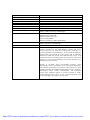
Change a segment boundary
If you find that the automatic segmentation boundary needs
adjusting (perhaps it cuts off the end of the last word that
the person says) then you should hold down CONTROL
and LEFTCLICK and DRAG the boundary to its new
position. (Perhaps this is how to do it in Windows…? I
certainly don’t need to hold down the control key in Unix,
just click on a boundary and drag.)
Ctrl+leftclick+drag boundary
To add a section boundary
If the automatic segmentation has missed a segment (for
example a section of silence) you should first CLICK on the
green channel for that speaker, then position the cursor at
the point in the audio where the section break should
appear, and then hit ENTER to add a break.
Enter
To delete a section boundary
Shift+Backspace
Play/ Pause
If the automatic segmentation has incorrectly split what
should be a single segment into two segments, you should
remove the border between them. LEFTCLICK in the second
segment (on the green bar) and hit SHIFT and BACKSPACE.
The TAB key will toggle between play and pause. However,
if you have a single segment selected, only that segment will
play when you hit TAB. If you then hit TAB again (after it
has played that segment), it will play that segment again.
Tab
(It may be worth noting that you can modify playback
options using the appropriate pull-down menu. It is
sometimes helpful to switch to continuous playback or
pause-and-continue mode, rather than stopping at segment
boundaries.)
Quit/ Exit
After you have saved your transcription you can quit
Channeltrans using CONTROL+Q
Ctrl+q
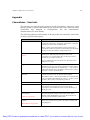
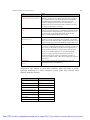
Annotators may choose to print this summary table and keep it nearby
(perhaps attaching it to their computer screen) while they become more
familiar with the software.
TASK
SHORTCUT
Open file
Ctrl+o
Save
Ctrl+S
Select section
Leftclick on green bar
Select several segments
Shift+leftclick on green bars
Change segment boundary
Ctrl+leftclick+drag
Add section boundary
Enter
Delete a section boundary
Shift+Backspace
Play/ Pause
Tab
Quit/ Exit
Ctrl-q
Easy PDF Creator is professional software to create PDF. If you wish to remove this line, buy it now.