1
Ifs10ep-jp.book Page 22 Friday, December 22, 2000 4:27 PM
6-10 Talavera Road, North Ryde, NSW 2113, Australia
Phone:
+61 2-9888-9999
Fax:
+61 2-9888-9588
Declaration of Conformity (U.S.A.)
Model Number:
Trade Name:
Responsible Party:
Address:
Telephone number:
Fax number:
Laser Printer FS-1000+ (as tested with enhancement optional units:
PF-17, IB-10E.)
Kyocera
Kyocera Mita America Inc.
225 Sand Road PO Box 40008 Fairfield, New Jersey 07004-0008, U.S.A.
(973) 808-8444
(973) 882-6000
Contact person for technical: Ryozo Kojima
Phone:
973-882-6019
Manufacturer’s name:
Kyocera Corporation, Printer Division
Manufacturer’s address: 2-14-9 Tamagawadai, Setagaya Ward, Tokyo 158-8610, Japan
This device complies with Part 15 of the FCC Rules, Operation is subject to the following two conditions: (1) This device may not cause harmful interference, and (2) this device must accept any
interference received, including interference that may cause undesired operation.
The manufacturer and its merchandising companies retain the following technical documentation
in anticipation of the inspection that may be conducted by the authorities concerned.
User’s instruction that conforms to the applicable specifications.
Technical drawings.
Descriptions of the procedures that guarantee the conformity.
Other technical information.
Kyocera Mita America Inc.
Disclaimer
We shall have no liability or responsibility to customers or any other person or entity with respect to any
liability, loss or damage caused or alleged to be caused directly or indirectly by equipment sold or furnished by us, including but not limited to, any interruption of service, loss of business or anticipatory
profits, or consequential damages resulting from the use or operation of the equipment or software.
Prolonged Non-Use and Moving the Printer
■ Prolonged Non-use
If you ever leave the printer unused for a long period of time, remove the power cord from the wall outlet.
We recommend you consult with your dealer about the additional actions you should take to avoid
possible damages that may occur when the printer is used next time.
■ Moving the Printer
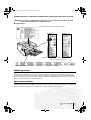
When you move the printer:
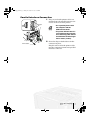
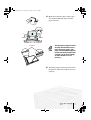
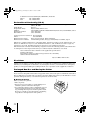
• Move it gently.
• Keep it as level as possible, to avoid spilling toner
inside the printer as shown in the figure.
• If you ship the printer, remove and ship the process
unit separately. Pack the process unit in a plastic
bag and ship them separate from the printer itself.
Be sure to consult a serviceman before attempting
long-distance transportation of the printer.
22