1
HSA Systems ApS
Page 2 of 61
HSAJET-CU user manual
Introduction
Congratulations on the purchase of an HSAjet CU unit. You have a powerful stand-alone controller
with features compareable to PC-solutions. With full remote control, on-line editing of content,
security features and simple operation, this unit is suitable for many different applications.
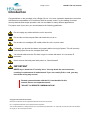
For proper care of your unit, you should observe the following guidelines :
Do not unplug any cables while the unit is turned on
Do not take out the compact flash card while the unit is on
Do not take out cartridges (HP model) while the unit is in print mode
Preferably you should shut down unit properly before turning off power. This will correctly
close any open files on the compact flash card
You should make sure the CU does not get in contact with water. It is not under IP
protection.
Never remove the back panel with power on. Shock hazard!
IMPORTANT
NEVER try to insert the CF card by force. You may break the card connector,
resulting in replacement of motherboard. If you can’t easily fit the card, you may
have it the wrong way around.
Remote communication with the CU is not detailed in this
manual. Please see separate manual
"HSAJET CU REMOTE COMMUNICATION".
Copyright and Trademark Information
Microsoft, and Windows are US registered trademarks of Microsoft Corporation.
HP is a registered trademark of the Hewlett-Packard Corporation
This and other litterature on HSAjet products is © HS Automatic ApS 2005-2007. You may freely use this instruction and translate it,
as long as you do not change the content.