1
Chapter 1 Do you Frog?
Chapter 2 Understanding the Keys
Left & Right Keyboard Layouts
Chapter 3 How to "Frog"
Chapter 4 Mac Command Key
Chapter 5 Key Arrangement Chart
Very soon you will be. If you read the instructions,
review the Tutorial and also have a look at the quick reference card,
Frogging is easy. Within an hour, you will be touch-typing. (About
the same time it takes to learn graffiti on a PDA or similar device.)
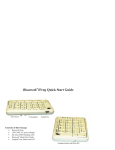
But first, let us discuss the opportunity of FrogPad. FrogPad has
broken the Qwerty code. FrogPad is the most unique and powerful
approach to text intensive data entry. It has been designed to be
the next global standard for human computer interfaces. Execute
any command, used on your regular keyboard with two hands, with
just one hand and your FrogPad.
1. Do you Frog?
Learning FrogPad
Do you Frog?
What does this imply? Although we first marketed FrogPad as being
an ergonomic keyboard, the true value of FrogPad is in the portable
wireless Internet market. FrogPad is the only portable, compact,
and fully functional one-handed keyboard that can provide accuracy
and speed for text intensive data applications. Plus it is easy to learn.
Here are a few things to keep in mind when you are training on Froggy.
Remember that it took a semester (56 hours) to learn to type 40 words-aminute (WPM) on the standard keyboard. It will take you less than 10
hours to learn 40 WPM on FrogPad. Some have achieved 40 WPM in 6
hours. The fact is 79% of the typing population hunts and pecks. FrogPad
is a natural transition for those who hunt and peck.
If you are from the hand-held game generation, you may be inclined to
hold a FrogPad in both hands and use your thumbs. This approach will
work with FrogPad. However, learning to use the FrogPad is easiest when
you first train yourself on one hand.
What does training mean? As a normal human your attention span may
allow you to stick to the tutorial for 10-15 minutes at a time. (Let us know
how long it is for Super Humans...) Also, remember to keep your eyes on
the monitor and not at the keyboard. You will be touch-typing within an
hour.
Two of the unique patented differences to Froggy are the algorithm and
the intuitive letter layout. This makes it fast and easy to learn.
Page 2
FrogPad Manual