1
2. Understanding the Keys
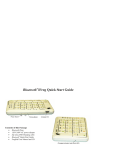
Left & Right Keyboard Layouts
Notice the 15 center keys. At the top left corner, the letters that are in black are used in 86% of the
English language. On the bottom left, the letters are in green, which are used in 14% of the English
language. In the most difficult language, Czech, those 15 letters still comprise 70% of that language.
In most Latin-based languages and in Japanese, it is close to 90%. We also define the character
positions for Arabic, Cyrillic, Hebrew, Korean and Pin Yin for future models.
15 Center Keys
Righty Layout
15 Center Keys
Lefty Layout
CTRL
ALT
0
1
2
Ctrl
6
< I
> App
BkSpc
Ins
3
+
" U
`
O /
Q \
Insert
Space
Delete $ -
Space
/
U "
`
E !
Z%
Ctrl
Delete $ 0
4
R *
B =
W :
M $
End
Pause 9
H L l
Alt
<
App >
8
5
N (
K )
I
BkSpc 1
T @
C ~
6
S [
G ]
2
3
g
-
D _
V ^
PgDn
A
+
Y {
X }
.
CapsLock
CapsLock
Enter
.
Symbol
Number
,
NOTE: When referring to the "LEFTY" FrogPad
We will abbreviate with LHL for 'Left Handed Layout'
FrogPad Manual
P ;
J #
PgUp
Right
5
A
Home 7
*
ALT
Num. Lk
Alt
Esc
Alt Hold
( N
) K
/ O
\ Q
g
App Hold
4
[ S
] G
App Hold
/
{ Y
} X
Alt Hold
PgDn
! E
% Z
-
A &
' +
Print Sc
- H
l L
~ C
Esc
Ctrl Hold
@ T
Home 9
Scroll Lk
_ D
^ V
8
F ?
Tab
Left
End
?F
Tab
Right
Pause 7
Ctrl Hold
*
PgUp
CTRL
& A
+ '
Scroll Lk
* R
=B
Left
: W
$ M
Print Sc
Num. Lk
; P
# J
Number
Symbol
Enter
,
.
NOTE: When referring to the "RIGHTY" FrogPad
We will abbreviate with RHL for 'Right Handed Layout'
3