1
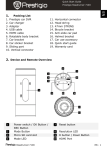
Quick Start Guide Prestigio Roadrunner 710X 1. 2. 3. 4. 5. 6. 7. 8. 9. EN 1. Packing List Prestigio sport recorder Adapter USB cable HDMI cable Rotatable body bracket Car bracket Car sticker bracket Sliding part Vertical connector 10. 11. 12. 13. 14. 15. 16. 17. Horizontal connector Head string 47mm STRING Bicycle bracket Anti-slide car pad Helmet bracket Quick start guide Warranty card 2. Device and Remote Overview 5 Power switch / OK Button / REC Button Mode Button Micro SD card slot Mode LED USB Port 6 Power LED 1 2 3 4 Roadrunner 710X 7 Reset button 8 11 Resolution LED R button / Down Button HDMI Port Laser LED 12 Lens 9 10 EN - 1 Quick Start Guide Prestigio Roadrunner 710X EN Getting started 3. Power on/Power off Turn the Power Switch to “ ”, buzzer beep 5 times and laser LED lights at the same time, the system comes into standby. Mode LED, Power LED and Resolution LED will on. To power off the device turn the Power Switch to “ ”, hold for 3 seconds, buzzer beep 5 times and laser LED flash 5 times. 4. Charging Using the USB cable: Connect the device to the USB port of a computer, the device will immediately start charging. Using the adapter: Connect the device to the adapter, the device will immediately start charging. Normally it takes approximately 2-3 hours to fully charge the device. Operating the device while charging with the AC adapter may extend the time of full charge. Note: Before using the device for the first time, please, provided to fully charge the Li-ion battery. The battery is completely charged in 2-3 hours. If the power is low, the buzzer will keep beeps, then the device will power off shortly. 5. Inserting the Micro SD-card Before starting video recording, please, insert a Micro SD card into the Micro SD card slot in the device. To extract the Micro SD card slightly push it inside the device, and remove. Note: If there is no card inserted when the device powered on, the buzzer will keep beeping and then power off shortly. If there is a little space left of Micro SD card, the buzzer will keep beeping and then power off shortly. EN – 2 Roadrunner 710X Quick Start Guide Prestigio Roadrunner 710X EN 6. Recording Before recording, press “R” button to choose the recording resolution and press “M” one time to set flip-REC if necessary, then move the switch to “REC” to start recording, the recorded files are saved on Micro SD Card. To stop recording, move the switch to center. The device backs to standby. 7. Taking pictures Switch to “ ” and back immediately to take pictures in burst. LED Indication 8. Menu Options Different LED color indicates different setting: M Mode LED R Resolution LED Green LED Standard Recording Mode Green LED 1920 X 1080P 30fps Red LED Flip Recording Mode Red LED 1280 X 720P 60fps Yellow LED Playback / Menu Mode Yellow LED 1280 X 720P 30fps Settings 9. General settings Press M button to enter Settings. Press the right to select Settings. The following settings are available: Roadrunner 710X EN - 3 Quick Start Guide Prestigio Roadrunner 710X EN Language: Select the desired language from the list. Record Overwrite: Once there is no more free space left on the SD card the device will automatically erase the oldest files on the card and continue recording new ones. Record File Size: Select one of the values to set the video duration. Stamp: Select ON to add time and date indications to the images and video. Format: Select to format the SD card. Important note: Once you select YES and press the navigation button the card will be formatted without warning. All data on it will be erased. TV Type: Select the AV output from NTSC / PAL. Time Setup: Install the current date and time Default setting: Select to restore default system settings. Night Mode: Set night mode if necessary. Flicker: Change frequency to remove the blinking effect when recording under artificial lighting. Firmware Version: Displays the current system version. 13. Playback mode To enter playback mode press M button. Press R button to select the file, then press OK button to view the file. 14. USB connection To download registered files on your PC/notebook, please, connect the device to the PC or notebook via USB-cable provided. After connecting the device to the PC and power on the device, the device will appear in “My computer” as the removable disk. All registered files are stored in DCIM folder, videos are stored in MOV format, and the pictures are stored in JPG format. You can now download the files from the device. 15. Playback on TV To playback the recorded files on TV, connect the device to your TV with the HDMI cable provided and follow the TV instructions or refer to your TV user manual. Notes: Please insert the Micro SD card before recording. When the Micro SD card is out of memory, it will automatically erase EN – 4 Roadrunner 710X Quick Start Guide Prestigio Roadrunner 710X EN the oldest files and start recording from the beginning (only if the Recycle option is activated). Safety precautions Please observe all safety precautions before using Prestigio Roadrunner 710X. Please follow all procedures outlined in this manual to correctly operate the device. Do not attempt to disassemble or alter any part of the device that is not described in this guide. Do not place the device in contact with water or any other liquids. The device is NOT designed to be liquid proof of any sort. In the event of liquid entry into interior of device, immediately disconnect the device from the computer. Continuing use of the device may result in fire or electrical shock. Please consult your product distributor or the closest support center. To avoid risk of electrical shock, do not connect or disconnect the device with wet hands. Do not place the device near a heat source or directly expose it to flame or heat. Never place the device in vicinity of equipments generating strong electromagnetic fields. Exposure to strong magnetic fields may cause malfunctions or data corruption and loss. Technical Specifications Recording resolution Video format Picture format Power source Interfaces EN Na Microphone Operating temperature Roadrunner 710X 1080P (1920 x 1080 / 30fps) / 720P/60 (1280 x 720 / 60fps)/ 720P/30(1280 x 720 / 30fps) / MOV JPG Rechargeable battery and 220V charger. HDMI, USB, Micro SD card (Supports max 64GB, high-speed Micro SD card recommended) Built-in - 5°~ 40°C EN - 5 Quick Start Guide Prestigio Roadrunner 710X EN Video Storage Capacity Storage H.264 H.264 848 X 2048 X 2592 X 3264 X card(G) 1080P 720P 480P 1536 1944 2448 (WVGA) (3M) (5M) (8M) 136min 8928 5024 3768 photos photos photos 4464 2512 1884 photos photos photos 2232 1256 942 photos photos photos 1116 628 471 photos photos photos 8G 4G 2G 1G 88min 44min 22min 11min 120min 60min 30min 15min 68min 34min 17min Disclaimer As the Prestigio products are constantly updated and improved, your device may have a slightly different appearance or modified functionality than presented in this Quick Start Guide. EN – 6 Roadrunner 710X