1
MouseMate Software Features
EasyJump for Windows
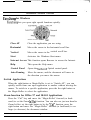
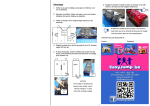
EasyJump lets you open eight special functions quickly.
Internet Access
Close AP
Close the application you are using.
Horizontal
Moves the cursor to the horizontal scroll bar.
Vertical
Moves the cursor to the vertical scroll bar.
Start
Activates the Windows Start menu.
Internet Access This function opens Browser to access the Internet.
Help
This opens the Help menu.
Control Panel
Opens the NetScroll Optical control panel.
Auto-Panning
Move the mouse, and the document will move in
the direction you move the mouse.
Switch Applications
When the right-button or Magic-Roller is set to “Switch AP”, you can
quickly switch from one open application to another without moving the
mouse. To switch to a specific application, press the the right button or
the Magic-Roller to select the application.
Zoom function for Office 97 and IE4.01 Applications
Press the “Ctrl” key and move the “Magic-Roller” forward (or backward) to set the Zoom In/Out function. You can also use just one hand to
Zoom In/Out: set the right button to be the ‘Ctrl” function, press the
right button and move the “Magic-Roller” forward (or backward) to enlarge (or decrease) the document window.
5