1
15
PREMIERE 6: Instructor Manual
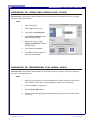
EXERCISE 10: SHORTENING AND SPLICING CLIPS
Instructor Note: Remember to demonstrate first, then allow the users to complete on their own, following
the steps in their User Manuals.
Steps:
1.
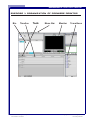
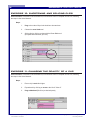
Drag at the ends of clips in the timeline to shorten them
2.
Choose the razor blade tool
3.
Splice clips by clicking on them with the Razor Blade tool
(this splits them wherever you click)
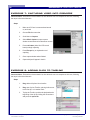
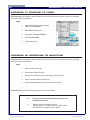
EXERCISE 11: CHANGING THE OPACITY OF A CLIP
Instructor Note: Remember to demonstrate first, then allow the users to complete on their own, following
the steps in their User Manuals.
Steps:
1.
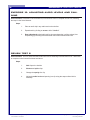
Place a clip in track 2 or higher
2.
Expand track by clicking on arrow to the left of “Video 2”
3.
Drag rubberband (Red Line) to desired opacity
File name: Premiere6_Instructor.pmd
Last modified: 05/20/02
Copyright Arizona Board of Regents, 2002
University of Arizona