1
USB3.0 -to-SATA II RAID Subsystem
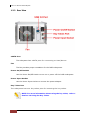
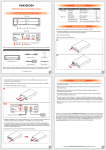
1.2.2 Rear View
eSATA Port
The subsystem has eSATA port for connecting to Host/Server.
Fan
The fan provides proper ventilation for the RAID subsystem.
Power On/Off Switch
Use the Power On/Off Switch to turn on or power off the RAID subsystem.
Power Input Socket
Use the Power Input Socket to connect the power adapter.
Key Token Port
The subsystem has one key token port for inserting the key token.
NOTE: For more information about using the key token, refer to
Section 2.2 Using the Key Token.
10
User Manual