1
5.5 Remote Control
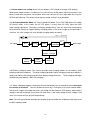
The Inverter can be set for daily shutdown/wake up. This command must be set through the
RS-232 interface. When this function is set, the timer inside the Inverter will begin to run, and the
load will be turned off by the shutdown / wake-up schedule. During the period of turn-off to the next
turn-on, the status LED blinks red every 2 seconds. For LCD version, the time period to next
turn-on will be shown on LCD panel by hour (Ref. item 15 of LCD description).
For the application of timer, the monitoring software, UPSilon, and the green cable are both required.
5.6 Reset the Inverter
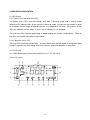
If any abnormal condition occurs, and the item 4.1 ~ 4.7 can not be executed, please unplug the
line cord and push the button for at least 15 sec., which will reset the Inverter.
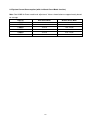
5.7 DIP Switch Settings
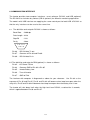
DIP 1
DIP 2
Charging current
Up
Up
35%
Down
Up
55%
Up
Down
75%
NOTE of Charging current control︰
The setting of DIP 1 & 2 is valid only when the DIP3 = Down.
Down
Down
100%
DIP 3 = Down, AC Priority Mode; DIP 3 = Up, DC Priority Mode.
DIP 4 for Green Mode setting
UP = Enabled / Down = Disable
18