1
Work Area
Topaz ReMask
User Manual
TriMap Technology
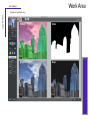
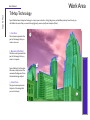
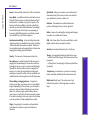
Topaz ReMask uses trimap technology to create your extraction. Using the green, red and blue primary brush tools, you
will define the areas that you want to keep (green), remove (red) and compute (blue).
1. Red Area
The red area represents the
part of the image that you
want to remove.
1
2. Blue Area (Outline)
The blue area represents the
part of the image that you
want to compute.
Topaz ReMask 5 will analyze
this area to help extract the
unwanted background from
the desired image subject.
13
2
3. Green Area
The green area represents
the part of the image that
you want to keep.
3