1
Topaz ReMask
User Manual
Work Area
What’s This?
Select this (or click F1) then click on a feature in the
ReMask interface to learn more about it.
Users Guide
Select for quick access to this user guide.
Tutorials
Takes you to the Topaz ReMask tutorials page where
you can access additional written and video tutorials to
help you with your ReMask workflow.
Tech Support
Brings you to the Topaz Labs support page where you
can request assistance from our support specialists,
contact our customer service team, retrieve lost license
keys, or browse through our Knowledge Base.
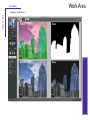
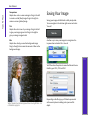
Before ReMask: The image is saturated and the brick wall in the
foreground takes focus away from the couple.
Product Info
Select this to go to the Topaz ReMask web page to
learn more about the Topaz ReMask plug-in.
About
Select this to see what version of ReMask you currently
have.
Startup Guide
Shows a step-by-step quick overview on how to use
ReMask. This is the pop-up that shows when you first
open the program and can be disabled.
After ReMask: The couple was masked out, allowing for
separate selective adjustments to their saturation and the new
monochromatic background. Now they are the focus!
21