1
Quality & Value
The SmartDVR.com
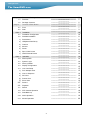
Chap.1
-------------------------------------------------------------------------------------------------------------------------------------------------------------------------
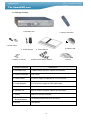
Features & Package Contents
1-1.
Features
1-2.
Package Contents
Chap. 2
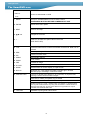
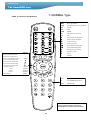
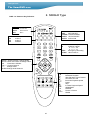
Function of Each Button
2-1.
2-2.
Chap. 3
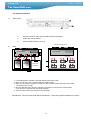
Front
Rear
Installation
3-1.
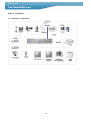
Installation Configuration
3-2.
Detailed Installation
1)
Rack Mount
2)
HDD(Hard Disk Drive)
3)
Camera
4)
Monitor
5)
Power
6)
Spot, Video Printer
7)
Chap. 4
Other External Device
Operation
5
5
6
-----------------------------------------------------------------------------------------------------------------------------
7
-----------------------------------------------------------------------------------------------------------------------------
9
7
10
-----------------------------------------------------------------------------------------------------------------------------
10
-----------------------------------------------------------------------------------------------------------------------------
11
-----------------------------------------------------------------------------------------------------------------------------
12
-----------------------------------------------------------------------------------------------------------------------------
12
-----------------------------------------------------------------------------------------------------------------------------
13
-----------------------------------------------------------------------------------------------------------------------------
14
14
11
11
12
13
14
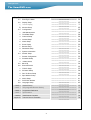
4-0.
Start-up DVR
4-1.
4-2.
System Log-in
Factory Default
4-3.
Display Configuration
-----------------------------------------------------------------------------------------------------------------------------
Live View Setup
Full / Multiple View
-----------------------------------------------------------------------------------------------------------------------------
15
2)
View in Sequence
16
3)
PIP View
---------------------------------------------------------------------------------------------------------------------------------------------------------------------------------------------------------------------------------------------------------
16
-----------------------------------------------------------------------------------------------------------------------------
17
-----------------------------------------------------------------------------------------------------------------------------
18
4-4.
1)
4) Freeze View
5) Zoom View
4-5. Record
4-6. Playback
4-7.
Search
4-8.
PTZ Camera Operation
4-9.
Data Back-Up
4.10
Audio Operation
-----------------------------------------------------------------------------------------------------------------------------
4.11
Mouse Operation
---------------------------------------------
3
14
15
15
16
16
17
18
19
19
20