1
WANGuard™ Lite 3.1 User Manual
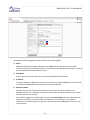
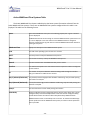
The network interface name must use the network interface naming conventons of the Linux
operatng system: eth0 for the frst interface, eth1 for the second, eth0.900 for the frst interface
with VLAN 900 and so on.
●
MAC Filter
For WANGuard Snif to distnguish between inbound and outbound trafc it must use at least one
of the two techniques available: MAC fltering or IP Validaton ( next parameter ).
The MAC Filter together with the Source / Destnaton switch allows WANGuard Snif to validate the
inbound trafc and the outbound trafc. The MAC Filter should contain the MAC address of the
upstream router ( with the Source switch on ) or the MAC address of the downstream router ( with
the Destnaton switch on ). The MAC address must be writen using the Linux conventon - six
groups of two hexadecimal values separated by colons (:).
●
IP Validaton
For WANGuard Snif to distnguish between inbound and outbound trafc it must must use at least
one of the two techniques available: MAC fltering ( previous parameter ) or IP Validaton.
IP Validaton parameter has three optons:
●
○
Of - Will disable IP Validaton. Make sure MAC Filter is confgured instead.
○
On - WANGuard Snif will only analyze the trafc that has the source and / or the destnaton IP
addresses in the selected IP Zone, excluding 0.0.0.0/0.
○
Strict - WANGuard Snif will only analyze the trafc that has either the source or the destnaton
IP addresses in the selected IP Zone, excluding 0.0.0.0/0.
Directon
You can confgure the directon of the trafc that should be analyzed by WANGuard Snif:
●
○
Inbound + Outbound - WANGuard Snif will monitor both inbound and outbound trafc. Using
this opton generates a minor performance penalty under very high loads.
○
Inbound - WANGuard Snif will only monitor inbound trafc.
Top
This checkbox lets you choose if you want WANGuard Snif to sort the trafc statstcs for top-like
visualizatons. It is recommended to leave it on because the performance penalty is extremely low.
●
Graph Data Path
This feld contains the path on the WANGuard Console server where the trafc graphs data
collected from the WANGuard Snif system is stored. It's safe to save multple WANGuard Sensors
graph data in the same path. If you set the data path on a larger partton, on RAM with tmpfs etc.,
make sure that the wanguard user has writng privileges there.
●
Graph Color Inbound
Here you can select the color you will see on graphs as inbound trafc for the current WANGuard
- 30 -