1
FRONT AND REAR PANELS
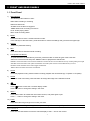
12)
Press this button to play the recorded video.
13) Pause / Stop / Rew / FF
Under the playback mode:
Press one of these button to pause / stop / rewind / fast-forward the playback file.
14) Up / Down / Left / Right
Press one of these direction buttons to move the cursor up/down/left/right.
Under the DVR menu mode, these direction buttons can use for the following operation:
Up / Down: Make the selection / Change the settings
Left / Right: Make the selection
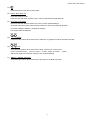
SLOW
15)
ZOOM
AUDIO
(Audio)
Press these two buttons at the same time to select live or playback sounds of the audio channels.
SEQ.
16)
P.T.Z
(PTZ)
Press these two buttons at the same time to enter / exit the PTZ control mode.
In the PTZ control mode → Zoom in: Press "+" button ; Zoom out: Press "-" button
Adjust PTZ angle: Press direction buttons to turn up/down/left/right
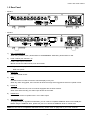
17) “MENU” + “ENTER” (Key lock)
Press these two buttons at the same time to lock keys on the DVR front panel.
2