1
Conversion Process
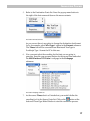
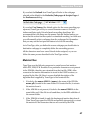
Use the Defaults Page of the Preferences dialog to choose the place
where new fonts will be stored:
Click the Always ask for destination folder radio button to make
TransType open the standard Save File dialog for each conversion session.
Click Save in the same folder as original fonts to let TransType save
the converted fonts in the same place as the input fonts reside. To specify a
particular folder, click the Use the following folder option and select
your custom destination folder on the disk where you would like converted
fonts to be stored.
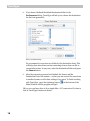
And finally, if you check the Save each font family in its own folder
option, then a separate folder will be created for each converted family in
the folder selected as the destination folder. This is particularly useful for
creating fonts in the Type 1 format.
27