1
JEFIT Pro User Manual Version 4.2.0722
Jefit, Inc.
_____________________________________________________________
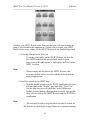
For a user to start this process and create their routine:
1.) On the Workout Routine page, the user will click on Switch
Routine button and click on “Create” on the bottom left hand corner of the
screen.
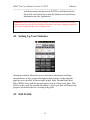
2.) After clicking the create button, the user will be brought to the
Create New Workout Routine page allow them to name their new workout,
select the difficulty level, routine type, training frequency and edit their
routine description.
3.) Once the routine is created and saved, the user will be brought
back to the routine day selection page and add in a routine day (see 6.4 on
how to create a routine day).
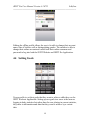
4.) Add in the routine day and open up the page for that specific date.
This page will allow the user to add in exercises into the day.
5.) On the bottom left hand corner of the screen the user will click the
“Add Exercise” prompting the user to search throughout the entire exercise
database and select workouts that are meant for that day of the week.
Note:
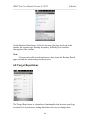
- When adding exercises into the routine day, as soon as you click on
an exercise (while in adding exercise mode), each workout will be
automatically placed into the routine day rather than the exercise page
opening up.
6.3 Editing Your Routine
21