1
DIGIPASS CertiID Installation Guide
Installing DIGIPASS CertiID
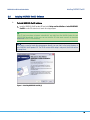
Figure 5: Installing DIGIPASS CertiID (5) – Selecting Destination Folder
NOTE
The 64-bit version of DIGIPASS CertiID installs 64-bit and some 32-bit components. If you install it,
you can only select the destination folder for the 64-bit components; 32-bit components are
always installed to the default destination folder.
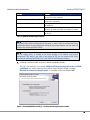
6. Select the software modules you want to install on your machine.
Figure 6: Installing DIGIPASS CertiID (6) – Selecting Features
© 2008, 2009 VASCO Data Security. All rights reserved. Unauthorized duplication or distribution is prohibited.
16