1
Installing DIGIPASS CertiID
DIGIPASS CertiID Installation Guide
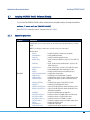
Property
Description
Specifies which module to register as default cryptographic provider.
Possible values:
DEFAULTPROVIDER
Auto
CSP
CM
…automatically determine module to register (default)
…registers VASCO CertiID Smart Card Crypto Provider
…registers VASCO Card Module
Table 2: Installation Properties
NOTE
Property names and values are case sensitive.
2.7.2
Examples
This example performs a typical installation with the default program features and automatically registers the
correct default cryptographic provider:
msiexec /i setup.msi /qn
This example installs a minimum set required to run DIGIPASS CertiID with third-party applications:
msiexec /i setup.msi /qn
ADDLOCAL=VdsCore,VdsCSP,VdsCardModule,VdsPKCS11,VdsTokDriversCardos4,
VdsTokDriversIdOne,VdsTokDriversStarcos3
This example installs all features and registers VASCO Card Module as default cryptographic provider:
msiexec /i setup.msi /qn DEFAULTPROVIDER=CM ADDLOCAL=ALL
© 2008, 2009 VASCO Data Security. All rights reserved. Unauthorized duplication or distribution is prohibited.
21