1
Installation Steps Now is a good time to make a note of your Cyber-Rain XCI controller serial number (14-digit
number located on the back of the controller):
My Cyber-Rain XCI Serial Number: _____________________________________________
1.
Mount the Controller.
Mount the controller on the wall with two #8 screws (included) mounted 6” apart (using the
included template). For outdoor applications, mount the controller in a plastic weatherproof box
(available from most Cyber-Rain authorized resellers or directly from www.cyber-rain.com).
2.
Install the Controller
Note: If your irrigation system uses a master valve or pump (usually to draw water from a
source such as a well) you will also need to use the master valve lead marked “M”. The CyberRain controller will provide constant power to the pump / master valve in order to enable
watering. If you do not have a master valve or pump installed, you will not need this feature.
The controller needs to be connected to your sprinkler valves. If you have an existing sprinkler
controller, the sprinkler valves are connected to the controller with the wires typically inserted
into numbered slots, which are called zones. Often these wires are in multiple colors. Before
disconnecting an existing controller, make note of which wire runs to each sprinkler valve and
mark them accordingly.
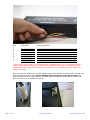
There should be a single wire for each zone plus a “common” wire. The common wire is
generally the white wire. (If you are replacing an existing sprinkler controller note the wire
marked “common”).
COMMON
ZONES
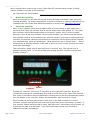
Connect the “common” wire to the “C” connector on the Cyber-Rain controller. Wires are
connected by pushing the corresponding white button on the front of the Cyber-Rain controller
with a pen or screwdriver while simultaneously inserting the wire into the corresponding socket
from the bottom of the controller. Release the white button when the wire is in place.
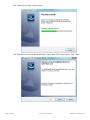
Next, connect the sprinkler valve wires for each zone to the slots numbered 1-8 on the
controller, noting a description of each zone and the slot that you are connecting it to below. If
your sprinkler system has fewer than 8 zones, start with zone 1 and continue until finished. All
8 zones do not need to be activated. If you have more than 8 zones, you will need an
additional controller (see page 41).
Page 4 of 46
Cyber-Rain Manual
Software Version 2.55