1
Final
guide
mute
sleep
cc
last
1-7 Menu Configuration
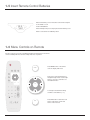
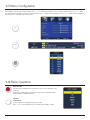
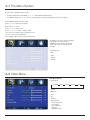
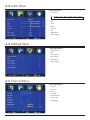
Press MENU to open the menu window. Navigate using 5 or 6 to select the desired menu. Press 4 or OK to enter the menu. Use 5 or 6 within
the selected menu to navigate to a submenu or setting to adjust. Press 4 or OK to enter the submenu or use 3 or 4 to adjust selected setting. Press
ok wait 10 seconds to exit the menu.
EXIT at any time, or
guide
cc
menu
exit
last
zoom
mute
input
display
sleep
ok
channel
zoom
2010 Remote Redesign
Final
input
display
menu
exit
volume
enter
channel
cc
guide
2010 Remote Redesign
Final
last
volume
mute
enter
sleep
cc ok
guide
last
waterproof
1-8 Basic Operation
zoom
mute
2010 Remote Redesign
Final
Power On / Off
input
sleep
zoom
input
display
menu
exit
ok / Standby button on the remote control or on the side panel to turn
Press the Power
on the unit.
Press Power / Standby button on the remote control or on the side panel again to
return the display to standby (off) mode.
waterproof
Selection
cc Mode
guidedisplay
of Input
menu
last
channel
exit
Press the Input button to display the input source menu.
Press 5 or 6 to select the input source you desire, then press OK to confirm.
mute
volume
channel
sleep
ok
enter
10