1
Overview
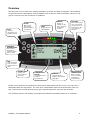
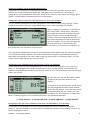
We have put a lot of effort into making UniWatch very fast and easy to operate. The feedback
we get from drivers and teams using UniWatch tells us that we have succeeded. Here you can
get an overview over the functions in UniWatch.
IrDA
Wireless
connection to a
portable printer.
ICONS
One icon for
each button.
Easy and fast to
understand.
LEDS
Bright LEDs for
fast feedback.
BEEPER
Built-in in
beeper for key
click, warnings
and status
sounds.
BUTTONS
Each button has its
own icon showing
the function at a
specific time. No
icon means no
function.
INFRARED
TEMPERATURE
Fast wireless
temperature
sensor for track
and tire temp.
USB
Fast connection
to PC for setup
and analysis of
data.
RUBBER GRIP
Secure grip
with rubber on
the sides.
TEMPERATURE
BUTON
The fastest way to
measure
temperatures.
DISPLAY
Large graphical
display, with multiple
languages.
ENVIRONMENT
TEMPERATURE
Built-in sensor
for environment
temperature
measurement.
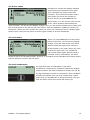
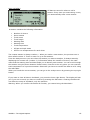
Please notice that the four buttons at each side is associated with four icons. The top icon is
associated with the top button. The next icon is associated with the second button from the
top. The buttons are placed that way to give a good ergonomic use with the thumbs.
The following section will explain more about the different hardware features in UniWatch.
UNIPRO – The original Laptimer
4