1
Chapter 1: Jumping Right In
Invest in a USB card reader. Prices for these devices have come way down
and most of these can read multiple memory card formats. Using card readers to download images is quicker and safer. Some computers even have
these built right in!
Playing with Photoshop CS2
Now that you took some photographs, copied them to your computer, and
backed them up to CD, get on Photoshop and do some messing around.
Select Photoshop from the Windows Start menu, or double-click the icon on
your Windows or Mac desktop.
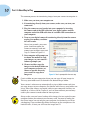
Photoshop CS2 presents you with the Welcome screen (see Figure 1-5) every
time you start up Photoshop. This screen provides you with an easy way to
view help documents and other information about Photoshop CS2.
Figure 1-5: The Photoshop Welcome Screen.
You can deselect the Show This Dialog at Startup check box in the lower left
of the Photoshop Welcome Screen if you don’t want to see this window every
time you start Photoshop.
Browsing for images
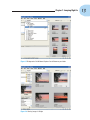
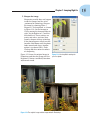
One of the biggest improvements to Photoshop in CS2 is Bridge, shown in
Figure 1-6. An update to the File Browser, Bridge provides you with a powerful
file management tool that allows you to visually select images you want to edit
as well as organize and catalog these images.
11