1
Maximum
Order
Total
OV
Maximum order total should be set according to a
seller's typical order amount. If a seller's average order
amount is $100.00, then the high limit might be set at
$150.00.
Restricted
Times
TM
For gateway clients who are passing AssureBuy the
order date and time based on their own time zone, the
restricted ordering times should be set according to their
time zone. For all other clients and gateway clients who
are not passing AssureBuy the order date, the restricted
times need to be set according to Greenwich Mean
Time (GMT). To help calculate GMT time, please see
the Time Zone Chart on page 91.
Duplicate
Billing
Address
XB
The duplicate billing address will check all incoming
orders and existing orders for the same billing address:
maximum orders and lookback. The maximum orders is
the number of orders with the same billing address the
seller will allow. The lookback period is the how many
minutes into the past the system should check to for
another order with the same billing address.
Duplicate
Credit
Card
XC
The duplicate credit card will check all incoming orders
and existing orders for the same credit card number
based on two settings: maximum orders and lookback.
The maximum orders is the number of orders with the
credit card number the seller will allow. The lookback
period is the how many minutes into the past the system
should check to for another order with the same credit
card number.
Duplicate
IP
Address
XP &
XR
The duplicate IP address will check all incoming orders
and existing order for the same IP address or IP range
based on two settings: maximum orders and lookback.
The maximum orders is the number of orders with the
same IP address the seller will allow. The lookback
period is the how many minutes back the system should
check to for another order with the same IP address.
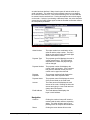
Custom Level Settings
Custom level fields will only appear if the seller has purchased a custom
watch code.
Field
Authentify
Approval
Action
AssureBuy Administration System User Manual
Watch
Code
AU
Description
The Authentify approval action is used to
determine what happens to the order if
Authentify is able to confirm the order with
the buyer. The order can either be sent to
process or the order can be placed on hold
for further review. This field is not a watch
action but rather an additional feature for the
Authentify feature only. If the Authentify
watch code is turned inactive, all watch
codes with Authentify as a watch action will
automatically be changed to a hold watch
action.
Administration System Features • 87