1
Pointing Model for the NTT
NTT-MAN-ESO-90100-0002
3
.
Introduction
This manual provides a description and operation of the Pointing Model (POM) software for the NTT.
1.1. Relevant Document
TPOINT user manual
Starting the Pointing Modeling Package (Operations)
At the moment there are two ways to make it: Automatic and Manual mode. Using automatic mode is
preferable because it is more easy and fast. Basically automatic mode chooses stars from a chosen catalog and
template file. Template file define regions of the sky where a measurement must be obtained. The template
makes a preset, and then takes a short exposure, calculates the error vectors, moves the star to center of rotator
by offsetting the telescope, store the errors and then move to next star.
Manual mode procedure is practically same than old pointing model.
Making a New Pointing Model
The making of a new pointing model requires several steps, which should be carefully hand led if a good
preset accuracy is required.
To make a pointing model the following steps are to be taken:
1.2. Check rotator center in database and in the telescope.
1.3. Preparation on TCS.
1.4. Measure the pointing errors
1.4.1. Automatic Procedure
1.4.2. Manual Procedure
1.5. Return TCS to Initial State
Rotator Center in Database and Telescope
First, focusing telescope and correct in the best way the mirror aberrations (image analysis, focus).
Mark down on RTD the point was the telescope pointing is required. This must be the center of
rotation of the rotator.
For checking the center of rotation of the rotator presetting to any star, not too bright and setting guide
probe to center field.
Offset it from the center by 20 arcs, and rotate the rotator +/- 180 degrees to move the object around.
Using the drawing tool of RTD to draw a circle following the rotating object makes this task easier.
Estimate the center of rotator and put down a good mark on it.
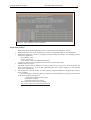
Write down x and y values from RTD. Make sure that the values of rotator center are the correct ones,
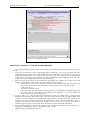
for it, read the values in the database with the command dbRead in wt5tcs xterm (Figure 2.1).
If in A side type:
dbRead "@wt5tcs:Appl_data:TCS:msw:insData.data(tccdNA,refX)"
dbRead "@wt5tcs:Appl_data:TCS:msw:insData.data(tccdNA,refY)"
If in B side type:
dbRead "@wt5tcs:Appl_data:TCS:msw:insData.data(tccdNB,refX)"
dbRead "@wt5tcs:Appl_data:TCS:msw:insData.data(tccdNB,refY)"
If values founded are different than the values to database change it by writing in wt5tcs xterm
If in A side type:
dbWrite "@wt5tcs:Appl_data:TCS:msw:insData.data(tccdNA,refX)" <value>
dbWrite "@wt5tcs:Appl_data:TCS:msw:insData.data(tccdNA,refY)" <value>
If in B side type:
dbWrite "@wt5tcs:Appl_data:TCS:msw:insData.data(tccdNB,refX)" <value>
dbWrite "@wt5tcs:Appl_data:TCS:msw:insData.data(tccdNB,refY)" <value>